Veil

The Project
Veil is an open source PDF reader that applies dark mode while preserving images, links, selectable text and document structure. It runs entirely in the browser, can be installed as a PWA and processes PDFs on the user's device, without sending them to external servers.
Source Code
The source code is entirely available on GitHub.
Genesis: Outside the Factory
The factory managed to influence veil too, my first project born outside that context.
On the production floor, the lights were always very strong and did not vary based on day or night. Without a clock it was in fact impossible to tell what time it was. I often went to read in the canteen or in the changing room, therefore in less lit places, but if the phone itself was blinding I was back where I started. I bought a foldable (an Honor Magic v2) to read at work and optimize my breaks. From the beginning I tried several dark mode readers and always found the same problems, the ones I had promised myself I would solve when I was able to. Today that problem weighs on me less than it did then, but I decided to keep that promise.
Four Problems
Here are the four problems I had set out to solve:
-
Not destroying images.
-
Returning to the page where I had stopped.
It was a missing piece I had noticed and felt was essential to implement. To contain the problem, at the end of every reading session I would note the last page in my phone notes. -
Avoiding absolute black as the background and absolute white as the text.
It was something that bothered me without me being able to explain why. -
Keeping the colors of the elements as close as possible to the original document (links, graphic elements, etc.).
The books I read there were in fact mostly design books rich in UI, case studies, figures, color screenshots. The most annoying thing was keeping the original PDF open in multitasking next to the dark reader and constantly switching between one and the other to see the images as they really were, not inverted and not in grayscale.
The Ruthless Analysis
One month after leaving the factory, I wrote down the ideas and spent a few days taking them apart.
I created a file called technical-feasibility-analysis.md and had Claude Code challenge every choice.
The file became a stratification of objections and counterproposals.
Two decisions were rejected before even reaching the code.
The first concerned the central problem, and was tied to YOLO nano. A very lightweight AI model, trained to recognize images inside rendered pages, able to decide what to invert and what not to. I liked the idea and found it elegant. Claude dismantled it right away.
The reason was that I did not have to look at the finished page as if it were a photograph and leave the task of guessing where the images were to a lightweight vision model. A native PDF is not a single flat image, but a sort of recipe containing instructions that tell the reader what to draw, in what order and at which point of the page. The format, therefore, already knew where the images were and so a classifier was not needed, those instructions had to be read.
The second was more ambitious. The initial draft was called "My Theme Reader": I had added features beyond the three problems I was solving and imagined a reader in which the user participated in building the theme, choosing color adjustments tailored to the individual PDF. I was fascinated by that kind of personalization and by the idea of also offering predefined templates. The analysis dismantled that too, but for a different reason, namely that I was entering a niche inside a niche. The useful product was something else: a well-made default. I believe the default is the case that the vast majority of users would have used, although since I did not conduct research on real users, it remains only an assumption. I put the My Theme Reader concept in the drawer and focused on doing one thing well.
The Two-Canvas Trick
The way veil works is easier to understand if we imagine it as two transparent sheets stacked on top of each other.
On the lower sheet, the entire page is drawn in dark mode.
On the sheet above, only the images are repainted in their original colors.
The reader sees a single page, but is actually looking at two perfectly aligned layers.
The first layer receives the PDF.js render, where the CSS filter is applied:
filter: invert(0.86) hue-rotate(180deg);
I chose 0.86 instead of 1.0 to solve problem number 3 and therefore obtain a soft dark gray, around #242424, and a slightly muted white, around #DBDBDB.
After a few tests, those are the two values I found most restful.
The hue-rotate(180deg) paired with the inversion does another thing I cared about: preserving the colors of the other elements of the document.
In this way, blue links and all the other elements would remain as close as possible to the original version of the PDF.
The same line of CSS therefore also covered the fourth problem.
The second layer is positioned above the first one with absolute positioning and repaints the original pixels of the images exactly over the regions where they are located.
The interesting problem here was understanding how to tell the second canvas where the images are.
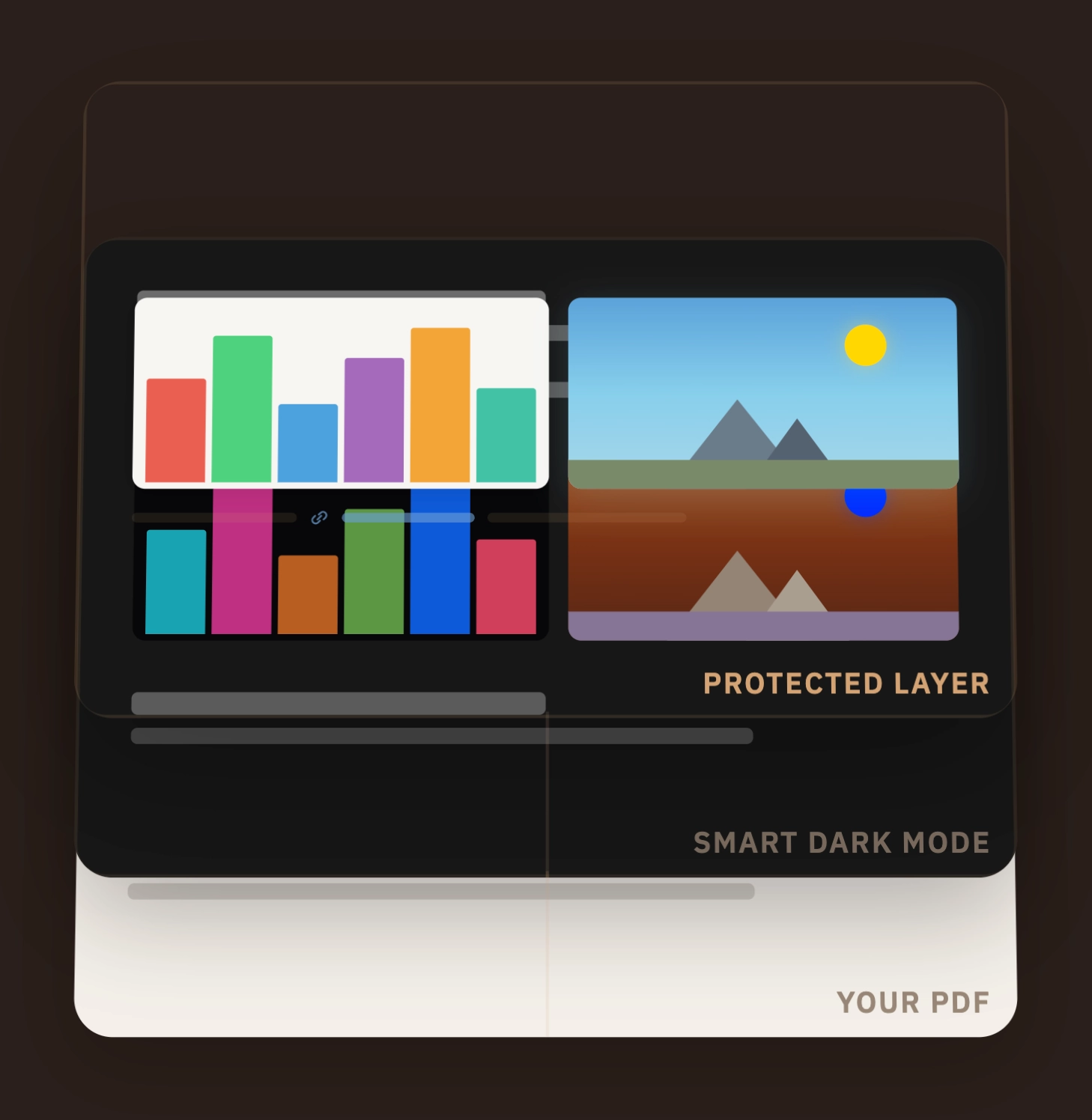
As we saw before, a native PDF does not save only the final result of the page, but also saves the instructions to rebuild it: draw this text, move the origin, scale this element, insert this image, continue from here.
PDF.js (an open source library developed by Mozilla Foundation) exposes this list through the public page.getOperatorList() API.
Without forking the library, I hooked into that API and implemented the way to walk through the list, as Mozilla's official reader would. The difference is that I did not use it to draw everything on screen, but only to understand where the images are drawn.
The delicate point is that veil had to understand where an image would end up on the page, but the PDF does not always say it with a ready-made rectangle, such as: "image from x=100, y=200, width=300 and height=180".
The PDF thinks differently. It is as if it placed a transparent sheet over the page: first it moves it to the right point, enlarges or shrinks it, sometimes rotates it; only after that does it say: "draw this image here".
In practice, instead of directly saving the final position of the image, the PDF saves the instructions to position that transparent sheet in the correct way.
To avoid the movement or rotation used for an image from also influencing the rest of the page, the PDF uses save and restore.
save means: "remember how the transparent sheet is positioned right now".
Then the PDF can move it, resize it or rotate it to draw a specific element, for example a smaller figure, a logo inside a box or a scanned page that is rotated.
When restore arrives, it returns to the position saved before.
In this way, the transformation used for that element does not alter what is drawn after. It is as if the PDF temporarily prepared a drawing area for that image, used it, and then returned to the normal way of drawing the page.
Technically this state is called CTM (Current Transformation Matrix). Veil treats it as a temporary map that describes how that transparent sheet has been positioned: where it is, how large it is and whether it is rotated.
At every save it saves a copy, at every transform it updates it and at every restore it returns to the previous copy.
When paintImageXObject appears in the sequence, veil knows that the PDF is about to draw an image.
At that point it looks at the current CTM: that is what says where the image will be positioned, how large it will be and whether it will be rotated.
From there veil derives the real rectangle occupied by the image on the canvas.
Finally, on the second canvas, the unfiltered one above the first, veil copies the pixels of that region from a clean render of the page. The first canvas remains inverted, the images return to their original colors, the surrounding text continues to be light on dark and the reader sees what they wanted to see without noticing the "trick".
In essence, there is only the PDF declaring where it will draw the images, and veil using that information to put the original pixels back in the right place. Since it is pure mathematics, it runs entirely on the CPU and costs only a few milliseconds per page.
BT.601
There is one case in which the filter must be turned off entirely, namely already dark pages. I did not want inversion to be applied to an already dark page, turning it into a light page, because the user would get a flash in their eyes. I also felt it would make the software feel "stupid", as if it blindly inverted everything it was asked to process.
After rendering, an extremely cheap operation is performed: the background luminance is measured by sampling the edges and corners of the page, because that is where pure background is most likely to be found without text or images in the way.
In other words, veil takes a few points at the margins of the page, reads their color and tries to understand whether the background is already dark enough.
At that point, the page is a canvas, therefore a grid of pixels. The browser allows those pixels to be read with getImageData(). For every point on the page, veil gets four values, red, green, blue and alpha. Alpha indicates transparency and is not needed here, while the first three channels are used to calculate luminance.
It does not look at color naively, by taking an identical average of red, green and blue. Instead it uses the BT.601 formula:
luminance = 0.299 * red + 0.587 * green + 0.114 * blue
- green 58.7%
- red 29.9%
- blue 11.4%
As seen in the Color Picker App, the weight of green is high because the human eye is biologically more sensitive to that color. Evolution in natural environments, where distinguishing shades of green could make a difference, partly explains this sensitivity. Blue and red matter less.
If the average luminance falls below 40%, the page is marked as already dark and inversion is skipped, showing the original page.
The Memory War
This was the longest and most tiring problem of the development, the one on which I spent more than half of the time dedicated to veil.
The first problem came up when I tested on a low-end tablet, a Samsung Tab S6 Lite.
Unlike on desktop, with documents over 200 pages the browser crashed.
The reason was that every page generated a container in the DOM, and every container contained two canvases, a text layer and a link layer.
On a 500-page PDF, this meant having more than 2000 elements (heavy ones) at the same time, the vast majority of them invisible to the user, because they were far from the screen.
The browser therefore ran out of available GPU memory.
I had underestimated the computational cost and, at the same time, overestimated low-end devices.
The solution was virtual scrolling. Instead of creating a complete HTML structure for every page of the PDF, veil maintains a maximum number of reusable structures: 5 on memory-constrained devices, meaning low-RAM Android and iOS, 7 on mobile devices with more margin and 15 on desktop.
Each of these structures contains everything needed to show a page processed by veil: the main canvas with dark mode, the overlay canvas with the original images, the selectable text layer and the clickable link elements.
The pool is used to cover the area the user is reading plus a safety margin: one page before and one after on the most limited devices, 2 before and 2 after on normal mobile devices, 5 before and 5 after on desktop.
The exact number of structures used varies based on how many pages are visible on screen at that moment. So 5, 7 and 15 are the maximum number of reusable structures present in the DOM, not a number always used in full.
When a page exits far enough from this area, its structure is emptied, reassigned to another page closer to the current reading position and filled with the new rendering. Contents, positions and dimensions are changed, but the HTML structure is always reused.
Once that was solved, an even worse problem came up: iOS.
Since PDF.js runs in a worker thread, meaning a separate part of the browser that works in the background while the page remains usable, that worker accumulates memory during page rendering: fonts already read, document indexes, image cache and resources reused multiple times.
Even when calling the cleanup functions made available by PDF.js, part of that state was never fully released.
After a few hundred pages, memory reached 200-300 MB and Jetsam, the iOS memory manager, closed the browser tab without warning.
The solution was brutal.
Every 15 renders, veil destroys the entire PDF.js instance and recreates it from scratch starting from the original buffer, meaning that the old worker is terminated and a new clean one starts.
The user does not notice because the canvases already painted remain in the DOM: once pixels are on screen, they no longer depend on PDF.js.
I discovered that this solution cost about 200-400 ms of reinitialization, scheduled in the moments when the browser has no other work to do.
A monotonically increasing generation counter protects against race conditions (situations in which an old operation finishes after a newer one and risks overwriting the correct result): every asynchronous operation checks whether it still belongs to the current generation before touching the DOM.
Without this check, a render started before PDF.js was recreated could finish late and draw an old page inside a structure already assigned to another page.
If instead the number no longer matches, veil understands that the operation belonged to the old PDF.js instance and discards the result before it can modify the page.
On desktop, however, the reset is not scheduled. In the code I had also considered a higher threshold, 40 renders, but for now I preferred not to activate it because I had not observed the same critical accumulation, not even on heavy documents. I remain conflicted about this choice. Prevention there too would be more reassuring, but a periodic recreation of PDF.js is still an invasive mechanism, with costs and complexity of its own.
Probably the next projects, the books and the path I am following will help me better understand where prevention ends and where overengineering begins.
That said, I believe the optimization for iOS fully represented the curb cut effect in this project, meaning sidewalk ramps for wheelchair users, which although they were born for people with that specific condition, ended up helping many other categories too, for example people with strollers and people on bikes.
Lock-In
Another point I considered essential was the possibility of exporting the converted PDF.
The thing I tolerate less and less in modern software, although I understand the reasons why it is adopted, is lock-in.
I could have closed the experience inside veil and implicitly communicated to the user that this kind of dark mode exists only if you open the document here.
Even if session saving and resume on the page where you had stopped would already have guaranteed a sufficient level of comfort for the user to stay, I felt it was not enough.
I decided that the user would choose which reader to use to read the converted PDF.
With the export button, a new PDF is generated with dark mode applied, selectable text, working internal and external links and OCR text in scanned PDFs included in the exported file.
For more details about the architecture, here is the ARCHITECTURE.md file in the repository.
What I Learned
Knowing the domain before inventing a solution:
At first I was reasoning as if the PDF were a finished page to analyze visually, and for this reason the idea of using YOLO nano seemed sensible to me.
The turning point was understanding that a native PDF should not be guessed from the outside, because it already contains the instructions that explain what is drawn and where.
Before adding intelligence, I had to better understand what I had in front of me.
A well-made default is worth more than many preferences:
The initial concept of My Theme Reader went toward themes, presets and adjustments, while veil forced me to do the opposite, namely remove possibilities and take responsibility for a default behavior.
Not because personalization is useless, but because in this case the real problem was opening a PDF in dark mode without destroying its images, colors and readability.
Memory is UX:
Before this project I would have treated memory, canvas and workers as performance topics, but here I understood that on iOS and on limited devices they become user experience.
In a PDF, the invisible is part of the document:
The lesson was not adding a text layer, links, OCR and export as separate features, but understanding that a PDF can remain visually correct while losing what makes it useful.
If, for example, the text gets copied together with the dark background of the reader, if links do not work, if the words inside a chart or scan remain trapped inside the image and if the result remains trapped inside the application, dark mode has only produced a page that is more comfortable to look at without truly preserving the document.
Giving up the immediate gratification of the fork:
Modifying PDF.js directly would have given me more control in the immediate term, but it would have created a debt difficult to sustain.
Staying on the public APIs imposed more work around the problem, but it kept veil easier to maintain.
Tests help see silent breakages and move faster:
In a PDF reader, many regressions do not appear with an obvious error.
A link can stop working, text can remain visible but no longer selectable, a page can look correct but have badly realigned images, and export can lose information.
Unit tests, E2E and visual regression were not only a safety net, but a way to proceed faster, because they allowed me to change code and immediately recover the time I would have lost when something broke.
This became even more important while working with agents, which could propose a solution, make a mistake and receive concrete feedback, instead of relying only on a stochastic and general evaluation of the code.
Agents are tools, not habits:
After the case study on Refactoring UI, veil was the second project in which I used Claude Code very extensively, while the other agents were useful mostly for reviews, diagnoses and counterproposals.
The important part was not relying on a specific tool, but learning to use agents as technical friction: making them challenge hypotheses, receiving alternatives and then verifying everything in the code, in tests and on real devices.
In the next projects I want to try other agents as primary ones too, to further avoid my method closing around a single tool.
Intentional overengineering:
DOI, CITATION.cff and Software Heritage were not necessary for the real use of veil.
I know it is unlikely that anyone will ever cite the tool in a paper, but that was not the point.
I wanted to learn the complete flow now, on a project of mine and still under my control, instead of discovering it for the first time when I will really need it.
Life After Deploy
I launched veil on Hacker News. I wrote what I felt I wanted to say, from the factory to the way it works, all the way to the BT.601 formula.
Here is the link to the Hacker News post and the article published by Gigazine, a Japanese tech magazine. I really appreciate that in the conclusion they quoted some passages from the HN discussion, in particular the one where I explain why I made veil offline first.
Reflection
In the factory I built for people I knew very well, from their domain to the device they would use.
Veil was the first time without that guarantee.
And yet the factory had prepared me for this too.