UX Engineer Log
From Notes to Code
This project represents the turning point of my journey. If from-factory-to-ux-engineer was my static logbook (GitHub used as if it were Google Drive), UX Engineer Log is the moment the log came to life. I migrated everything from a static structure to a Docusaurus (React) architecture, transforming the documentation into a real software product with a Design System, localization, and production-grade performance.
The Origins: The Mental "Jailbreak"
Everything starts with an iPod Touch 4G that captivated me when I was 9 years old.
Apple offered a perfect but closed experience.
Putting the iPod into DFU Mode and installing Cydia, I learned my first fundamental lesson: User Experience is malleable.
It can be modified, it can be improved, but it can also be broken.
It wasn't just changing a wallpaper. It was installing WinterBoard to redesign the UI, using Barrel to feel the 3D cube effect under my fingers, or configuring SBSettings to fix a flawed Apple UX that still didn't allow quick toggles for Wi-Fi.
Every tweak carried the real risk of "bricking" the device (or ending up in an infinite Boot Loop), and every emergency restore was a lesson on how file systems work under the hood.
At that age, I went to the library just to get my daily hour of usage on the iMac with Mac OS X Lion. Years later, creating the RPG Creature Search App project was an incredible emotion: replicating that Aqua UI, simulating window opening, closing, and minimizing, but always with a personal touch, was one of the most beautiful experiences of my life. That childhood curiosity to look beyond the standard interface is the same that drives me today not to settle for "it works", but to want to understand the why.
The Experience in the Trenches (The Factory)
Even before defining myself as a UX Engineer, I became one out of necessity in a food factory. While official management software was ignored because it was complex and distant from reality, I saw my colleagues stressed. After just 4 days in the department, I realized that daily production planning was the bottleneck. From there, the idea was born to develop a Web App to manage hourly consumption and forecast production quantities. I was obsessed. I worked on it during breaks, in the bathroom, during night shifts, between sets at the gym, getting my muscles cold because my mind was lost in creating the tool that everyone would use. And so it was. The app reached 100% organic adoption, used by the entire department across all 3 shifts. Not because it was graphically perfect, but because it solved a real problem. That’s where I understood that empathy is the most powerful technical skill in existence. Soon, colleagues from other departments started asking me for similar solutions. It was at that moment that I did UX without knowing UX: I was doing usability tests and user interviews without knowing the formal method, but applying its essence.
A Visual Tribute: Cydia
Returning to UX Engineer Log, for the visual aspect, I wanted to pay homage to my origins. I armed myself with my tablet, sketched a wireframe, brought it to High Fidelity in Figma, and delved into Docusaurus. The chosen themes, Coffee & Sand (Light Mode) and Warm Night (Dark Mode), are not random colors. They pick up the hues of the original Cydia icon. The top part (light) became my Light Mode, the bottom part (dark) my Dark Mode. A circle closing.
The "Silent Mac" Philosophy
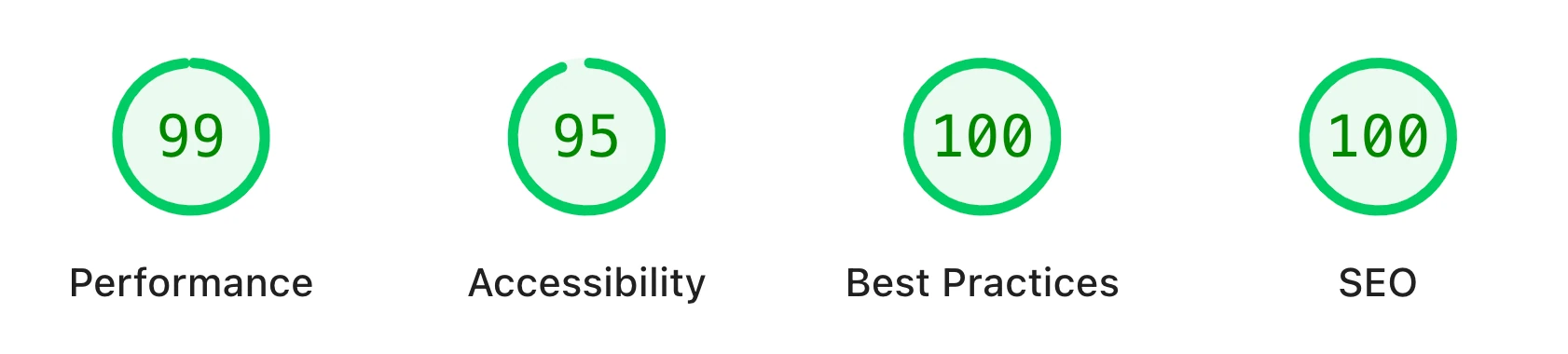
Speed is a form of respect. Owning an Intel MacBook, I noticed that many modern sites make my fans take off with heavy, unoptimized, and excessive effects. I chose a different path:
- Asset Colocation: Everything local, converted to WebP and WebM. No external hotlinks. Thanks to this project, I added tools like CloudConvert (for GIFs) and Squoosh to my "Tool" folder on the desktop, learning to manually adjust the detail percentage for every single image. The goal was to find the best mathematical compromise between reduced weight and unchanged quality, without sacrificing even a visible pixel.
- GPU Efficiency: I recreated visual effects with calculated CSS and solid colors instead of heavy live blurs (Backdrop Filter).
- Result: On my Intel Mac, the site maintains a temperature between 36°C and 40°C. The same temperature as when I am on the desktop at rest. The fans remain at the absolute minimum regime (~1800 rpm). Absolute silence.
For me, a documentation tool must be able to remain open in the background at all times, like a silent extension of the system, without ever consuming resources (CPU or battery) needed for the main work.
My "Second Brain"
The further I went, the more I realized I couldn't remember everything. The Search Bar and Vademecums integrated into this site are not exercises in style, but my second brain. They are practical manuals I built because I couldn't do without them. Analyzing the commits of from-factory-to-ux-engineer, you can see how I jotted down new concepts as I encountered them in projects, only to integrate them later into the Vademecums. As I will explain in some specific READMEs, these notes were vital for completing the most complex challenges.
Maintenance Manual
Before this project, I had never seriously used the terminal. I thought it slowed down the process; instead, it improved the quality of my work drastically, leading me to reason in watertight compartments, or rather, "by commit". I jotted down the essential commands in a .txt file on the desktop; I report here the ones that, when put to the test, proved indispensable.
Git Workflow
Essential commands for version control.
# See current status (which files changed)
git status

# See changes in detail (code line by line) - Press Q to exit
git diff

# Prepare all files for saving
git add .

# Create the "package" (Commit) with a message
git commit -m "type(scope): description of changes"

# Send everything online (GitHub/Netlify)
git push
Docusaurus Operations
Commands for managing the React/Docusaurus environment.
# Start the site locally (Development Mode)
npm run start
# or
npm run serve

# Create the production build (Static Output)
npm run build

# Clear cache (if changes don't appear)
npm run clear
Mobile Testing
Procedure to test UX on real devices (iPhone/Android) on the local network.
- Start the exposed server:
npm run start -- --host 0.0.0.0
- Find the Mac's local IP address:
ipconfig getifaddr en0
- On the mobile device:
Open the browser and navigate to:
FOUND_IP:3000(e.g.,192.168.1.5:3000).
Utility
- File Map: Generate a structure map (excluding node_modules and hidden files):
find . -not -path '*/.*' -not -path './node_modules*' > mappa.txt
- Optimization: CloudConvert (GIF to WebM) and Squoosh (WebP).
What I Learned
Architecture & React:
- Docusaurus & MDX: Transforming static markdown into interactive components
- Component Swizzling: Customizing internal framework components
- i18n Routing: Managing a bilingual site (IT/EN) while keeping code clean
Performance Engineering:
- Asset Optimization: WebP (Quality 90) and WebM to reduce weight by 90%
- Lazy Loading & Async Decoding: Image loading strategies
- Thermal Management: Optimizing CSS to not stress GPU/CPU
Methodology:
- Git Storytelling: Using commits (feat, fix, style) to tell the project story
- Design System Consistency: Standardizing borders, shadows, and spacing across hundreds of pages
- Utility-First CSS: Abandoning monolithic CSS for reusable classes
Next Steps: Continue filling this system with new designs and algorithms, but above all, welcome you to UX Engineer Log!