Fruit Search App
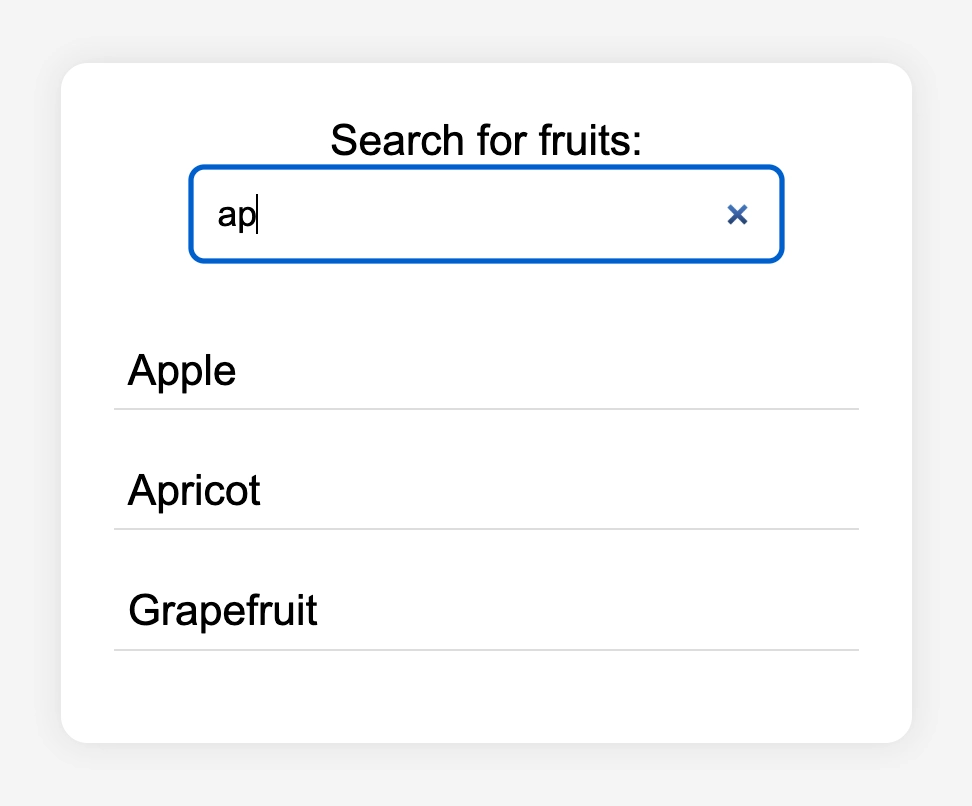
The Project
A freeCodeCamp workshop that concluded the "Understanding Effects and Referencing Values in React" section, putting useEffect, useRef, and Custom Hooks into practice through asynchronous management with async/await. Technically more complex than previous React projects, but above all rich in theoretical reflections that I struggled not to put in writing.
Source Code
- index.jsx
- index.html
- styles.css
const { useState, useEffect } = React;

export function FruitsSearch() {
  const [query, setQuery] = useState('');
  const [results, setResults] = useState([]);

  function handleSubmit(e) {
    e.preventDefault();
  }

  useEffect(() => {
    if (query.trim() === '') {
      setResults([]);
      return;
    }
    const timeoutId = setTimeout(async () => {
      try {
        const response = await fetch(`https://fruit-search.freecodecamp.rocks/api/fruits?q=${query}`);
        const data = await response.json();
        setResults(data.map(fruit => fruit.name));
      } catch (error) {
        console.error("Error fetching data:", error);
      }
    }, 700);
    return () => clearTimeout(timeoutId);
  }, [query]);

  return (
    <div id="search-container">
      <form onSubmit={handleSubmit}>
        <label htmlFor="search-input">Search for fruits:</label>
        <input
          id="search-input"
          type="search"
          value={query}
          onChange={(e) => setQuery(e.target.value)}
        />
      </form>
      <div id="results">
        {results.length > 0 ? (
          results.map(item => (
            <p key={item} className="result-item">{item}</p>
          ))
        ) : (
          <p>No results found</p>
        )}
      </div>
    </div>
  );
};
<!DOCTYPE html>
<html>
<head>
  <meta charset="UTF-8" />
  <title>Fruits Search</title>
   <script src="https://cdnjs.cloudflare.com/ajax/libs/react/18.3.1/umd/react.development.min.js"></script>
   <script src="https://cdnjs.cloudflare.com/ajax/libs/react-dom/18.3.1/umd/react-dom.development.min.js"></script>
   <script src="https://cdnjs.cloudflare.com/ajax/libs/babel-standalone/7.26.5/babel.min.js"></script>
  <script
    data-plugins="transform-modules-umd"
    type="text/babel"
    src="index.jsx"
  ></script>
  <link rel="stylesheet" href="styles.css" />
</head>
<body>
  <div id="root"></div>
  <script
    data-plugins="transform-modules-umd"
    type="text/babel"
    data-presets="react"
    data-type="module"
  >
    import { FruitsSearch } from './index.jsx';
    ReactDOM.createRoot(document.getElementById('root')).render(<FruitsSearch />);
  </script>
</body>
</html>
body {
  font-family: Arial, sans-serif;
  display: flex;
  justify-content: center;
  align-items: center;
  height: 100vh;
  background-color: #f4f4f4;
}

#search-container {
  text-align: center;
  background: white;
  padding: 20px;
  border-radius: 10px;
  box-shadow: 0 0 10px rgba(0, 0, 0, 0.1);
}

#search-input {
  padding: 10px;
  width: 80%;
  border: 1px solid #ccc;
  border-radius: 5px;
  margin-bottom: 10px;
}

#results {
  text-align: left;
  max-height: 150px;
  overflow-y: auto;
}
.result-item {
  padding: 5px;
  border-bottom: 1px solid #ddd;
}
React, 1984, and the Problem with AI
Ever since I discovered what's under the hood of useRef, essentially a { current: value } object that React manages in memory, exactly as plain JavaScript would do, I found myself asking the same question I ask with every React project: how useful will all this be in a future where AI writes most of the code?
The reflection got deeper. It's true that AI will write less code with this library, but it still has to remember (keep in the context window) that for each of React's functions there are, in fact, JavaScript functions with behaviors that aren't directly visible. It's as if we're adding a layer of invisible complexity that AI still needs to know to do debugging.
Newspeak from 1984 came to mind: a vocabulary ideally reduced from 50,000 to 5,000 words to limit thought. Isn't React the same thing? It reduces available functions, groups behaviors under new names. A writer who only knows those 5,000 words, isn't he missing the possibility of combining the remaining 45,000 in ways that weren't even conceivable with the reduced vocabulary? Aren't we therefore depriving an AI even more capable than today's of the possibility of combining raw, uncontained functions to create the perfect system for the application being designed? Are we adding unnecessary complexity?
I realize I can't study React without asking myself these kinds of questions. In these moments, I find comfort in the fact that React is not a framework but a library: nothing prevents me from mixing both. But the question remained.
I looked for answers that would disprove this thought, because I was aware of the Dunning-Kruger effect I felt on me, after all, this is only the 7th React exercise I've done. The Code Tutor answered with five points that convinced me:
1. The inverted metaphor. In 1984, Newspeak reduces words to reduce the ability to think. In React, imperative commands are reduced to increase the ability to manage complexity. With Vanilla JS you have control over every single atom, but if you need to manage 10 million atoms, the probability of unmanageable spaghetti code is extremely high, even for an AI. React doesn't remove words to censor you, it removes them to prevent the building from collapsing under the weight of useless details.
2. AI loves structures, not chaos. If you have a count variable displayed in 10 places on the page, in Vanilla JS an AI has to remember to write 10 document.getElementById instructions every time it changes. If it forgets one (and AIs "hallucinate" or lose context), the UI is silently broken. In React, the AI writes count in state and the engine takes care of the rest. React provides AI with a proven mental structure to solve the synchronization problem, which is mathematically difficult.
3. The Law of Leaky Abstractions. Joel Spolsky (the inventor of Trello) wrote: "All non-trivial abstractions, to some degree, are leaky." React is an abstraction over pure JS. As long as everything goes well, the 5,000 words are enough. But as soon as there's a weird browser bug, a performance issue, or a complex 60fps animation, React's Newspeak fails. And if you don't know pure JS, you don't know how to fix the leak.
4. The Human-AI collaboration factor. AI will write the code, but who will read it? If it spits out 5,000 lines of ultra-optimized but incomprehensible Vanilla JS and I need to change the color of a button, I'm screwed. React is the lingua franca between human intent and machine execution. It's the common language that allows a human being to intervene on what the AI has produced.
5. The Sapir-Whorf Hypothesis. "The language you speak shapes the way you think." In programming this is a recognized fact: if you only know React's Newspeak, your brain will try to solve any problem with useState and a component, even when it's not needed. Knowing the 50,000 words reminds you that sometimes two lines of JS and a standard HTML tag are enough to do what React would do with 100 lines of complex code.
He then added a reflection that definitively closed the circle: in 1984, the Party reduced words to prevent "thoughtcrime", if the word "freedom" doesn't exist, you can't even formulate the thought of rebelling. React did the same thing with code: it made it physically difficult to write certain buggy patterns (direct DOM manipulation, unsynchronized state, listeners lost in memory). It removed the vocabulary of imperative DOM to force you to think in terms of State.
useEffect: Synchronization, Not Reaction
The tutor immediately warned me that I shouldn't see useEffect as a way to say "do this when this happens".
The correct way is Synchronization. I shouldn't think: "When I click, start the timer." Rather: "I want the timer to be synchronized with the isActive state. If it's active, the timer should start. If it's not active, it should stop."
useEffect therefore acts as a mechanism that keeps the component synchronized with external systems (Browser, API, time) that React doesn't directly control.
This completely changes how you reason about architecture, because if I think in events, my code becomes a list of instructions: "When I click Start, start the timer. When I click Stop, stop it. When I click Reset, reset everything." It works as long as things are simple. But if I add a new condition, like "the timer should also stop if the user leaves the page," I have to remember to go add that logic in every right place. If I forget a handler, the bug is guaranteed.
If instead I think in synchronization, I ask myself just one question: "When should the timer be active? In this case when isActive is true. Period." I write a single useEffect that observes isActive and behaves accordingly. If tomorrow I add a new way to stop the timer, a timeout, leaving the page, a network error, I don't have to touch the useEffect. I just need to set isActive = false from anywhere in the code, and the timer stops on its own. The logic is in one place, not distributed across ten handlers.
Batching vs Debouncing: Two Cousins That Look Alike
freeCodeCamp talked about Debouncing, yet it seemed like I was seeing the Batching from the Toggle Text App again. Weren't they the same thing?
The answer I received was that they are two mechanisms that both "wait," but with completely different purposes:
| Batching | Debouncing | |
|---|---|---|
| Who does it? | React automatically | You, in the code |
| Purpose | Merge multiple renders into one | Delay a heavy call |
| Analogy | The waiter who waits for all orders before going to the kitchen | The elevator doors that restart the timer every time someone enters |
| When does it trigger? | Every time you call multiple setState in a row | Only after X milliseconds of "silence" |
| Typical use case | Automatic render optimization | Search input, resize, scroll |
In this workshop I used precisely Debouncing: I wait 700ms after the last keystroke before calling the API, avoiding a request for every single character typed.
useRef: The Director of Attention
freeCodeCamp introduced me to useRef with an example on input focus. The first thing I thought was: complexity added to what HTML and CSS already did perfectly well on their own. I actually understood why later.
useRef and useState solve two different problems. useState is a shop window, so every time you change something, React redraws everything and the user sees it. useRef is the pocket: you can put things in it, take them out, change them, and nobody notices. No re-render.
The inputRef.current syntax exists because useRef creates a { current: value } object that survives re-renders. Normal variables inside a component die and are reborn with every redraw. useRef doesn't, React always returns you the exact same memory address.
But the use case that struck me most is accessibility. In Single Page Applications the page never reloads: the index.html is always the same. For those using a keyboard or screen reader, this is problematic because without the browser thinking for you to notify the user of the page change, you have to communicate to the browser itself that something has changed. Here are three extremely problematic scenarios if you don't manage focus with useRef:
- Form Error: The user fills out a long form, clicks "Submit" at the bottom of the page. There's an error in the first field at the top: a red message appears. Visually it's obvious. But the browser focus stayed on the "Submit" button at the bottom. Someone using a screen reader hears: "Submit button pressed." Then silence... The error message exists in the DOM, but nobody communicated it to them. With
useRef, you move the focus directly to the error message the moment it appears: the screen reader reads it immediately. - Page Change: In a traditional HTML site, when you click a link the page reloads and focus automatically restarts from the beginning. In React this doesn't happen: the content changes, but focus remains on the link you just clicked, which sometimes doesn't even exist in the DOM anymore because the component was unmounted. The screen reader finds itself announcing a ghost element. With
useRef, when the "page" changes you move focus to the<h1>of the new content: the user immediately knows where they are. - Modal Opening (dialog window that appears over the page): Visually the background is dark, the rest of the site is inaccessible. For the keyboard, no: everything still exists. If the user presses TAB enough times, focus escapes the modal and ends up on links and buttons hidden under the dark background. They're interacting with something they can't see. With
useRef, when the modal opens you move focus inside it (usually to the first input or the "Close" button), thus allowing only actions within it.
The Curb Cut Effect always applies, which I first encountered in the Google UX course: the solution designed for a specific need ends up helping everyone. Managing focus with useRef helps power users who don't touch the mouse, situational users with a broken arm or dead trackpad, and, something I'd never considered until now, those browsing on Smart TV or PlayStation. A console controller works exactly like a keyboard: Up, Down, Right, Left, Enter. If focus is managed well, the site works on the couch too. If it's not, the cursor gets stuck (and the user leaves).
Custom Hooks: Separating Logic from Component
I wondered where to put the accessibility code: did it make sense to include it directly in the component? I discovered that common practice is to extract it into an external function, a Custom Hook, that lives in its dedicated file, for example hooks/useFocus.js, and is called with a single line. The component stays clean, the logic is in one place and reusable wherever I need it.
async/await: A Discovery in the Review
The Vademecum was essential for reviewing try, catch, async, and await, because I didn't remember the syntax by heart. Rereading it, though, I discovered something that wasn't explained sufficiently: I thought async and await were inseparable. They're not.
You can have an async function without await: it's syntactically valid, but pointlessly asynchronous. Conversely, await can never appear outside an async function: it's a syntax error. The two aren't inseparable, but they have a precise direction: await needs async, async doesn't need await.
I immediately updated the Vademecum to reflect this distinction more precisely.
The Transparency of This Log
It often happens that the questions I ask myself, like the one about 1984, seem stupid to me after reading the answer. The temptation to show myself as perfect is there, I admit it. But projects like Landing Page and Maintenance made me hit rock bottom with errors, and those experiences raised my tolerance for "seeming ignorant" so high that by now transparency comes naturally to me.
I take notes on the questions and answers from the Code Tutor in a file called "future README", then I try to organize them like I'm doing now. I'm finding it increasingly difficult to understand whether this site is a diary, a portfolio, or a second brain. Probably all three things together.
What I Learned
useEffect as Synchronization:
The most important mental model shift of the module. Not "do X when Y happens," but "keep this component synchronized with this external system." It completely changes how you design architecture.
Debouncing Implemented:
700ms delay before calling the API. Every new keystroke cancels the previous timeout (clearTimeout) and starts a new one. The cleanup function of useEffect (return () => clearTimeout(timeoutId)) is the mechanism that makes all this possible.
useRef as Re-render Survival:
A reference to a { current: value } object that React keeps in memory between renders. It doesn't trigger re-renders when it changes: it's the difference between the shop window (visible to everyone) and the pocket (invisible, but always accessible).
Custom Hooks as Logic Separation:
Extracting logic into a reusable hook (hooks/useFocus.js) keeps components clean and centralizes cross-cutting behaviors like accessibility.
async/await Are Not Inseparable:
async declares a function as asynchronous. await suspends execution inside that function. They can exist without each other, even if it rarely makes sense.
Next:
One-Time Password Generator (Lab)