Superhero Application Form
The Project
A freeCodeCamp workshop to put form management in React into practice, preceded by a theory section that revisited the rendering cycle, state immutability, and fundamental Hooks, before analyzing the evolution of approaches for handling user data: from the historical trade-off between Controlled Inputs (via state) and Uncontrolled ones (via ref), all the way to the modern revolution of useActionState, which delegates the dirty work to the server, significantly reducing the amount of code needed.
Source Code
- index.jsx
- index.html
- styles.css
const { useState } = React;

export const SuperheroForm = () => {

  const powerSourceOptions = [
    'Bitten by a strange creature',
    'Radioactive exposure',
    'Science experiment',
    'Alien heritage',
    'Ancient artifact discovery',
    'Other'
  ];

  const powersOptions = [
    'Super Strength',
    'Super Speed',
    'Flight',
    'Invisibility',
    'Telekinesis',
    'Other'
  ];

  const [heroName, setHeroName] = useState('');
  const [realName, setRealName] = useState('');
  const [powerSource, setPowerSource] = useState('');
  const [powers, setPowers] = useState([]);

  const handlePowersChange = e => {
    const { value, checked } = e.target;
    setPowers(checked ? [...powers, value] : powers.filter(p => p !== value));
  }

  return (
    <div className='form-wrap'>
      <h2>Superhero Application Form</h2>
      <p>Please complete all fields</p>
       <form method='post' action='https://superhero-application-form.freecodecamp.org'>
        <div className='section'>
          <label>
            Hero Name
            <input
              type='text'
              value={heroName}
              onChange={e => setHeroName(e.target.value)}
            />
          </label>
          <label>
            Real Name
            <input
              type='password'
              value={realName}
              onChange={e => setRealName(e.target.value)}
            />
          </label>
        </div>
        <label className='section column'>
          How did you get your powers?
          <select value={powerSource} onChange={e => setPowerSource(e.target.value)}>
            <option value=''>
              Select one
            </option>
           {powerSourceOptions.map(source => (
             <option key={source} value={source}>
                {source}
              </option>
            ))}
          </select>
        </label>
        <label className='section column'>
          List your powers (select all that apply):

          {powersOptions.map(power => (
            <label key={power}>
              <input
                type='checkbox'
                value={power}
                checked={powers.includes(power)}
                onChange={handlePowersChange}
              />
              <span>{power}</span>
            </label>
          ))}
        </label>
        <button
          className='submit-btn'
          type='submit'
          disabled={!heroName || !realName || !powerSource || powers.length === 0}
        >
          Join the League
        </button>
      </form>
    </div>
  )
};
<!doctype html>
<html>
  <head>
    <meta charset="UTF-8" />
    <title>Superhero Application Form</title>
    <script src="https://cdnjs.cloudflare.com/ajax/libs/react/18.3.1/umd/react.development.js"></script>
    <script src="https://cdnjs.cloudflare.com/ajax/libs/react-dom/18.3.1/umd/react-dom.development.js"></script>
    <script src="https://cdnjs.cloudflare.com/ajax/libs/babel-standalone/7.26.3/babel.min.js"></script>
    <script
      data-plugins="transform-modules-umd"
      type="text/babel"
      src="index.jsx"
    ></script>
    <link rel="stylesheet" href="styles.css" />
  </head>

  <body>
    <div id="root"></div>
    <script
      data-plugins="transform-modules-umd"
      type="text/babel"
      data-presets="react"
      data-type="module"
    >
      import { SuperheroForm } from './index.jsx';
      ReactDOM.createRoot(document.getElementById('root')).render(<SuperheroForm />);
    </script>
  </body>
</html>
body {
  margin: 0;
  padding: 0;
  min-height: 100vh;
  font-family: Arial, sans-serif;
  display: flex;
  justify-content: center;
  align-items: center;
  background: linear-gradient(30deg, #ff9999 50%, #6699ff 50%)
}

.form-wrap {
  background-color: white;
  width: 400px;
  padding: 20px;
  border: 1px solid black;
  box-shadow: 5px 5px 10px black;
}

.form-wrap h2,
.form-wrap p {
  text-align: center;
}

.form-wrap p {
  position: relative;
  top: -18px;
}

.section {
  display: flex;
  margin-bottom: 30px;
}

.column {
  flex-direction: column;
}

.submit-wrap {
  text-align: center;
}

.submit-btn {
  display: block;
  margin: 0 auto;
  padding: 0.4rem 0.5rem;
  border: 1px solid black
}

.submit-btn:hover {
  cursor: pointer;
  background-color: #f3f3f3;
}

.submit-btn:disabled {
  cursor: not-allowed;
}
The Theory: Controlled Inputs, Uncontrolled Inputs, and useActionState
This is the chapter I liked least about React. I saw too much complexity to handle forms that in plain HTML were done in a much simpler way. I remember that in the Telephone Number Validator I wrote:
Nobody ever talks about it, but I think that beyond the gold standard "mobile-first", you should evaluate based on the device that will be predominantly used to browse your application. If you're building an application primarily meant for desktop, it might make more sense to adopt the old method of dedicating a media query to mobile. In this project I still chose the mobile-first approach to get used to this way of thinking, a skill I want to consolidate. I might be wrong, but I always get red flags when I hear "that's just how it is". There are always a thousand nuances and "it depends" that often go unmentioned.
This is another one of those cases. freeCodeCamp explained three distinct approaches to me:
Controlled Inputs: the tools are useState + onChange. React becomes the Single Source of Truth: the HTML input remembers nothing on its own.
Every keystroke is intercepted, React updates the state, triggers a re-render and prints the character on screen.
This gives you absolute real-time control, perfect for instant validations and dynamically disabling buttons, but at the cost of continuous re-renders.
import { useState } from "react";

function ControlledForm() {
  const [name, setName] = useState("");

  return (
    <input
      type="text"
      value={name} // React controls what's displayed on screen
      onChange={(e) => setName(e.target.value)} // React intercepts and updates
    />
  );
}
Uncontrolled Inputs: the tool is useRef. It's an "old school" approach, similar to Vanilla JS: React doesn't save what you type into state.
It lets the browser manage the input field. React only steps in when you press Submit: at that point it reads the value with ref.current.value and grabs the final data all at once.
This often makes typing feel "lighter", because you don't trigger a re-render on every keystroke like with Controlled Inputs. The downside is that you lose the convenience of real-time React: validations and formatting while typing become more cumbersome to implement.
import { useRef } from "react";
import { sendToDatabase } from "./api"; // Sends the data to the backend

function UncontrolledForm() {
  const nameRef = useRef(null); // A "hook" to read the input later

  const handleSubmit = (e) => {
    e.preventDefault(); // Prevents page refresh
    const finalValue = nameRef.current.value; // Reads the value only on submit
    sendToDatabase(finalValue); // Sends the final value
  };

  return (
    <form onSubmit={handleSubmit}>
      <input type="text" ref={nameRef} /> {/* No value/onChange: the browser handles everything */}
      <button type="submit">Submit</button>
    </form>
  );
}
useActionState: the tool is useActionState + the native <form action={...}> attribute. Instead of fighting the browser, it uses native HTML to submit data.
The hook listens automatically and returns variables like isPending out of the box, without having to manually write isLoading = true/false or manage try/catch.
It drastically reduces the amount of code and handles loading automatically.
It's defined as the modern standard for data submission operations to servers.
import { useActionState } from "react";
import { saveData } from "./actions"; // The remote (server-side) logic that saves to the database

function ModernForm() {
  const [
    state,      // Contains the server's final response (e.g. "Error" or "Saved!")
    formAction, // The automatic replacement for the old "handleSubmit". Handles submission for us
    isPending   // Is 'true' during the seconds data travels to the server, otherwise 'false'
  ] = useActionState(saveData, null);

  return (
    // We pass 'formAction' to 'action'. Stops page reload on its own without e.preventDefault()
    <form action={formAction}>

      {/* No onChange or value. The server will fetch the data using exclusively the 'name' attribute */}
      <input type="text" name="username" />

      {/* We leverage isPending to physically disable the button and prevent double clicks */}
      <button type="submit" disabled={isPending}>
        {isPending ? "Loading..." : "Submit"}
      </button>

    </form>
  );
}
The Workshop
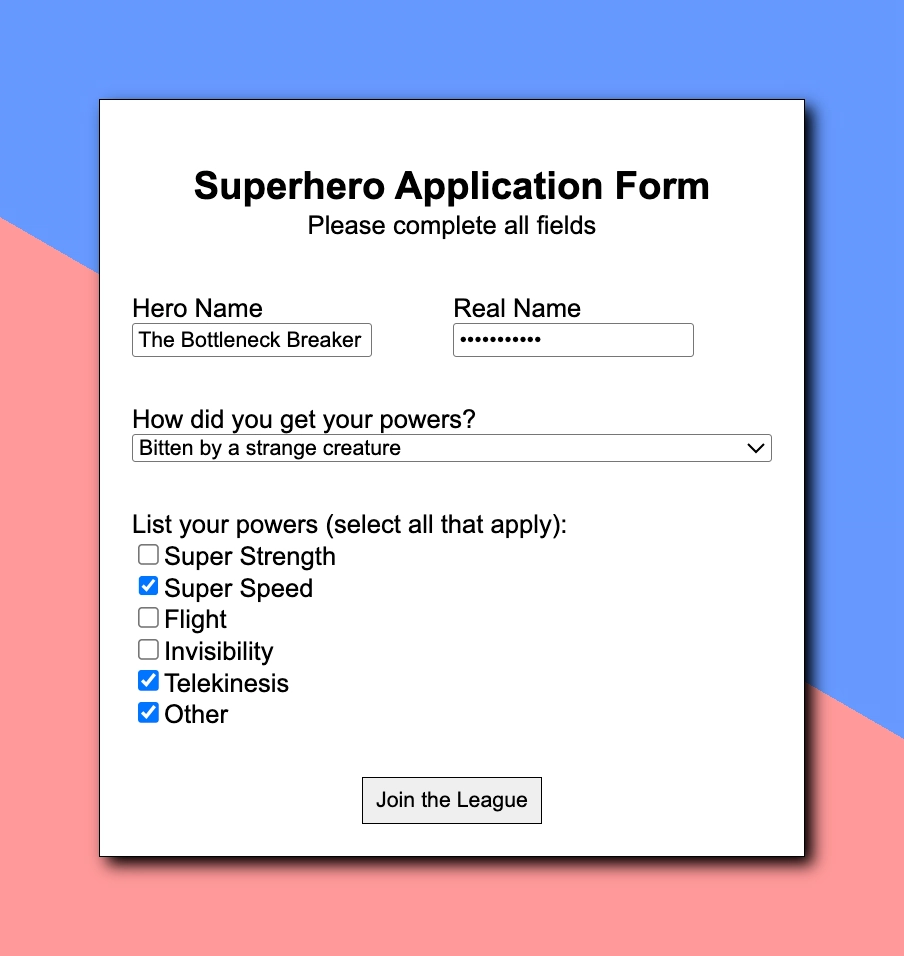
The form collects four pieces of data: Hero Name, Real Name (password field), the power source via a <select>, and a list of powers via checkboxes. freeCodeCamp chose the Controlled Inputs approach: a separate useState for each field, with onChange updating the state on every keystroke.
The most interesting part was handling the checkboxes. With a text input the problem is simple: you save a string. With checkboxes you have to track an array that grows when the user checks one and shrinks when they uncheck it:
const handlePowersChange = e => {
    const { value, checked } = e.target;
    setPowers(checked ? [...powers, value] : powers.filter(p => p !== value));
}
checked is a boolean that React reads directly from the checkbox: true if it was just checked, false if it was just unchecked.
If checked is true, the spread operator ...powers unpacks all the already selected powers into a new array and appends the new value at the end: if powers was ["Flight", "Invisibility"] and the user checks "Super Speed", the result is ["Flight", "Invisibility", "Super Speed"].
If instead the checkbox is unchecked, filter returns a new array without that value. In both cases I never touch the original array: I always create a new one, respecting immutability.
The submit button is disabled until all fields are filled in. Instead of creating a dedicated isFormValid state to keep in sync, I bound disabled directly to a condition built from the already existing states:
disabled={!heroName || !realName || !powerSource || powers.length === 0}
If even just one of the four is empty, the button stays disabled.
What I Learned
Checkbox management with arrays:
With checkboxes it's not enough to save a string: you have to manage an array in state that grows and shrinks. The critical point is immutability: if you modify the array directly with push, React doesn't see the change because the reference to the array stays the same, and the component doesn't re-render.
Button validation without dedicated state:
Binding disabled directly to a boolean condition built from the already existing states avoids creating a redundant isFormValid state. If all the necessary data is already in state, validation is just a matter of logic: !heroName || !realName || !powerSource || powers.length === 0. No extra lines, no useEffect to keep it in sync.
Option lists and memory optimization:
In the exercise, freeCodeCamp has you declare the powerSourceOptions and powersOptions arrays inside the component.
Keeping everything encapsulated seems tidy, but thanks to the Code Tutor I discovered a potential bottleneck tied to how React itself works: objects/arrays defined inside the function get recreated (new references) on every render (so on every keystroke in the input).
Since these lists are static data, the real best practice for a production app is to declare them "physically" outside and before the component.
// Best practice: These are OUTSIDE. They are created only once when the file is loaded.
const powerSourceOptions = ['Bitten...', 'Radioactive...'];
const powersOptions = ['Super Strength...', 'Super Speed...'];

export const SuperheroForm = () => { // <--- Component starts here
  const [heroName, setHeroName] = useState('');
  // ...
};
One useState per field:
In this workshop each form field has its own separate state: heroName, realName, powerSource, powers. It's the most explicit and readable approach, but it scales poorly: with ten fields we'd have ten useState and ten nearly identical onChange handlers.
I discovered that the alternative is to collect everything into a single object in state, typically called formData, and write a single generic handleChange function that knows which field to update by reading e.target.name, the name of the input that triggered the event. This gives you one state with one function that handles everything, no matter how many fields there are.
The controlled <select>:
Connecting a <select> to state works exactly like a text input: value={powerSource} keeps the menu in sync with the state, and onChange updates it when the user picks an option. The only thing to watch out for is initializing the state with an empty string (useState("")) and adding as the first menu item an option with value="", in this case "Select one". Without this, React would visually show the first real option as already selected, but the state would still be empty: the two would be out of sync, and the button validation wouldn't work correctly because powerSource would always appear empty even with an option apparently chosen.
I'll Say It in the Next One
My impression about the added complexity of forms in React remains: it seems excessive compared to plain HTML. But I'll reserve the right to confirm or change my mind in the next exercise, where I'll build a form from scratch without guided instructions.
Next: Build an Event RSVP (Lab)