Cash Register
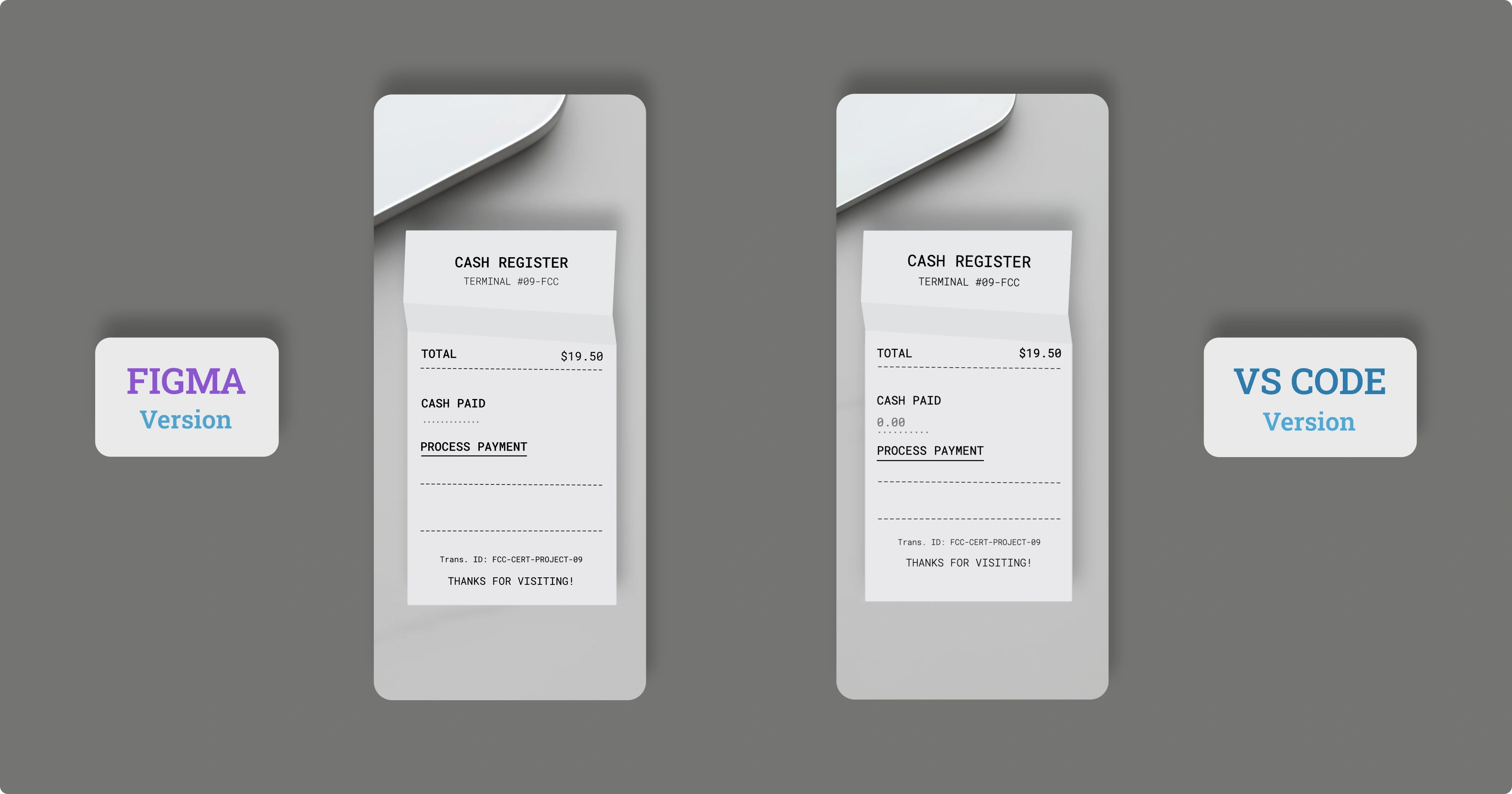
The Project
Cash Register developed with vanilla JavaScript and OOP architecture, implementing greedy algorithms, precise integer calculations, and complete drawer state management. An application that demonstrates validation patterns, optimal change calculation, and skeuomorphic design.
Source Code
- index.html
- styles.css
- script.js
<!-- DESIGN
   ------
   * This file contains the HTML structure of the Cash Register application.
   * The architecture follows this flow:
   * - Head with meta tags and the Google Font 'Roboto Mono', was chosen as the font to realistically simulate the
   *   monospaced, dot-matrix style of a thermal receipt printer
   * - Body containing a <main> element
   * - Inside <main>, a primary <div> ".receipt-container" is used to display the SVG background (the paper receipt)
   * - A child <div> ".receipt-content" is nested inside the container to hold all the actual UI content (text, form, etc.).

   * The UI content itself is semantically structured into three main blocks:
   * - .receipt-header: Contains the main title and terminal ID
   * - .receipt-body: Contains the core interactive elements (form, input, button) and the output area (#change-due)
   * - .receipt-footer: Contains the closing messages and transaction ID.
-->

<!DOCTYPE html>
<html lang="en">
    <head>
        <title>Cash Register</title>
        <meta charset="UTF-8" />
        <meta name="viewport" content="width=device-width, initial-scale=1.0">
        <link rel="stylesheet" href="styles.css">
        <link rel="preconnect" href="https://fonts.googleapis.com">
        <link rel="preconnect" href="https://fonts.gstatic.com" crossorigin>
        <link href="https://fonts.googleapis.com/css2?family=Roboto+Mono:wght@300;400;700&display=swap" rel="stylesheet">
    </head>

    <body>

        <!--
            * freeCodeCamp instructions:
            * - You should have an input element with an id of "cash"
            * - You should have a div, span, or p element with an id of "change-due"
            * - You should have a button element with an id of "purchase-btn"
        -->

        <main>

            <div class="receipt-container">
                <div class="receipt-content">
                    <div class="receipt-header">
                        <h1>CASH REGISTER</h1>
                        <p>TERMINAL #09-FCC</p>
                    </div>
                    <div class="receipt-body">
                        <div class="total">
                            <p>TOTAL</p>
                            <p>$19.50</p>
                        </div>
                        <p>-------------------------------</p>
                        <form id="cash-register-form">
                            <label for="cash">CASH PAID</label>
                            <div class="user-input">
                                <input type="number" id="cash" name="cash" placeholder="0.00" step="0.01" min="0" required>
                            </div>
                            <button type="button" id="purchase-btn" class="cta-button">PROCESS PAYMENT</button>
                        </form>
                        <p>-------------------------------</p>
                        <div id="change-due"></div>
                        <p>-------------------------------</p>
                    </div>
                    <div class="receipt-footer">
                        <p class="tribute"><a href="https://www.freecodecamp.org/" target="_blank" rel="noopener noreferrer" aria-label="Visit freeCodeCamp website (opens in new tab)">Trans. ID: FCC-CERT-PROJECT-09</a></p>
                        <p>THANKS FOR VISITING!</p>
                    </div>
                </div>
            </div>

        </main>

        <script src="script.js"></script>
    </body>

</html>
/* DESIGN
   ------
   * I chose to make the mobile version the default (Mobile-First approach),
   * with the desktop version being an override in a single media query
   * for the same reasons as the other project, namely:
   * - Mobile traffic is dominant, so it should be the primary experience
   * - Mobile devices load only the base CSS and variables, ensuring a
   *   faster load time, which is critical for mobile connections.

   * The architecture is a "Utility-First Variables" system:
   * - All values (fonts, margins, sizes) are centralized in :root variables,
   *   organized by UNIVERSAL and MOBILE (default)
   * - The DESKTOP media query only overrides these variables, which keeps
   *   the CSS ruleset minimal and highly maintainable.

   * The layout is a hybrid:
   * - A single ".receipt-container" is centered using position: absolute
   *   to hold the SVG receipt background
   * - Inside, ".receipt-content" uses display: flex with
   *   flex-direction: column to manage the internal UI flow
   * - Techniques (like radial-gradient for input dots)
   *   are used to achieve the skeuomorphic "receipt" design.
*/


/* UNIVERSAL (common variables to mobile and desktop) */

:root {
    /* Background */
    --background: url("https://github.com/user-attachments/assets/6b1734ff-6f1c-4c9f-8b5d-463daea23f85"); /* incredibly lightweight background, weighs only 70 KB */
    --font-color: #000;

    /* Font */
    --font-family: "Roboto Mono", monospace, sans-serif;
    --font-weight-light: 300;
    --font-weight-normal: 400;
    --font-weight-medium: 500;

    /* Color */
    --input-dots-hover-button-color: #6b6b6a;

    /* Animation */
    --result-animation: slideInFade 0.4s cubic-bezier(0.2, 1, 0.3, 1);
}


/* MOBILE (default version) */

:root {
    /* Receipt frame */
    --receipt-image: url("https://github.com/user-attachments/assets/c16ae536-5d58-41d2-8712-d52244549792"); /* the receipt is also incredibly lightweight, only 2 KB, I created it in Figma */
    --receipt-width: 377.702px;
    --receipt-height: 662.999px;
    --receipt-position-top: 50%;
    --receipt-position-left: 50%;
    --aspect-ratio: 377.702 / 662.999;

    /* Layout & Position */
    --receipt-padding: 0 54px 24px 44px;
    --title-margin-top: 110px;
    --subtitle-margin-top: 5px;
    --total-1-margin-top: 85px;
    --hyphens-1-margin-top: 0px;
    --label-margin-top: 28px;
    --input-margin-top: 4px;
    --button-margin-top: 12px;
    --hyphens-2-margin-top: 24px;
    --result-margin-top: 3px;
    --hyphens-3-margin-top: 5px;
    --footer-block-margin-top: 16px;
    --tribute-margin-top: 2px;
    --footer-margin-top: 12px;

    /* Font Size */
    --font-size-base: 18px;
    --font-size-title: 24px;
    --font-size-small: 16px;
    --font-size-result: 14px;
    --font-size-hyphens: 15px;
    --font-size-x-small: 12px;

    /* Input */
    --input-padding: 5px 0;
    --input-dots-width: 28%;
    --input-dots-height: 2px;
    --input-dots-size: 1.2px;
    --input-dots-spacing: 8px;

    /* Button */
    --button-padding: 2px 0;
    --button-underline-thickness: 1.5px;
    --button-underline-offset: 8px;

    /* Result */
    --result-min-height: 2em;
}


/* Total CSS reset to avoid unexpected behavior across different browsers */
* {
    margin: 0;
    padding: 0;
    box-sizing: border-box;
}

body {
    background-image: var(--background);
    background-size: cover;
    background-repeat: no-repeat;
    min-height: 100vh; /* Fallback per browser che non supportano dvh */
    min-height: 100dvh; /* L'unità del viewport dinamico per iOS */
    background-attachment: fixed;
    background-position: 65% 0%;
    font-family: var(--font-family);
    color: var(--font-color);
    font-weight: var(--font-weight-light);
    font-size: var(--font-size-base);
    overflow: hidden;
}

.receipt-container {
    background-image: var(--receipt-image);
    position: absolute;
    top: var(--receipt-position-top);
    left: var(--receipt-position-left);
    transform: translate(-50%, -50%);
    width: var(--receipt-width);
    background-repeat: no-repeat;
    background-size: 100% 100%;
    max-height: var(--receipt-height);
    aspect-ratio: var(--aspect-ratio);
}

.receipt-content {
    display: flex;
    flex-direction: column;
    text-align: center;
    padding: var(--receipt-padding);
}

.receipt-header {
    margin-top: var(--title-margin-top);
    transform: rotate(0.674deg);
}

.receipt-footer {
    width: 100%;
    margin-top: var(--footer-block-margin-top);
}

h1 {
    font-size: var(--font-size-title);
    font-weight: var(--font-weight-normal);
}

button {
    font-weight: var(--font-weight-medium);
}

.receipt-header > p, .receipt-footer > p:nth-child(2) {
    font-size: var(--font-size-small);
}

.receipt-header > p {
    margin-top: var(--subtitle-margin-top);
}

.total {
  display: flex;
  justify-content: space-between;
  width: 100%;
  margin-top: var(--total-1-margin-top);
}

.total > p {
    margin-top: 0;
    font-weight: var(--font-weight-medium);
}
.total > p:nth-child(2) {
    margin-top: 0;
}

.receipt-body > p {
    font-size: var(--font-size-hyphens);
}

.receipt-body > p:nth-child(2) {
    margin-top: var(--hyphens-1-margin-top);
    transform: rotate(0.561deg);
}
.receipt-body > p:nth-child(4) {
    margin-top: var(--hyphens-2-margin-top);
    transform: rotate(0.371deg);
}
.receipt-body > p:nth-child(6) {
    margin-top: var(--hyphens-3-margin-top);
}


#cash-register-form {
    margin-top: var(--label-margin-top);
    text-align: left;
    font-weight: var(--font-weight-normal);
}

.user-input {
    position: relative;
}

.user-input::before {
    content: "";
    position: absolute;
    bottom: 0;
    left: 0;
    width: var(--input-dots-width);
    height: var(--input-dots-height);
    background-image: radial-gradient(
        circle,
        var(--input-dots-hover-button-color) var(--input-dots-size),
        transparent 1px
    );
    background-size: var(--input-dots-spacing) 100%;
    background-repeat: repeat-x;
    background-position: bottom left;
}

input {
    margin-top: var(--input-margin-top);
    border: none;
    background: transparent;
    width: 100%;
    padding: var(--input-padding);
    font-family: var(--font-family);
    font-size: var(--font-size-base);
    font-weight: var(--font-weight-medium);
}

input:focus {
    outline: none;
}

/* these next two rules hide the typical input field arrows (0.00 ▲ ▼)
 * on all WebKit-based browsers (like Safari, Chrome, Edge) */
input::-webkit-outer-spin-button,
input::-webkit-inner-spin-button {
  -webkit-appearance: none;
  margin: 0;
}

input[type=number] { /* does the same thing as the block above, but for Firefox */
  -moz-appearance: textfield;
}

button {
    margin-top: var(--button-margin-top);
    background: transparent;
    border: none;
    cursor: pointer;
    font-family: var(--font-family);
    font-size: var(--font-size-base);
    text-decoration: underline;
    text-decoration-thickness: var(--button-underline-thickness);
    text-underline-offset: var(--button-underline-offset);
    padding: var(--button-padding);
    color: black;
}

#change-due {
    margin-top: var(--result-margin-top);
    min-height: var(--result-min-height);
    font-size: var(--font-size-result);
    font-weight: var(--font-weight-medium);
}

.tribute {
    margin-top: var(--tribute-margin-top);
    font-size: var(--font-size-x-small);
}
.tribute a {
    color: var(--font-color);
    text-decoration: none;
}

.receipt-footer > p:nth-child(2) {
    margin-top: var(--footer-margin-top);
}


button:hover {
    color: var(--input-dots-hover-button-color);
}


/* DESKTOP (override of mobile variables and addition of receipt-frame) */

@media (min-width: 600px) and (min-height: 850px) {

:root {
    /* Receipt frame */
    --receipt-image: url("https://github.com/user-attachments/assets/272d1484-ae7b-4027-ae06-ce93290a36b5");
    --receipt-width: 447.315px;
    --receipt-height: 785.195px;
    --receipt-position-top: 55%;
    --receipt-position-left: 70%;
    --aspect-ratio: 377.702 / 662.999;

    /* Layout & Position */
    --receipt-padding: 0 64px 24px 54px;
    --title-margin-top: 130px;
    --subtitle-margin-top: 10px;
    --total-1-margin-top: 112px;
    --label-margin-top: 32px;
    --button-margin-top: 20px;
    --hyphens-2-margin-top: 38px;
    --result-margin-top: 12px;
    --hyphens-3-margin-top: 12px;
    --tribute-margin-top: 8px;
    --footer-margin-top: 16px;

    /* Font Size */
    --font-size-hyphens: 17.7px;

    /* Result */
    --result-min-height: 2em;
}
}
/* DESIGN
   ------
  * This file contains the validation logic for Cash Register
  * The main architectural decisions include:
  *
  * - Class-based Architecture (OOP): The choice to use a `class CashRegister`
  *   encapsulates all the operational logic. This approach promotes separation of
  *   responsibilities, so while the `constructor` handles the initial preparation of the
  *   drawer, the subsequent methods (`processPurchase`, `#calculateChange`) manage
  *   the change calculation phases. This promotes a more organized and modular code.
  *   I admit I used them in the first place because I wanted to practice, as it's a concept
  *   that excited me from the first moment I encountered it, much like what happened with variables
  *   in the CSS context. However, I first tried to understand if it was a good approach for this
  *   specific case, and luckily, it turned out to be.
  *
  * - Calculations with integers: JavaScript doesn't count the way we do, for example, 0.1 + 0.2
  *   for it is 0.30000000000000004 instead of 0.3). This is because while we humans count with ten
  *   fingers (base-10), computers count using billions of ON/OFF switches (base-2); it's like trying
  *   to weigh exactly 0.1 grams on a scale having only 1g, 2g, 4g, etc., weights available.
  *   You can't be perfectly precise, and this imprecision accumulates in calculations.
  *   To get around this very problem, all monetary operations were performed using cents (integers).
  *   The conversion from dollars to cents happens at the input, and the final re-conversion for the
  *   output is in dollars. This approach guarantees maximum calculation precision.
  *
  * - Data structure (Map): I'm referring to the management of "cashInDrawer".
  *   I used this approach because Map would give me more consistent code.
  *   I'll add an example below to quickly show what I mean:
  *   If I had used objects:
  *   let pennies = drawer.PENNY;
  *   let hundreds = drawer["ONE HUNDRED"];
  *   Using Map:
  *   let pennies = this.cashInDrawer.get("PENNY");
  *   let hundreds = this.cashInDrawer.get("ONE HUNDRED");
  *
  * - Greedy algorithm for change:
  *   For the change calculation process, I used a greedy algorithm.
  *   This means that, starting from the highest value denomination (thanks to the
  *   pre-sorted "DENOMINATIONS"), the system tries to dispense the largest possible
  *   number of that bill/coin, and then progressively moves to the lower value
  *   ones, until the change due is depleted.
  *   It's a strategy that makes the "best choice at the moment," and for standard monetary
  *   systems, it always guarantees the optimal result. This isn't always true, in fact,
  *   imagining an atypical monetary system with denominations of 1, 7, and 10 cents, to give
  *   15 in change, the greedy approach would end up giving 6 coins (1x10 + 5x1), while the
  *   optimal solution would have been 3 coins (1x7 + 1x7 + 1x1).
  *   I had used the same approach in the Roman Numeral Converter.
*/


/* freeCodeCamp instructions:
 * - You should have a global variable called price.
 * - You should have a global variable called cid.
 * - When #cash < price, alert "Customer does not have enough money to purchase the item".
 * - When #cash == price, #change-due shows "No change due - customer paid with exact cash".
 * - Test (price 19.5, cash 20, standard cid): #change-due shows "Status: OPEN QUARTER: $0.5".
 * - Test (price 3.26, cash 100, standard cid): #change-due shows "Status: OPEN TWENTY: $60 TEN:
 *   $20 FIVE: $15 ONE: $1 QUARTER: $0.5 DIME: $0.2 PENNY: $0.04".
 * - Test (price 19.5, cash 20, cid[PENNY, 0.01]): #change-due shows "Status: INSUFFICIENT_FUNDS".
 * - Test (price 19.5, cash 20, cid[PENNY, 0.01, ONE, 1]): #change-due shows "Status: INSUFFICIENT_FUNDS".
 * - Test (price 19.5, cash 20, cid[PENNY, 0.5]): #change-due shows "Status: CLOSED PENNY: $0.5".
 */


const cashInput = document.getElementById("cash");
const purchaseBtn = document.getElementById("purchase-btn");
const result = document.getElementById("change-due");

let price = 19.5;
let cid = [["PENNY", 1.01], ["NICKEL", 2.05], ["DIME", 3.1], ["QUARTER", 4.25], ["ONE", 90], ["FIVE", 55], ["TEN", 20], ["TWENTY", 60], ["ONE HUNDRED", 100]];
const DENOMINATIONS = [["ONE HUNDRED", 10000], ["TWENTY", 2000], ["TEN", 1000], ["FIVE", 500], ["ONE", 100], ["QUARTER", 25], ["DIME", 10], ["NICKEL", 5], ["PENNY", 1]];

class CashRegister {

    constructor(cid) {
        this.cashInDrawer = new Map();
        this.totalInDrawer = 0; // Total cash in drawer, in cents

        cid.forEach(([currencyName, amountInDollars]) => { // first we destructure
            const amountInCents = Math.round(amountInDollars * 100); // round because it rounds to the nearest integer, e.g., 4.4 -> 4, 4.5 -> 5
            this.cashInDrawer.set(currencyName, amountInCents); // sets the cash in drawer exactly like in cid but this time the values are in cents
            this.totalInDrawer += amountInCents; // since we started from zero (this.totalInDrawer = 0) we now sum and assign with the values
        });

        this.sortedCashInDrawer = new Map(); // we create a new map because we want the values to be sorted like in DENOMINATIONS, so from largest to smallest (greedy algorithm)
        DENOMINATIONS.forEach(([name, value]) => {
          if(this.cashInDrawer.has(name)) { // we check if it actually exists in the this.cashInDrawer map
            this.sortedCashInDrawer.set(name, this.cashInDrawer.get(name)); // we can't use += because it's only used when working with numbers, .set() is its equivalent when working with maps. So with .get() we read the value from the original map (cashInDrawer), while with set we write that value to the new map (sortedCashInDrawer)
          }
        })
    }

    processPurchase(priceInCents, cashGivenInCents) {
      let changeDueInCents = cashGivenInCents - priceInCents;

      const originalChangeDue = changeDueInCents;

      if (this.totalInDrawer < changeDueInCents) {
        return {status: "INSUFFICIENT_FUNDS", change: []};
      }

      else {
        let changeToGive = []; // here we save the change to give
        this.sortedCashInDrawer.forEach((amountInDrawer, name) => { // we iterate over the denominations in the drawer, from largest to smallest (thanks to sortedCashInDrawer)
          let amountToReturn = 0;
          const currencyValue = DENOMINATIONS.find(denom => denom[0] === name) [1]; // finds the value in cents of the current denomination (e.g., 2000 for "TWENTY")
          let availableAmount = amountInDrawer; // copy of the available amount of money in the drawer

          while (changeDueInCents >= currencyValue && availableAmount > 0) { // With this loop, it keeps taking this denomination as long as the change is sufficient and as long as there is some in the drawer
            changeDueInCents -= currencyValue; // subtract from the total change due
            availableAmount -= currencyValue; // subtract from the stock of this denomination
            amountToReturn += currencyValue; // add to the partial total to return
          }

          if (amountToReturn > 0) {
            changeToGive.push([name, amountToReturn / 100]) // we convert cents to dollars for the output
          }
        });

        if (changeDueInCents > 0) { // here we check if (after the loop) there is remaining change, which means we didn't have the right coins/bills
          return {status: "INSUFFICIENT_FUNDS", change: []};
        }

        if (this.totalInDrawer === originalChangeDue) { // finally we check if the change due emptied the drawer, how? by comparing with the original total
          return {status: "CLOSED", change: changeToGive};
        }

        else {
          return {status: "OPEN", change: changeToGive};
        }

      }
    }

}


cashInput.addEventListener("blur", () => { // I noticed that on my iPhone 12 mini, so on iOS, after clicking the input and then exiting, the receipt stays scrolled up, this way we bring it back to the original state
  window.scrollTo(0, 0);
});

cashInput.addEventListener("keydown", (event) => {
  if (event.key === "Enter") {
    event.preventDefault();
    purchaseBtn.click();
  }
});


purchaseBtn.addEventListener("click", () => {
  const register = new CashRegister(cid); // We create a new class instance every time the user clicks the button, this is essential because the freeCodeCamp tests will modify the global "cid" variable to run the test
  const cashGiven = parseFloat(cashInput.value); // we read the value from the input (which is a string, e.g., "20") and convert it to a number (e.g., 20.0) using parseFloat() to be able to do calculations

  // we convert everything to cents for "safe" calculations
  const priceInCents = Math.round(price * 100);
  const cashGivenInCents = Math.round(cashGiven * 100);

  if (isNaN(cashGiven) || cashGiven <= 0 ) {
    alert("Please enter a valid positive number");
    cashInput.value = "";
    return;
  }

  else if (cashGivenInCents < priceInCents) {
    alert("Customer does not have enough money to purchase the item");
    cashInput.value = "";
    return;
  }

  else if (cashGivenInCents === priceInCents) {
    result.textContent = "No change due - customer paid with exact cash";
    cashInput.value = "";
    return;
  }

  else { // this happens when the customer paid more, so we calculate the change
    const transactionResult = register.processPurchase(priceInCents, cashGivenInCents); // This is the line that "activates" the main logic of our cash register. We call the 'processPurchase' method (the "brain" that does all the calculations) passing it the price and the cash received. The method will return a "report" (an object) that contains the 'status' of the transaction and, if necessary, the 'change' (the calculated change)

    if (transactionResult.status === "INSUFFICIENT_FUNDS") { // we format the output based on the status
      result.textContent = "Status: INSUFFICIENT_FUNDS";

    } else if (transactionResult.status === "OPEN" || transactionResult.status === "CLOSED") {
      let changeText = transactionResult.change.map(item => `${item[0]}: $${item[1]}`).join(" ");
      result.textContent = `Status: ${transactionResult.status} ${changeText}`;
    }
    cashInput.value = "";
  }
});
The Achievement: Google UX Certificate
I earned the Google UX Certificate by completing the last 2 courses I was missing and creating the other 2 required projects to obtain it.
These were two very intense weeks and I'm really happy with what I accomplished.
The Cash Register Project
In certification projects like this one, I document most of the technical choices directly in the code, including discoveries made during development. There's not much to add here then.
Nevertheless, I want to highlight some aspects. First of all, I'm thrilled to have created incredibly lightweight images without sacrificing graphics.
The SVG Receipt - 2 KB:
The result was achieved thanks to Figma, where I created the receipt with a rectangle and the pen tool. Being native SVGs, I simply grouped the various elements and exported as SVG. Result: 2 KB!
The Optimized Background - 70 KB:
Initially I had chosen a different image: a table with a slice of bread and lettuce leaf. Unfortunately it didn't offer good contrast and weighed 2 MB. So I conducted a new search in stock photo libraries, taking the opportunity to update my Tools folder on the desktop with the best image tools.
I took inspiration from an illustration and used Imagen (tool in Gemini workspace). Since the initial quality was poor, I applied upscaling with one of the tools in the folder. Then, thanks to ImageOptim, the image further decreased in weight while maintaining intact aesthetics.
Result: highest quality with a weight of only 70 KB!
The Logic with OOP Classes:
I documented everything inside the code. I wanted to use classes to practice and fortunately it proved to be an excellent choice, although it's a more complex solution than necessary compared to what's required to pass the freeCodeCamp tests.
The Other Two Projects for Google UX
Maintenance App Website:
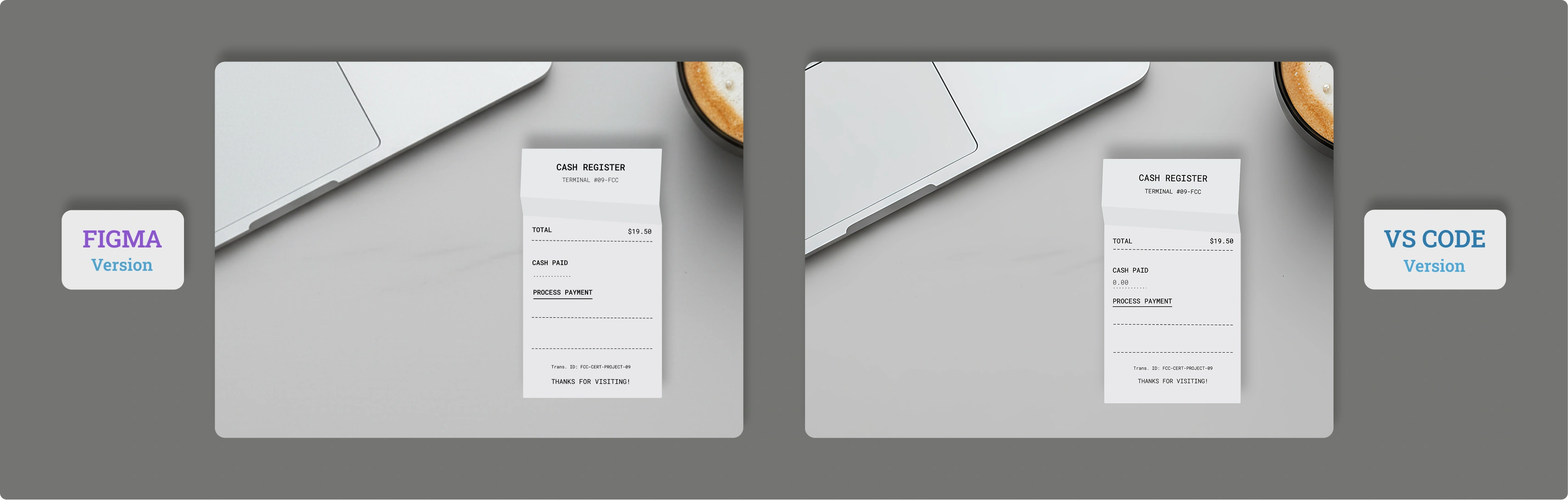
The first was a simple website. I decided not to follow other tracks, but rather to revisit the Maintenance App imagining I was selling that service. Here's the result:
Maintenance App Website, mobile and desktop version
Desktop Version

Mobile Version

Mosaic: The Heart Project
The third project for the certification was the most significant one: Mosaic, an AI tool for therapists. Given the depth of the visual design (Liquid Glass analysis, Accessibility) and the Open Source philosophy, I treated it as a standalone UI Design Concept.
Explore the Mosaic ConceptWhat I Learned
Advanced OOP Architecture:
- ES6 classes to encapsulate complex operational logic
constructor()for initialization and data preparation- Private methods (
#calculateChange) to protect internal logic - Separation of responsibilities between preparation and calculation
Modern Data Structures:
Mapinstead of objects for more consistent key-value management- Uniform data access:
.get()and.set()vs mixed notations - Iteration with
.forEach()on Map for cleaner logic
Greedy Algorithms:
- "Best choice at the moment" strategy for optimal change calculation
- Pre-sorting denominations from largest to smallest
whileloop to dispense maximum number of each denomination- Understanding limitations: works only with standard monetary systems
Precise Calculations with Integers:
- Floating-point problem:
0.1 + 0.2 !== 0.3in JavaScript - Dollars → cents conversion at input for precision
Math.round()for safe rounding- Cents → dollars reconversion only at output
Robust Input Validation:
- Guard clauses for precondition checks
isNaN()to validate numbers- Edge case handling: exact cash, insufficient, greater
- Informative alerts for immediate feedback
Transaction State Management:
INSUFFICIENT_FUNDSstatus when impossible to give changeCLOSEDstatus when change completely empties the drawerOPENstatus for standard transactions with partial change- Return of structured objects:
{status, change}
Image Optimization:
- Native SVGs from Figma: 2 KB for vector graphics
- Imagen (Gemini) for illustration generation
- AI upscaling to improve quality without weight
- ImageOptim for final compression
Skeuomorphic Design:
- Radial gradient to simulate input dots on receipt
background-sizeandbackground-repeatfor patterns- Roboto Mono font to simulate thermal printer
- Transform rotate for realistic imperfections
Mobile-First with CSS Variables:
- All values centralized in
:rootvariables - Media query that overrides only necessary variables
100vh+100dvhfallback to handle iOS dynamic URL bar- Conditional loading: different SVG receipts for mobile/desktop
Advanced Event Handling:
blurevent for iOS scroll fix after input focuskeydownwithEnterfor alternative submitpreventDefault()to control form behavior- Class instance recreated at each click for freeCodeCamp tests
Functional Array Methods:
.find()to search denomination value in DENOMINATIONS.forEach()to iterate on Map cashInDrawer.map()to format change array into string.join()to concatenate output strings
Next Project: Learn Fetch and Promises by Building an fCC Authors Page