Profile Card
The Project
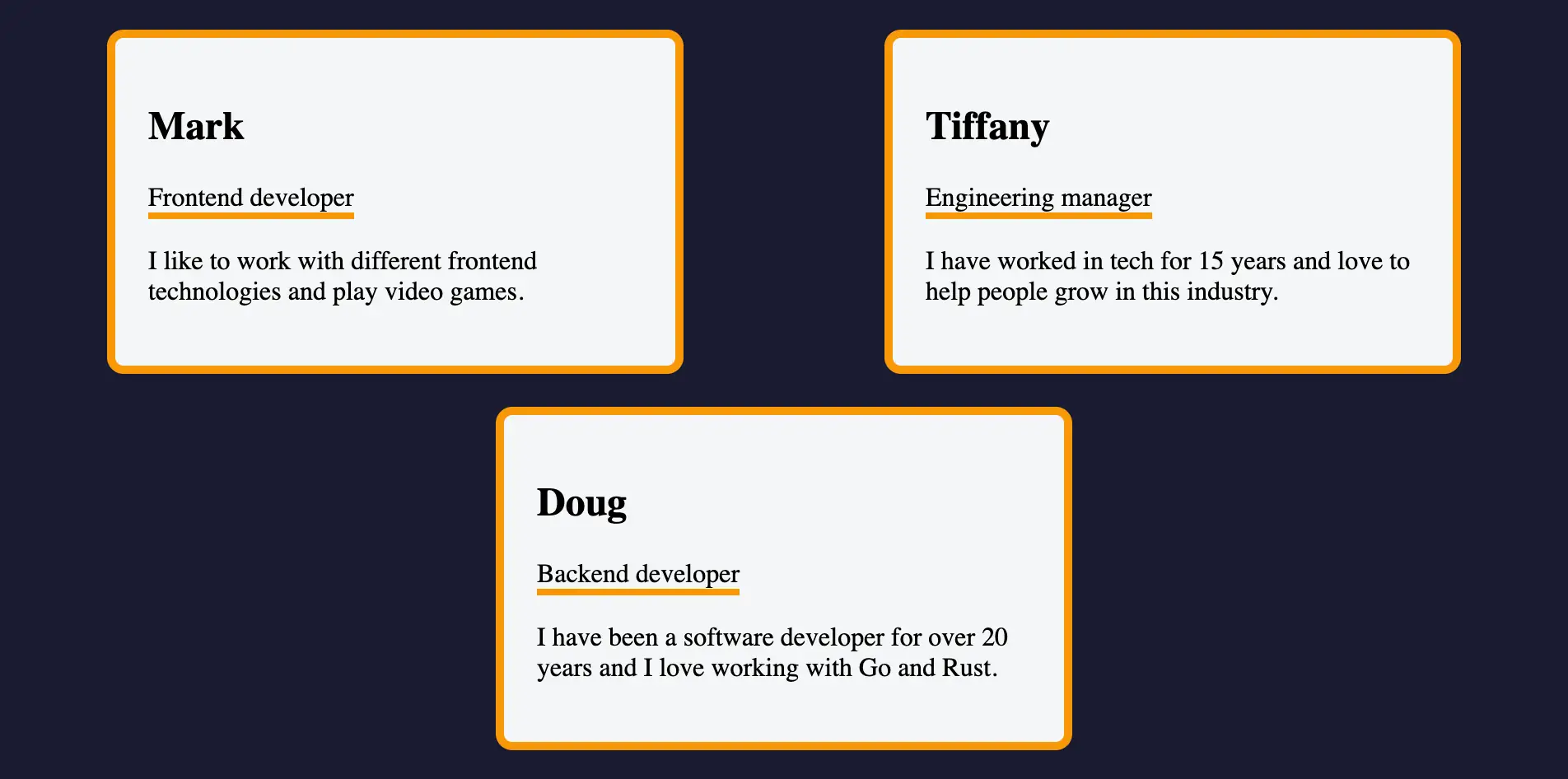
Profile Card is my first data-driven React project, where I applied the concepts of Props, Conditional Rendering and Lists to transform static data into dynamic components.
Source Code
- index.jsx
- styles.css
- index.html
export function Card({ name, title, bio }) {
  return (
    <div className="card">
      <h2>{name}</h2>
      <p className="card-title">{title}</p>
      <p>{bio}</p>
    </div>
  )
}

export function App() {
  const profiles = [
    {
      id: 1,
      name: "Mark",
      title: "Frontend developer",
      bio: "I like to work with different frontend technologies and play video games."
    },
    {
      id: 2,
      name: "Tiffany",
      title: "Engineering manager",
      bio: "I have worked in tech for 15 years and love to help people grow in this industry."
    },
    {
      id: 3,
      name: "Doug",
      title: "Backend developer",
      bio: "I have been a software developer for over 20 years and I love working with Go and Rust."
    }
  ];
  return (
    <div className="flex-container">
      {profiles.map((profile) => (
        <Card
          key={profile.id}
          name={profile.name}
          title={profile.title}
          bio={profile.bio}
        />
      ))}
    </div>
  );
}
:root {
  --dark-grey: #1b1b32;
  --light-grey: #f5f6f7;
  --dark-orange: #f89808;
}

body {
  background-color: var(--dark-grey);
}

.flex-container {
  display: flex;
  flex-wrap: wrap;
  justify-content: space-around;
  align-items: center;
}

.card {
  border: 5px solid var(--dark-orange);
  border-radius: 10px;
  width: 100%;
  padding: 20px;
  margin: 10px 0;
  background-color: var(--light-grey);
}

.card-title {
  border-bottom: 4px solid var(--dark-orange);
  width: fit-content;
}

@media (min-width: 768px) {
  .card {
    width: 300px;
  }
}
<!doctype html>
<html>
  <head>
    <meta charset="UTF-8" />
    <title>Reusable Card component</title>
    <script src="https://cdnjs.cloudflare.com/ajax/libs/react/18.3.1/umd/react.development.js"></script>
    <script src="https://cdnjs.cloudflare.com/ajax/libs/react-dom/18.3.1/umd/react-dom.development.js"></script>

    <script src="https://cdnjs.cloudflare.com/ajax/libs/babel-standalone/7.26.3/babel.min.js"></script>
    <script
      data-plugins="transform-modules-umd"
      type="text/babel"
      src="index.jsx"
    ></script>
     <link rel="stylesheet" href="./styles.css" />
  </head>
  <body>
    <div id="root"></div>
    <script
      data-plugins="transform-modules-umd"
      type="text/babel"
      data-presets="react"
      data-type="module"
    >
      import { App } from './index.jsx';
      ReactDOM.createRoot(document.getElementById('root')).render(
        <App />
      );
    </script>
  </body>
</html>
What I Learned in Theory
Before getting to this project there was theory on Data, extremely interesting. Here are the concepts I want to hold onto.
The Mask of JSX
In previous projects I had understood that React was syntactic sugar, but I hadn't understood how much.
Essentially, under the hood it's all React.createElement, therefore pure JavaScript objects. The curly braces { } aren't "special React syntax", they're a sort of "portal" that brings you back into the JavaScript world. Outside the braces you're in "static text" mode, inside the braces you're in "executable logic" mode.
For example, when I write <h2>{name}</h2>, the braces say "take the name variable and execute it as JavaScript". If I write <h2>name</h2> without braces, React literally prints the word "name" on screen. This explains why style={{ color: 'red' }} has double braces: the first pair is the JavaScript portal, the second is the actual CSS object.
I'm extremely happy that the template literal with ternary is a best practice in React because I already loved it in vanilla JavaScript. Its conciseness but absolute simplicity when reading makes it perfect: {condition ? 'yes' : 'no'} reads as if it were a natural question.
I was used to seeing && as a condition for boolean logic (true or false), it actually also works as an operator that returns values. When I write const result = true && "Hello", the operator sees true, continues and returns "Hello". If I write const result = false && "Hello", the operator sees false, stops and returns false. In React this becomes {message && <p>{message}</p>}: if message is a string (truthy), React proceeds to the second piece and renders the paragraph. If message is an empty string (falsy), React stops and returns "", which React completely ignores (doesn't draw anything). React is programmed to ignore false, null, undefined and true, so conditional rendering with && works perfectly. Ironically, I understood this JavaScript mechanism not by studying JavaScript itself, but React.
Components as Pure Functions
I understood that a component is literally a function that produces only UI: Props input → UI output. Props are immutable by contract, the child can't modify them. Data flows only downward (One-Way Data Flow), so if I want to change something I need to change the input at the source in the parent component, and React will re-execute the child's function with the new data.
In my practical case: <Card name="Mark" /> passes the string "Mark" as input to the Card function. Inside Card, if I try to do name = "Doug", I'm only reassigning a local variable that gets thrown away at the next render. To really change what the user sees, I need to modify the profiles array inside App (which is the parent), and React will automatically re-execute Card with the new value. It's like the assembly lines in the factory where I work: the conveyor belt (Props) brings the pieces with the label already written. I, the worker (child component), can read the label and assemble the piece accordingly, but I can't change what's written. If the label is wrong, I need to stop the line and have it corrected upstream (in the parent component).
The Theory of Identity (Keys)
When a list changes, React must decide whether to destroy everything and redo it or move only certain elements. The key comes to our rescue, which doesn't serve to order, but to identify.
For example, if I have a list of three users and use key={index}, the keys will be 0, 1, 2. If I remove the first user, React still sees key 0, 1 and thinks "perfect, users 0 and 1 are still here, I only need to remove number 2". But actually user 0 was deleted, and those I see now were 1 and 2. React would therefore reuse the wrong DOM node. If instead I use key={profile.id} with unique IDs like 101, 202, 303, when I remove user 101, React knows exactly "the user with ID 101 is gone, but 202 and 303 are still here". So it would correctly reuse their DOM nodes. I discovered that this will become extremely important when I have input boxes or animations, because, without stable keys, the text the user writes can "jump" into another box or disappear completely because React reused the wrong DOM node.
crypto.randomUUID() - The Ideal Weapon for IDs
A point I dwelled on with great pleasure is crypto.randomUUID() because I find it extremely fascinating in its operation.
It's a browser's native Web API that generates a version 4 UUID (Universally Unique Identifier). When you invoke it you get a 36-character string like "c90d075d-53a1-4226-a634-118e69213159".
It's different from Math.random(), this is because the latter is a pseudo-random generator that uses a mathematical formula, meaning that if you know the starting point (seed), you can predict the next numbers and there's a non-negligible probability of getting the same number twice. crypto.randomUUID() instead uses the CSPRNG (Cryptographically Strong Pseudo-Random Number Generator) which draws from the operating system's entropy: imperceptible mouse movements, CPU thermal noise, timing of pressed keys. It's "true" randomness based on the physical chaos of the real world, not just mathematics.
The probability of collision (generating two equal IDs) is practically impossible. A UUID has (2^122) possible combinations. If I generated 1 billion UUIDs per second for the next 85 years, the probability of finding two equal ones would still be lower than winning the SuperEnalotto jackpot 5 consecutive times.
The mistake to avoid is generating the key during render. If I write {todos.map(todo => <li key={crypto.randomUUID()}>{todo.text}</li>)}, every time React redraws the list it generates new keys, thinks they're all new elements, destroys the DOM and recreates it from scratch. I lose focus on inputs and devastate performance. The rule is: I generate the ID only once at data creation, when the user presses "Enter", and stick it to the object forever. Then in JSX I use that stable ID as key.
I then wondered about computational cost and following some research it emerged that crypto.randomUUID() is about 20-30 times slower than Math.random() (400ms vs 15ms to generate 1 million IDs). But to generate ONE single ID when the user clicks "Add Task", the computer takes 0.0004 milliseconds. To give a comparison the human eye takes 16 milliseconds to perceive a frame at 60Hz. Generating a UUID is therefore 40,000 times faster than what the eye can see. The real bottleneck in React apps is DOM rendering (10-50ms), not ID generation. Worrying about the cost of crypto.randomUUID() to make an analogy, would be like worrying about the weight of a hair while doing deadlifts with a 200kg barbell.
Another doubt I had is whether it could be integrated into an offline first application and the answer was yes, and it's also very simple to understand why, entropy comes from the local device (hardware noise, timing), not from the cloud. It was a great discovery because it also guarantees that if one day the user syncs data with the cloud, those IDs will never conflict with those of any other user in the world.
Profile Card
The project was extremely simple in terms of implementation: an array of objects (profiles) mapped into <Card /> components with Props destructuring.
The interesting part wasn't the "what" (three cards in a row), but the "how". I completely separated the data array from the rendering logic: the <Card /> component is totally reusable because it knows nothing about the specific data it receives, it only works with the Props that arrive to it. I used .map() to iterate over the array and generate JSX dynamically, and each card received key={profile.id} to give React a stable identity with which to track each element.
It's the first time I see a true separation between Data and View. In Calcola Turno I had HTML separated from JavaScript, but the JS had to "know" the DOM structure to manipulate it (document.getElementById, appendChild). If I changed the HTML, the JS would break. Here instead <Card /> is totally blind: it doesn't know if the data comes from a local array, from a server, or from a database. It receives Props and renders, period. If tomorrow I change the data source, the component doesn't even know.
What I Learned
Destructuring Props directly in parameters:
function Card({ name, title, bio })instead offunction Card(props)+props.name. Cleaner, IDE autocomplete works better, and you immediately see what the component expects.
.map() as React's Core Pattern:
- Transforming data arrays into JSX arrays is the most used pattern in React. It's not "React magic", it's standard JavaScript
.map()that returns renderable values. - Pattern:
{array.map(item => <Component key={item.id} {...item} />)}. Essential to understand that each iteration must return a valid React element.
One-Way Data Flow (Unidirectionality):
- Data lives in the parent component (
App), flows to children (Card) via Props, but children can't modify it. If the child needs to communicate upward, it will do so via callback (concept I'll see soon with Event Handlers).
Separation between Container and Presentational Components:
Appis the Container: manages data, orchestrates children.Cardis Presentational: receives Props, renders UI, knows nothing about the broader context.- This pattern makes
<Card />reusable: I can use it in 10 different places with different data.
JSX as JavaScript Expression:
- The
returnof.map()returns JSX, which under the hood is a JavaScript object. React collects all these objects in an array and renders them. - This explains why I can do
const cards = profiles.map(...)and thenreturn <div>{cards}</div>. JSX is just syntax, it doesn't change JavaScript's nature.
Props Immutability (Read-Only Contract):
- If I try to do
name = "other"inside<Card />, React doesn't explode, but I'm violating the contract. Props are designed as immutable input. If mutable data is needed, I'll use State (next step).
Flex Container for Responsive Layout:
className="flex-container"in CSS probably uses Flexbox to arrange cards in a row with automatic wrap. This mentally prepares for the fact that React handles logic, CSS handles layout.
Next:
Build a Mood Board (Labs)