Navbar
The Project
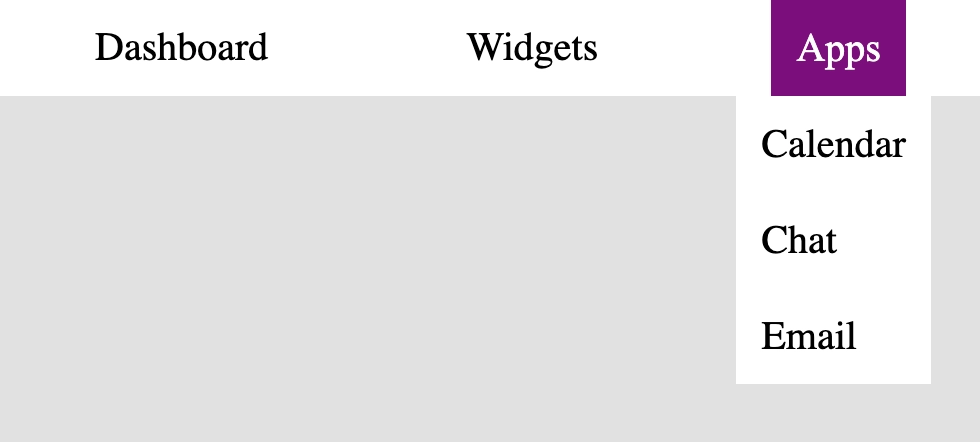
Navbar is my first React project, a reusable navigation component that marks the transition from vanilla JavaScript to a component-oriented library.
Source Code
- index.jsx
- styles.css
- index.html
export const Navbar = () => {
  return (
    <nav className="navbar">
      <ul>
        <li className="nav-item">
          <a href='#'>Dashboard</a>
        </li>
        <li className="nav-item">
          <a href="#">Widgets</a>
        </li>
        <li className="nav-item">
          <button aria-expanded="false">Apps</button>
          <ul className="sub-menu" aria-label="Apps">
            <li>
              <a href="#">Calendar</a>
            </li>
            <li>
              <a href="#">Chat</a>
            </li>
            <li>
              <a href="#">Email</a>
            </li>
          </ul>
        </li>
      </ul>
    </nav>
  )
}
*,
*::before,
*::after {
  box-sizing: border-box;
  margin: 0;
  padding: 0;
}

:root {
  --white: #fff;
  --light-grey: #e1e0e0;
  --dark-purple: #7c0e7c;
  --black: #000;
}

body {
  background-color: var(--light-grey);
}

.navbar {
  background-color: var(--white);
}

.navbar ul {
  display: flex;
  justify-content: space-around;
}

.navbar ul li {
  list-style: none;
  border-radius: 4px;
}

.navbar ul li a {
  text-decoration: none;
  color: var(--black);
  padding: 10px;
  display: inline-block;
  width: 100%;
}

button {
  background: transparent;
  border: none;
  font-family: 'Times New Roman', Times, serif;
  padding: 10px;
  font-size: 1rem;
}

.navbar ul .nav-item a:hover {
  background-color: var(--dark-purple);
  color: var(--white);
}

button:hover {
  background-color: var(--dark-purple);
  color: var(--white);
}

.navbar ul .nav-item .sub-menu {
  visibility: hidden;
  opacity: 0;
  position: absolute;
  right: 5%;
  transition: opacity 0.5s ease;
  display: block;
  background-color: var(--white);
}

@media (min-width: 768px) {
  .navbar ul .nav-item .sub-menu {
    right: 15%;
  }
}

@media (min-width: 1024px) {
  .navbar ul .nav-item .sub-menu {
    right: 13%;
  }
}

.navbar ul .nav-item:hover .sub-menu,
.navbar ul .nav-item:focus-within .sub-menu {
  visibility: visible;
  opacity: 1;
}
<!doctype html>
<html>
  <head>
    <meta charset="UTF-8" />
    <title>Reusable Navbar</title>
    <script src="https://cdnjs.cloudflare.com/ajax/libs/react/18.3.1/umd/react.development.js"></script>
    <script src="https://cdnjs.cloudflare.com/ajax/libs/react-dom/18.3.1/umd/react-dom.development.js"></script>

    <script src="https://cdnjs.cloudflare.com/ajax/libs/babel-standalone/7.26.3/babel.min.js"></script>
    <script
      data-plugins="transform-modules-umd"
      type="text/babel"
      src="index.jsx"
    ></script>
     <link rel="stylesheet" href="./styles.css" />
  </head>
  <body>
    <div id="root"></div>
    <script
      data-plugins="transform-modules-umd"
      type="text/babel"
      data-presets="react"
      data-type="module"
    >
      import { Navbar } from './index.jsx';
      ReactDOM.createRoot(document.getElementById('root')).render(
        <Navbar />
      );
    </script>
  </body>
</html>
A New Approach: freeCodeCamp Changes Method
In the new freeCodeCamp course series (including this one), the "exercise-only" mentality has been abandoned in favor of quizzes, theoretical parts with multiple-choice questions, and a greater emphasis on theory. Guided exercises are now called Workshops, certification projects have become Labs, and some remain defined as "Certification Projects".
I'm not convinced by this method. I find it too academic.
I had to get practical exercises from AI throughout the theory, because it was necessary to fully understand the various concepts. I maintain that practice remains primary in a field like this, especially when it comes to understanding abstract concepts like the Virtual DOM or reconciliation.
Nevertheless, it was really useful, I actually extracted quite a few notions, and one was incredible: the concept of SPA (Single Page Application) that I saw in the first theoretical lessons was exactly what I had built in Calcola Turno a few days ago in Vanilla JS, without formally knowing the pattern!
Calcola Turno was a "handmade" Vanilla SPA, it indeed had:
- A single
index.html, simulated routing with.hiddenclasses to show/hide views - Rudimentary state management with global variables (
selectedGroup,selectedDate,currentMonth) saved inlocalStorage - Pure functions like
calculateShift(group, date)that accept data and return results without touching the DOM - A
renderCalendar()function that reads the state and generates HTML dynamically
I had applied React principles without knowing it:
Logic separated from UI, render function that reacts to state changes, event listeners that update state and retrigger render. The only difference is that I had to do everything manually: document.createElement, for loops, appendChild, and remember to call renderCalendar() every time the state changed.
If I understood React concepts so effectively, it was precisely thanks to that previous practice. I therefore realize that React automates exactly what with Vanilla JavaScript you are forced to do by hand.
I got a lot of help from analyzing "live" files and concepts like package.json and node_modules directly from this site itself, which has Docusaurus as its architecture (therefore React-based). It helped me give substance to the few sentences in the course that explained everything.
The Project: Three Macro-Times
I stopped at three macro-times, analyzing what I had learned up to that point. Here's what I learned in each phase.
First Time: Components and Naming Convention
I understood why React requires capitalization in component names (<Navbar /> and not <navbar />).
It's mandatory syntax, not a particular style. When the transpiler (Babel/Vite), that is the translator that converts JSX into vanilla JavaScript, reads JSX, it must decide what to do with it:
<div>(lowercase) → React thinks "standard HTML tag" and generatesReact.createElement('div')<Navbar>(uppercase) → React thinks "custom function" and generatesReact.createElement(Navbar)passing the function reference, not a string
The Code Tutor explained it using this analogy: it's like a guest list at a nightclub. Lowercase names (div, span, p) are the "commoners" entering through the standard HTML entrance. Uppercase names (Navbar, Header) are the VIPs: React understands they are components and treats them with a different process, executing the function.
I also understood the difference between Named Export (export function Navbar) and Default Export (export default Navbar):
- Default Export: it's like asking "who lives in this house?". There's only one answer. When you import you can call it whatever you want (
import X from './Navbar'), flexible but risky… - Named Export: it's instead the intercom of an apartment building. You have to specifically look for the right surname with curly braces:
import { Navbar } from './Navbar'. Definitely more precise.
I discovered that Named Exports are preferred in the professional world for reusable components because the IDE (like VS Code) suggests the exact name (autocomplete), if you make a mistake writing, maybe writing { Navbr } the app will stop working immediately with a clear error, instead of importing undefined and making you discover the bug only when you actually try to use the component. Additionally, Named Exports help tree shaking, that is, build tools eliminate unused code, precisely because these explicit exports allow bundlers to see exactly what is imported and what isn't. If I export 10 components but import only 2, the bundler eliminates the other 8 from the final bundle. If instead I group them in an object (export default { Navbar, Footer, Card }), the bundler includes them all, because it sees a single boxed block and can't figure out which pieces I actually use.
Second Time: JSX and Its Quirks
I understood why we use className instead of class.
The official reason is "because class is a reserved word in JavaScript" (it's used to define Classes in object-oriented programming). But there's a deeper and more interesting reason.
When JavaScript manipulates the DOM, the browser doesn't use the word class. If you open the console and write document.getElementById('mioDiv').class, you get undefined. This is because the browser's native API calls that property className, not class.
React therefore chose to follow the DOM's JavaScript API instead of imitating HTML syntax. So when you write <div className="card">, React is translating directly into element.className = "card", which is exactly what you would do in vanilla JavaScript.
In essence: JSX imitates HTML in appearance, but follows JavaScript rules. It prefers to be faithful to the language that executes the code rather than the markup it imitates.
I also discovered why round parentheses after return are essential when JSX breaks to a new line.
JavaScript has Automatic Semicolon Insertion (ASI): meaning that if it sees a return and then a line break, it thinks "The user forgot the semicolon. I'll put it in!".
return
  <nav>...</nav>
Becomes:
return;
  <nav>...</nav>  // unreachable code
Round parentheses are as if they tell JavaScript: "Stop! I'm not done. The return value starts here ( and ends there ). Treat everything as a single package".
An analogy I'll insert in the Real World Vademecum React to make the concept immediately clear is that it's like holding together a stack of papers with a staple: without the staple, the papers scatter. Parentheses are the staple that holds the JSX block together.
Third Time: WET Code and Promises of Dynamism
Looking at the final code, I smelled the "stench" of repetition (WET vs DRY):
<li><a href="#">Calendar</a></li>
<li><a href="#">Chat</a></li>
<li><a href="#">Email</a></li>
In HTML I was forced to do it. If I had 100 items, I had to copy-paste 100 times.
The Code Tutor reassured me that soon I'll never write lists by hand again thanks to .map(), as in Vanilla JavaScript,
I also noticed that aria-expanded="false" is, at this moment, a lie. It's static. Even if the menu opened (via CSS hover), that value would remain false, confusing a screen reader.
In real React I'll never write "false" by hand. I'll write a state variable like aria-expanded={isOpen}. If isOpen is true, React will change the HTML attribute automatically.
What I Learned
Library vs Framework (Inversion of Control):
- Understood that React is a library, not a framework: you call React when needed (to draw the UI), not vice versa. It's like going to IKEA and deciding everything yourself, instead of buying a model home with predefined layout.
- React only deals with the View, not routing, data management, or authentication. This freedom is powerful but loads you with the responsibility of architecting the project.
Single Page Application (SPA):
- Recognized that Calcola Turno (Vanilla JS) applied exactly this pattern: an SPA that intercepts clicks, prevents browser reload, and surgically replaces only the pieces of content that change.
- The illusion of the "theater that never collapses": a single real
index.html, the rest is visibility switching managed by JavaScript.
Virtual DOM and Reconciliation:
- Understood why React uses a Virtual DOM: the browser's real DOM is heavy, every modification costs Reflow and Repaint. The Virtual DOM is like a CAD project: you modify the paper (instant), then React does Diffing (comparison) and updates only the changed pixels in the real DOM.
- Instead of destroying the house and rebuilding it (
innerHTML), React only changes the door handle.
Declarative vs Imperative Paradigm:
- Mental shift from "telling the browser how to do everything" (imperative, Vanilla JS) to "declaring the desired final state" (declarative, React). You say "I want the navbar to be open", React takes care of the How.
- It's like going from driving a manual car (explicit shifting of every gear) to taking a taxi (you only say the destination).
JSX as syntactic sugar:
- Every JSX tag (
<div className="ciao">) is transformed by the compiler intoReact.createElement('div', {className: 'ciao'}). You're writing pure JavaScript disguised as HTML. - Fragments (
<>...</>) are transparent envelopes: they group elements for thereturn, but dissolve in the DOM without leaving useless wrappers that would break Flexbox/Grid layouts.
Security (XSS Protection):
- React automatically sanitizes everything you print between curly braces
{variabile}, converting it to pure text string. If a hacker inserts<script>alert('boom')</script>, React renders it as harmless text. - The only way to disable this protection is
dangerouslySetInnerHTML, whose terrifying name is intentional.
Naming Convention and Export:
- Components with mandatory capitalization to distinguish them from native HTML tags at compiler level.
- Named Export preferred for reusable components: IDE autocomplete, immediate errors on typo, more effective tree shaking.
Vite Ecosystem (Restaurant Architecture):
src(kitchen): raw code (JSX), the browser can't read it directly.- Vite (chef): transpiles, compiles, assembles the finished dish.
public(buffet): static assets served as they are (images, icons).node_modules(warehouse): third-party libraries, managed by npm, never touched by hand.
Componentization and DRY:
- Manually generated lists are WET code (repetition). React pushes toward
.map()to transform data arrays into component lists with one line. - Deep nesting (Matryoshka) signals need to break into sub-components (
<DropdownMenu />). React "hates" overly deep code pyramids.
Accessibility and State (Anticipation):
- Hardcoded attributes like
aria-expanded="false"are "promises of dynamism": they signal where State will be needed to make the UI truly interactive and accessible. <a>tags in SPA: used only for external links. For internal navigation, components like<Link />(React Router) are used that change URL without reloading the page.
Reflections
Calcola Turno taught me the why of React:
After many lines of document.createElement, day.className = ..., daysContainer.appendChild(day), I perfectly understand why React exists. All that imperative code block becomes declarative JSX:
// Instead of for loop + createElement + appendChild...
{daysArray.map(day => (
  <div
    key={day.date}
    className={`day ${day.isToday ? 'today' : ''} ${day.shiftType}`}
    onClick={() => handleDayClick(day)}
  >
    {day.number}
  </div>
))}
React therefore introduces a higher level of abstraction: you free yourself from the mental load of managing the DOM manually and focus only on data logic.
I wonder how much all this syntactic sugar will make sense in an era where AI will write the vast majority of code. Will there still be a need for these "shortcuts"?
The only thing I'm certain of is that as long as we humans are Reviewers, yes, it will still be necessary. We'll have to understand what the generated code does, verify its correctness, and make architectural decisions. I fear that syntactic sugar will only serve to make code readable to humans, not machines.
I'll report everything in the new Real World Vademecum React, where I'll organize these concepts in a more structured and consultable way.
Next:
Build a Reusable Footer