Todo App
The Project
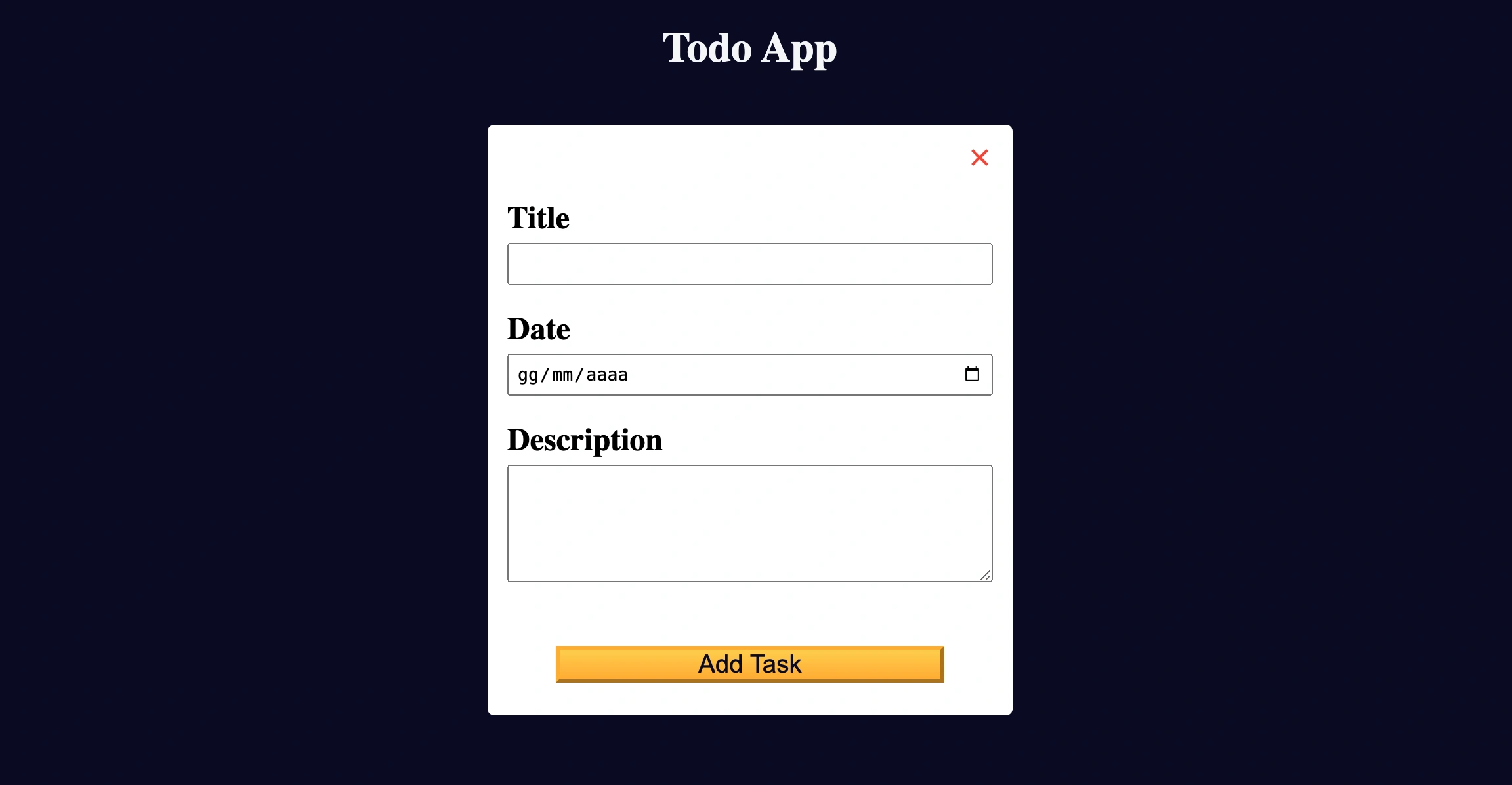
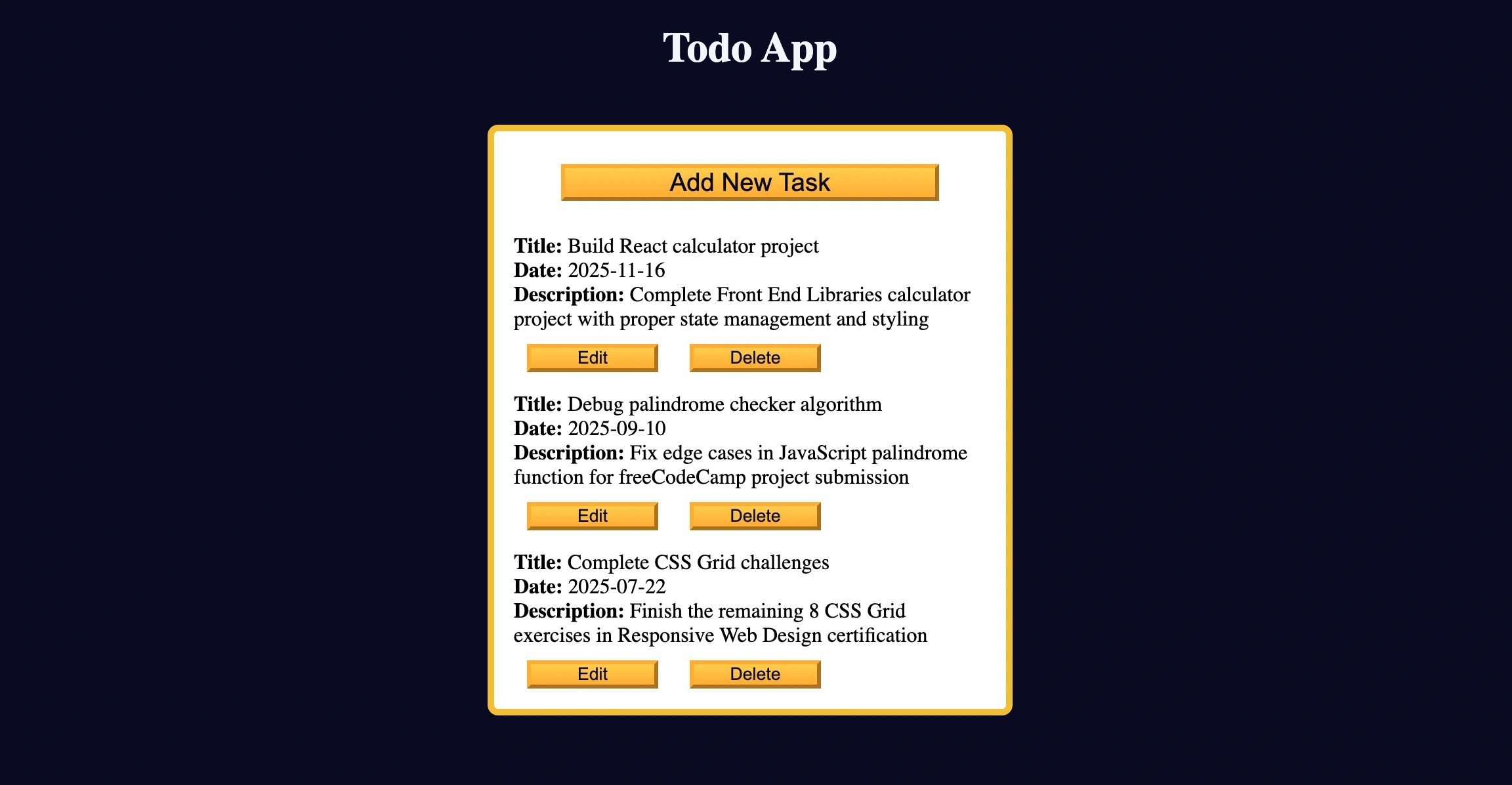
A complete Todo App with localStorage for data persistence, developed with vanilla JavaScript, advanced form handling and dynamic user interface. A task management application with complete CRUD functionality.
Source Code
- index.html
- styles.css
- script.js
<!DOCTYPE html>
<html lang="en">

<head>
  <meta charset="UTF-8" />
  <meta http-equiv="X-UA-Compatible" content="IE=edge" />
  <meta name="viewport" content="width=device-width, initial-scale=1.0" />
  <title>Learn localStorage by Building a Todo App</title>
  <link rel="stylesheet" href="styles.css" />
</head>

<body>
  <main>
    <h1>Todo App</h1>
    <div class="todo-app">
      <button id="open-task-form-btn" class="btn large-btn">
        Add New Task
      </button>
      <form class="task-form hidden" id="task-form">
        <div class="task-form-header">
          <button id="close-task-form-btn" class="close-task-form-btn" type="button" aria-label="close">
            <svg class="close-icon" xmlns="http://www.w3.org/2000/svg" viewBox="0 0 48 48" width="48px" height="48px"><path fill="#F44336" d="M21.5 4.5H26.501V43.5H21.5z" transform="rotate(45.001 24 24)" /><path fill="#F44336" d="M21.5 4.5H26.5V43.501H21.5z" transform="rotate(135.008 24 24)" /></svg>
          </button>
        </div>
        <div class="task-form-body">
          <label class="task-form-label" for="title-input">Title</label>
          <input required type="text" class="form-control" id="title-input" value="" />
          <label class="task-form-label" for="date-input">Date</label>
          <input type="date" class="form-control" id="date-input" value="" />
          <label class="task-form-label" for="description-input">Description</label>
          <textarea class="form-control" id="description-input" cols="30" rows="5"></textarea>
        </div>
        <div class="task-form-footer">
          <button id="add-or-update-task-btn" class="btn large-btn" type="submit">
            Add Task
          </button>
        </div>
      </form>
      <dialog id="confirm-close-dialog">
        <form method="dialog">
          <p class="discard-message-text">Discard unsaved changes?</p>
          <div class="confirm-close-dialog-btn-container">
            <button id="cancel-btn" class="btn">
              Cancel
            </button>
            <button id="discard-btn" class="btn">
              Discard
            </button>
          </div>
        </form>
      </dialog>
      <div id="tasks-container"></div>
    </div>
  </main>
  <script src="script.js"></script>
</body>

</html>
:root {
  --white: #fff;
  --light-grey: #f5f6f7;
  --dark-grey: #0a0a23;
  --yellow: #f1be32;
  --golden-yellow: #feac32;
}

*,
*::before,
*::after {
  margin: 0;
  padding: 0;
  box-sizing: border-box;
}

body {
  background-color: var(--dark-grey);
}

main {
  display: flex;
  flex-direction: column;
  justify-content: center;
  align-items: center;
}

h1 {
  color: var(--light-grey);
  margin: 20px 0 40px 0;
}

.todo-app {
  background-color: var(--white);
  width: 300px;
  height: 350px;
  border: 5px solid var(--yellow);
  border-radius: 8px;
  padding: 15px;
  position: relative;
  display: flex;
  flex-direction: column;
  gap: 10px;
}

.btn {
  cursor: pointer;
  width: 100px;
  margin: 10px;
  color: var(--dark-grey);
  background-color: var(--golden-yellow);
  background-image: linear-gradient(#fecc4c, #ffac33);
  border-color: var(--golden-yellow);
  border-width: 3px;
}

.btn:hover {
  background-image: linear-gradient(#ffcc4c, #f89808);
}

.large-btn {
  width: 80%;
  font-size: 1.2rem;
  align-self: center;
  justify-self: center;
}

.close-task-form-btn {
  background: none;
  border: none;
  cursor: pointer;
}

.close-icon {
  width: 20px;
  height: 20px;
}

.task-form {
  display: flex;
  position: absolute;
  top: 50%;
  left: 50%;
  transform: translate(-50%, -50%);
  background-color: var(--white);
  border-radius: 5px;
  padding: 15px;
  width: 300px;
  height: 350px;
  flex-direction: column;
  justify-content: space-between;
  overflow: auto;
}

.task-form-header {
  display: flex;
  justify-content: flex-end;
}

.task-form-body {
  display: flex;
  flex-direction: column;
  justify-content: space-around;
}

.task-form-footer {
  display: flex;
  justify-content: center;
}

.task-form-label,
#title-input,
#date-input,
#description-input {
  display: block;
}

.task-form-label {
  margin-bottom: 5px;
  font-size: 1.3rem;
  font-weight: bold;
}

#title-input,
#date-input,
#description-input {
  width: 100%;
  margin-bottom: 10px;
  padding: 2px;
}

#confirm-close-dialog {
  padding: 10px;
  margin: 10px auto;
  border-radius: 15px;
}

.confirm-close-dialog-btn-container {
  display: flex;
  justify-content: center;
  margin-top: 10px;
}

.discard-message-text {
  font-weight: bold;
  font-size: 1.5rem;
}

#tasks-container {
  height: 100%;
  overflow-y: auto;
}

.task {
  margin: 5px 0;
}

.hidden {
  display: none;
}

@media (min-width: 576px) {
  .todo-app,
  .task-form {
    width: 400px;
    height: 450px;
  }

  .task-form-label {
    font-size: 1.5rem;
  }

  #title-input,
  #date-input {
    height: 2rem;
  }

  #title-input,
  #date-input,
  #description-input {
    padding: 5px;
    margin-bottom: 20px;
  }
}
const taskForm = document.getElementById("task-form");
const confirmCloseDialog = document.getElementById("confirm-close-dialog");
const openTaskFormBtn = document.getElementById("open-task-form-btn");
const closeTaskFormBtn = document.getElementById("close-task-form-btn");
const addOrUpdateTaskBtn = document.getElementById("add-or-update-task-btn");
const cancelBtn = document.getElementById("cancel-btn");
const discardBtn = document.getElementById("discard-btn");
const tasksContainer = document.getElementById("tasks-container");
const titleInput = document.getElementById("title-input");
const dateInput = document.getElementById("date-input");
const descriptionInput = document.getElementById("description-input");

const taskData = JSON.parse(localStorage.getItem("data")) || [];
let currentTask = {};

const removeSpecialChars = (val) => {
  return val.trim().replace(/[^A-Za-z0-9\-\s]/g, '')
}

const addOrUpdateTask = () => {
   if(!titleInput.value.trim()){
    alert("Please provide a title");
    return;
  }
  const dataArrIndex = taskData.findIndex((item) => item.id === currentTask.id);
  const taskObj = {
  id: `${removeSpecialChars(titleInput.value).toLowerCase().split(" ").join("-")}-${Date.now()}`,
  title: removeSpecialChars(titleInput.value),
  date: dateInput.value,
  description: removeSpecialChars(descriptionInput.value),
};

  if (dataArrIndex === -1) {
    taskData.unshift(taskObj);
  } else {
    taskData[dataArrIndex] = taskObj;
  }

  localStorage.setItem("data", JSON.stringify(taskData));
  updateTaskContainer()
  reset()
};

const updateTaskContainer = () => {
  tasksContainer.innerHTML = "";

  taskData.forEach(
    ({ id, title, date, description }) => {
        (tasksContainer.innerHTML += `
        <div class="task" id="${id}">
          <p><strong>Title:</strong> ${title}</p>
          <p><strong>Date:</strong> ${date}</p>
          <p><strong>Description:</strong> ${description}</p>
          <button onclick="editTask(this)" type="button" class="btn">Edit</button>
          <button onclick="deleteTask(this)" type="button" class="btn">Delete</button>
        </div>
      `)
    }
  );
};


const deleteTask = (buttonEl) => {
  const dataArrIndex = taskData.findIndex(
    (item) => item.id === buttonEl.parentElement.id
  );

  buttonEl.parentElement.remove();
  taskData.splice(dataArrIndex, 1);
  localStorage.setItem("data", JSON.stringify(taskData));
}

const editTask = (buttonEl) => {
    const dataArrIndex = taskData.findIndex(
    (item) => item.id === buttonEl.parentElement.id
  );

  currentTask = taskData[dataArrIndex];

  titleInput.value = currentTask.title;
  dateInput.value = currentTask.date;
  descriptionInput.value = currentTask.description;

  addOrUpdateTaskBtn.innerText = "Update Task";

  taskForm.classList.toggle("hidden");
}

const reset = () => {
  addOrUpdateTaskBtn.innerText = "Add Task";
  titleInput.value = "";
  dateInput.value = "";
  descriptionInput.value = "";
  taskForm.classList.toggle("hidden");
  currentTask = {};
}

if (taskData.length) {
  updateTaskContainer();
}

openTaskFormBtn.addEventListener("click", () =>
  taskForm.classList.toggle("hidden")
);

closeTaskFormBtn.addEventListener("click", () => {
  const formInputsContainValues = titleInput.value || dateInput.value || descriptionInput.value;
  const formInputValuesUpdated = titleInput.value !== currentTask.title || dateInput.value !== currentTask.date || descriptionInput.value !== currentTask.description;

  if (formInputsContainValues && formInputValuesUpdated) {
    confirmCloseDialog.showModal();
  } else {
    reset();
  }
});

cancelBtn.addEventListener("click", () => confirmCloseDialog.close());

discardBtn.addEventListener("click", () => {
  confirmCloseDialog.close();
  reset()
});

taskForm.addEventListener("submit", (e) => {
  e.preventDefault();

  addOrUpdateTask();
});
Time to Stop
In some steps I struggled quite a bit, it was as if my brain was at maximum capacity.
I definitely made a mistake yesterday when, after finishing the predetermined amount of steps (30), I started delving into CSS, as well as continuing in parallel with the English course, also from freeCodeCamp.
I know that the effort required for learning shouldn't be underestimated and that's exactly why in the past I alternated between code and design.
Well, it's time to resume design. I need to have surgery for two inguinal hernias and there are only a few days left, the idea was to go as far as possible with coding, exactly as I've done in these last weeks, and "mentally disconnect" in the post-operative period with design. Apparently, that's not feasible.
I need to alternate between the two activities because I risk lowering the learning level to a threshold so low that it wouldn't even be worth opening freeCodeCamp.
The Responsibility of Learning
All this because I take this path seriously. When I encounter a concept I can't understand, even after studying it in depth, I always remind myself that I can't afford not to assimilate it, because this isn't a hobby, it's my future job. If I don't understand a concept now it will mean I'll waste much more time tomorrow learning it, plus not knowing it equals losing pieces of the mental puzzle I need to think like a developer.
What I Learned
localStorage Mastery:
localStorage.getItem()to retrieve persistent datalocalStorage.setItem()to save data in the browserJSON.parse()andJSON.stringify()for object conversion- Data handling when localStorage is empty with
|| []
Advanced Array Methods:
.findIndex()to find the index of specific elements.unshift()to add elements to the beginning of the array.splice()to remove elements from specific positions.forEach()with destructuring for elegant iteration
Complete Form Handling:
e.preventDefault()to control form behavior- Input validation with empty value checking
- Form state management (Add vs Update mode)
- Dynamic form reset after operations
Advanced DOM Manipulation:
- Template literals for dynamic HTML generation
innerHTMLfor complete content updatesparentElementfor relative DOM navigation- Event handling with function parameters
Modal Dialog System:
showModal()andclose()for native dialog control- Close confirmation handling with change checking
- Value comparison to detect unsaved changes
Utility Functions:
removeSpecialChars()for input sanitization- Unique ID generation with timestamp
- String manipulation with
trim(),replace(),split(),join()
State Management:
- Global state management with
currentTaskobject - Synchronization between UI and localStorage
- Add/Edit pattern with the same form
Reflection
Google UX here I come!
Next Project: Learn Recursion by Building a Decimal to Binary Converter