Statistics Calculator
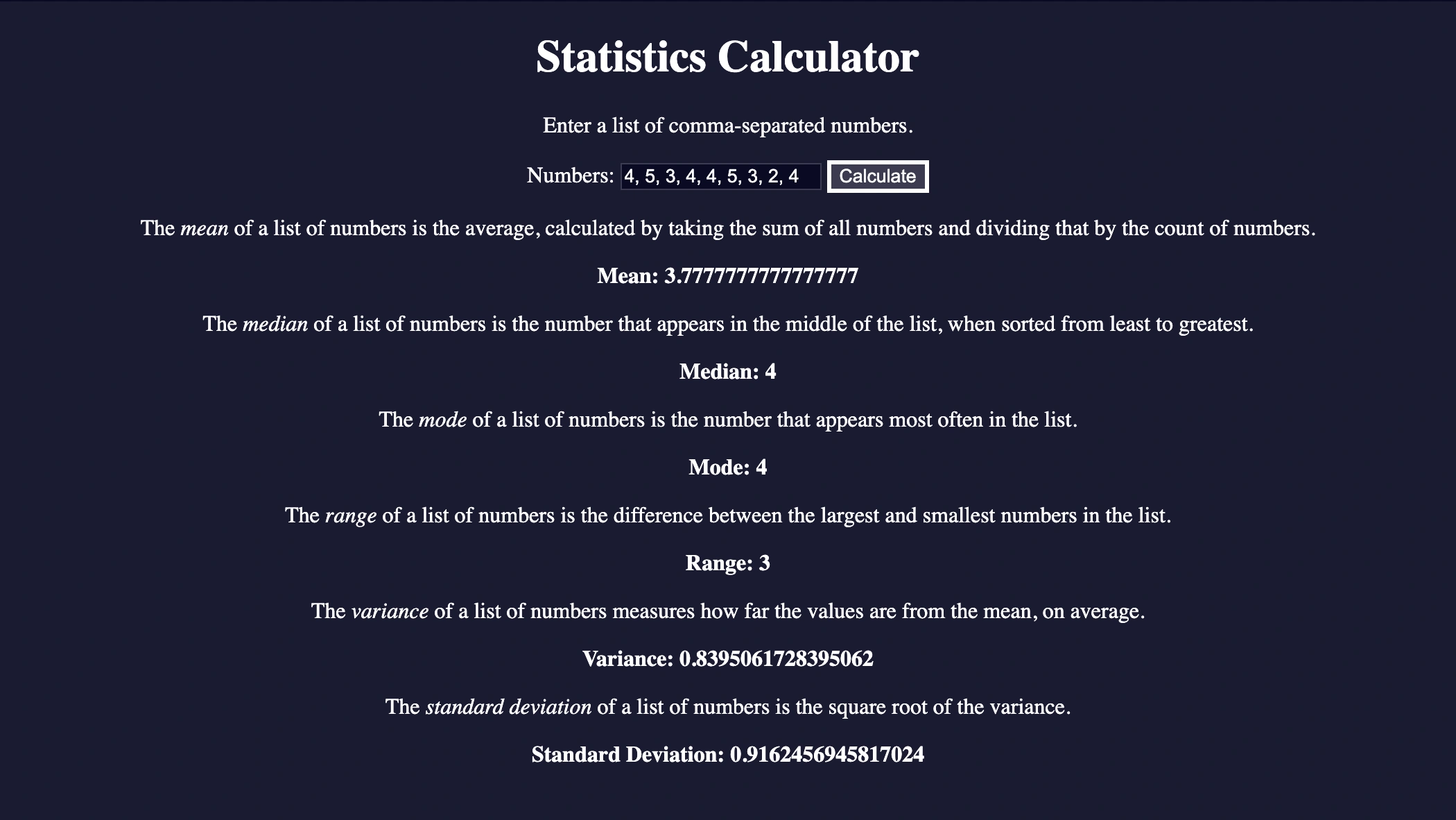
Practical example of the Statistics Calculator analyzing user satisfaction survey (UX) data.
The entered numbers (4, 5, 3,...) simulate ratings given by a group of users for a new feature, on a scale from 1 to 5 stars.
The Mode and Median of 4 reveal that the most common reaction and the "typical" user's experience were very positive.
The Mean (3.89), while slightly lower due to a single negative rating, confirms an overall more than favorable reception.
Finally, the low Standard Deviation is an excellent sign, as it indicates that the experience was consistent and predictable for most users. In a real-world context, these results would suggest validating the design's success and, as a next step, investigating the reasons behind that single negative feedback for further optimization.
The Project
Statistical calculator developed with JavaScript and advanced array methods, capable of calculating mean, median, mode, range, variance and standard deviation from a series of numbers entered by the user.
Source Code
- index.html
- styles.css
- script.js
<!DOCTYPE html>
<html lang="en">
  <head>
    <meta charset="UTF-8" />
    <meta name="viewport" content="width=device-width, initial-scale=1" />
    <title>Statistics Calculator</title>
    <link rel="stylesheet" href="styles.css">
  </head>

  <body>
    <h1>Statistics Calculator</h1>
    <p>Enter a list of comma-separated numbers.</p>
    <form onsubmit="calculate(); return false;">
      <label for="numbers">Numbers:</label>
      <input type="text" name="numbers" id="numbers" />
      <button type="submit">Calculate</button>
    </form>
    <div class="results">
      <p>
        The <dfn>mean</dfn> of a list of numbers is the average, calculated by
        taking the sum of all numbers and dividing that by the count of numbers.
      </p>
      <p class="bold">Mean: <span id="mean"></span></p>
      <p>
        The <dfn>median</dfn> of a list of numbers is the number that appears in
        the middle of the list, when sorted from least to greatest.
      </p>
      <p class="bold">Median: <span id="median"></span></p>
      <p>
        The <dfn>mode</dfn> of a list of numbers is the number that appears most
        often in the list.
      </p>
      <p class="bold">Mode: <span id="mode"></span></p>
      <p>
        The <dfn>range</dfn> of a list of numbers is the difference between the
        largest and smallest numbers in the list.
      </p>
      <p class="bold">Range: <span id="range"></span></p>
      <p>
        The <dfn>variance</dfn> of a list of numbers measures how far the values
        are from the mean, on average.
      </p>
      <p class="bold">Variance: <span id="variance"></span></p>
      <p>
        The <dfn>standard deviation</dfn> of a list of numbers is the square
        root of the variance.
      </p>
      <p class="bold">
        Standard Deviation: <span id="standardDeviation"></span>
      </p>
    </div>
  </body>
</html>
body {
  margin: 0;
  background-color: rgb(27, 27, 50);
  text-align: center;
  color: #fff;
}

button {
  cursor: pointer;
  background-color: rgb(59, 59, 79);
  border: 3px solid white;
  color: white;
}

input {
  background-color: rgb(10, 10, 35);
  color: white;
  border: 1px solid rgb(59, 59, 79);
}

.bold {
  font-weight: bold;
}
const getMean = (array) => array.reduce((acc, el) => acc + el, 0) / array.length;

const getMedian = (array) => {
  const sorted = array.toSorted((a, b) => a - b);
  const median =
    sorted.length % 2 === 0
      ? getMean([sorted[sorted.length / 2], sorted[sorted.length / 2 - 1]])
      : sorted[Math.floor(sorted.length / 2)];
  return median;
}

const getMode = (array) => {
  const counts = {};
  array.forEach(el => counts[el] = counts[el] ? counts[el] + 1 : 1);

  if (new Set(Object.values(counts)).size === 1) {
    return null;
  }
  const highest = Object.keys(counts).sort(
    (a, b) => counts[b] - counts[a]
  )[0];
  const mode = Object.keys(counts).filter(
    (el) => counts[el] === counts[highest]
  );
  return mode.join(", ");
}

const getRange = (array) => {
  return Math.max(...array) - Math.min(...array);
}

const getVariance = (array) => {
  const mean = getMean(array);
  const variance = array.reduce((acc, el) => {
    const difference = el - mean;
    const squared = difference ** 2;
    return acc + squared;
  }, 0) / array.length;
  return variance;
}

const getStandardDeviation = (array) => {
  const variance = getVariance(array);
  const standardDeviation = Math.sqrt(variance);
  return standardDeviation;
}

const calculate = () => {
  const value = document.querySelector("#numbers").value;
  const array = value.split(/,\s*/g);
  const numbers = array.map(el => Number(el)).filter(el => !isNaN(el));

  const mean = getMean(numbers);
  const median = getMedian(numbers);
  const mode = getMode(numbers);
  const range = getRange(numbers);
  const variance = getVariance(numbers);
  const standardDeviation = getStandardDeviation(numbers);

  document.querySelector("#mean").textContent = mean;
  document.querySelector("#median").textContent = median;
  document.querySelector("#mode").textContent = mode;
  document.querySelector("#range").textContent = range;
  document.querySelector("#variance").textContent = variance;
  document.querySelector("#standardDeviation").textContent = standardDeviation;

}
The Two-Phase Journey
This was a project I experienced in two different ways.
Phase 1: Mathematical Understanding Before tackling it, I went back to review each of the required mathematical concepts. I therefore expected to understand them more deeply thanks to this exercise, and that's exactly what happened. I spent the first half of the project with this awareness.
Phase 2: The Revelation of Usefulness In the second half, around step 30, I realized how useful this knowledge could be. Having just done another usability study a few days ago for the project I'm working on in the Google UX course, I had the feeling that a similar program could help me a lot in condensing all the data resulting from the research. Here's a table that summarizes everything:
| Statistical Concept | What It Measures in UX | Key Scenario (Revelation) |
|---|---|---|
| Mean | The "overall performance". | Provides a quick benchmark (e.g. average checkout time), but can be misleading when outliers (very slow users) skew the results. |
| Median | The "typical experience" of the average user. | If the median is much lower than the mean, it means most users are fast and only a small group has problems. It reveals where to focus efforts. |
| Mode | The "most common reaction" or most frequent feedback. | Perfect for ratings. If out of 100 votes, 80 are "5 stars", the mode tells you the feature is a success, even if a few low votes ruin the average. |
| Standard Deviation | The consistency and predictability of the experience. | Our ultimate goal. Low = clear and reliable design. High = confusing and frustrating design. In an A/B test, with equal means, the design with lower standard deviation always wins. |
I believe that thanks to these 4 concepts, you can move from "I conducted Usability Tests and the prototype works well for people" to "I conducted Usability Tests and the prototype works well for people and the data proves it".
What I Learned
Advanced Array Methods:
.reduce()to calculate sums (mean, variance) in a compact and efficient way..toSorted()to create a sorted copy of the array without mutating the original, fundamental for calculating the median..map()to transform the array of strings into an array of numbers..filter()to clean the input from non-numeric values..forEach()to iterate and populate the UI.
Statistical Logic in JS:
- Implementation of mean, median (handling both even and odd array lengths), mode (with handling of multimodal cases or absence of mode), range, variance and standard deviation.
Object and String Manipulation:
- Creation and manipulation of objects to count occurrences in the
getModefunction. - Use of
Object.keys()andObject.values()to analyze frequencies. new Set()to verify if all elements appear with the same frequency..split(/,\s*/g)to parse user input robustly, handling variable spaces.
Functional Programming:
- Writing pure functions that take an array as input and return a calculated value.
- Function composition (e.g.
getVariancecallinggetMean).
Reflection
The sprint I experienced in the second half came from the thought that everything I was learning could give life to a "UX calculator": a program that not only calculates numbers, but interprets them from a user experience perspective
Next Project: Learn Functional Programming by Building a Spreadsheet