Spreadsheet
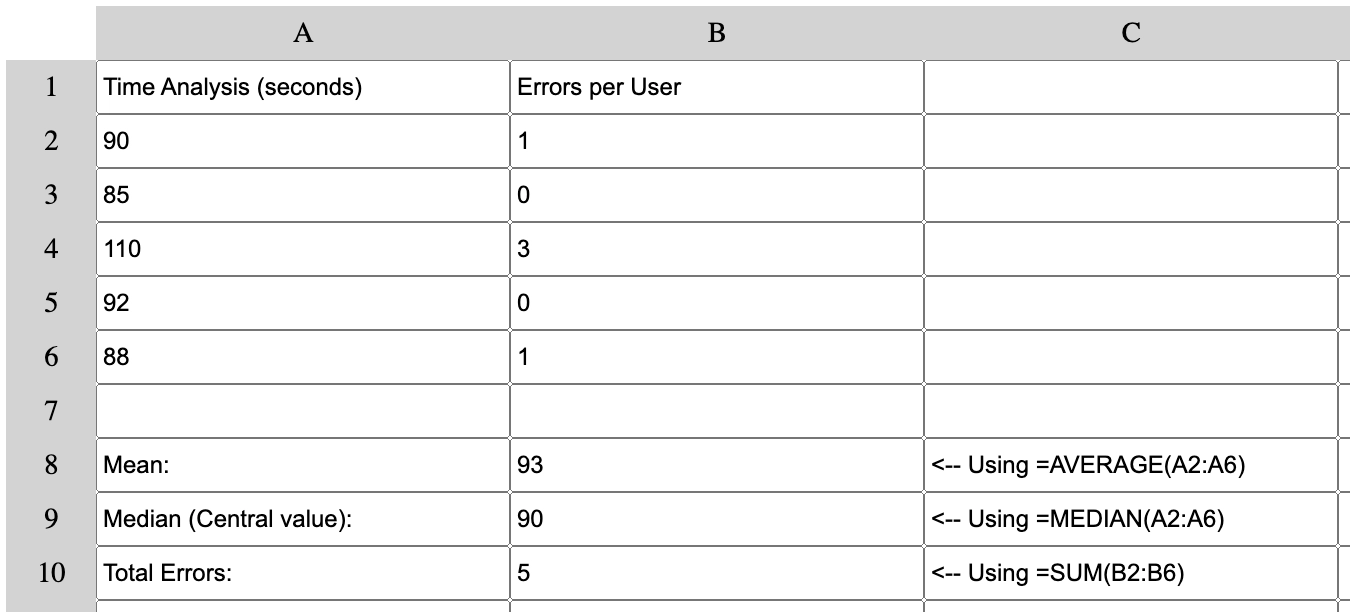
Practical example of the Spreadsheet analyzing usability test data.
The data entered simulate completion times (in seconds) and errors made by 5 users testing a new feature (for example, a checkout process).
The Mean (93s) and Median (90s) of completion times are very close. This is an excellent signal, because it indicates a consistent and predictable user experience, without extreme outliers that would distort the average.
Total Errors (5) are analyzed together with times, revealing a key insight: the user with the longest time (110s) was also the one who made the most errors (3).
In a real context, this result provides a clear next step: the UX team should immediately review the session recording of that specific user (User 3) to identify the design flaw that caused both the delay and the errors, leading to targeted optimization.
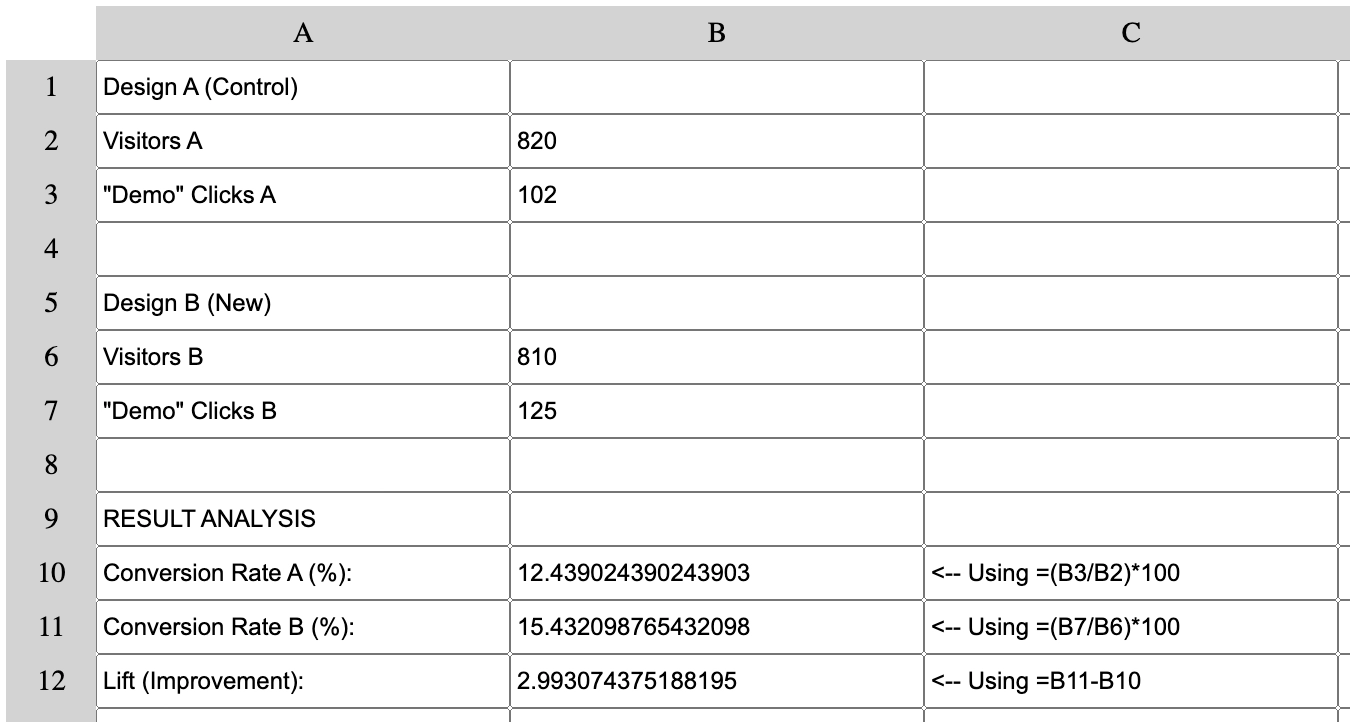
Practical example of the Spreadsheet used to quickly analyze A/B Test results.
This simulation compares two designs: "Design A" (the original Control) and "Design B" (the New version), to see which of the two has a better Conversion Rate for the "Request Demo" button.
The spreadsheet calculates the Conversion Rate for both, showing Design A at 12.4% and Design B at 15.4%. This metric is crucial because it measures the persuasive strength of each design.
The key metric "Lift (Improvement)" shows that Design B performs ~3 percentage points higher than the original.
This provides clear, data-driven validation. The insight from this spreadsheet is a clear recommendation to replace Design A with Design B, since the new design is clearly more effective at converting users.
The Project
Functional spreadsheet developed with pure JavaScript, implementing advanced functions such as sums, averages, medians, ranges and formula evaluation. A project that demonstrates functional programming principles applied to a real-world use case.
Source Code
- index.html
- styles.css
- script.js
<!DOCTYPE html>
<html lang="en">
  <head>
    <meta charset="utf-8" />
    <meta name="viewport" content="width=device-width, initial-scale=1" />
    <title>Functional Programming Spreadsheet</title>
    <link rel="stylesheet" href="styles.css">
  </head>
  <body>
    <div id="container">
      <div></div>
    </div>
  </body>
</html>
#container {
  display: grid;
  grid-template-columns: 50px repeat(10, 200px);
  grid-template-rows: repeat(11, 30px);
}

.label {
  background-color: lightgray;
  text-align: center;
  vertical-align: middle;
  line-height: 30px;
}
const infixToFunction = {
  "+": (x, y) => x + y,
  "-": (x, y) => x - y,
  "*": (x, y) => x * y,
  "/": (x, y) => x / y,
}

const infixEval = (str, regex) => str.replace(regex, (_match, arg1, operator, arg2) => infixToFunction[operator](parseFloat(arg1), parseFloat(arg2)));

const highPrecedence = str => {
  const regex = /([\d.]+)([*\/])([\d.]+)/;
  const str2 = infixEval(str, regex);
  return str === str2 ? str : highPrecedence(str2);
}

const isEven = num => num % 2 === 0;
const sum = nums => nums.reduce((acc, el) => acc + el, 0);
const average = nums => sum(nums) / nums.length;

const median = nums => {
  const sorted = nums.slice().sort((a, b) => a - b);
  const length = sorted.length;
  const middle = length / 2 - 1;
  return isEven(length)
    ? average([sorted[middle], sorted[middle + 1]])
    : sorted[Math.ceil(middle)];
}

const spreadsheetFunctions = {
  "" : (nums) => nums,
  sum,
  average,
  median,
  even: nums => nums.filter(isEven),
  someeven: nums => nums.some(isEven),
  everyeven: nums => nums.every(isEven),
  firsttwo: nums => nums.slice(0, 2),
  lasttwo: nums => nums.slice(-2),
  has2: nums => nums.includes(2),
  increment: nums => nums.map(num => num + 1),
  random: ([x, y]) => Math.floor(Math.random() * y + x),
  range: nums => range(...nums),
  nodupes: nums => [...new Set(nums).values()]
}

const applyFunction = str => {
  const noHigh = highPrecedence(str);
  const infix = /([\d.]+)([+-])([\d.]+)/;
  const str2 = infixEval(noHigh, infix);
  const functionCall = /([a-z0-9]*)\(([0-9., ]*)\)(?!.*\()/i;
  const toNumberList = args => args.split(",").map(parseFloat);
  const apply = (fn, args) => spreadsheetFunctions[fn.toLowerCase()](toNumberList(args));
  return str2.replace(functionCall, (match, fn, args) => spreadsheetFunctions.hasOwnProperty(fn.toLowerCase()) ? apply(fn, args) : match);
}

const range = (start, end) => Array(end - start + 1).fill(start).map((element, index) => element + index);
const charRange = (start, end) => range(start.charCodeAt(0), end.charCodeAt(0)).map(code => String.fromCharCode(code));

const evalFormula = (x, cells) => {
  const idToText = id => cells.find(cell => cell.id === id).value;
  const rangeRegex = /([A-J])([1-9][0-9]?):([A-J])([1-9][0-9]?)/gi;
  const rangeFromString = (num1, num2) => range(parseInt(num1), parseInt(num2));
  const elemValue = num => character => idToText(character + num);
  const addCharacters = character1 => character2 => num => charRange(character1, character2).map(elemValue(num));
  const rangeExpanded = x.replace(rangeRegex, (_match, char1, num1, char2, num2) => rangeFromString(num1, num2).map(addCharacters(char1)(char2)));
  const cellRegex = /[A-J][1-9][0-9]?/gi;
  const cellExpanded = rangeExpanded.replace(cellRegex, match => idToText(match.toUpperCase()));
  const functionExpanded = applyFunction(cellExpanded);
  return functionExpanded === x ? functionExpanded : evalFormula(functionExpanded, cells);
}

window.onload = () => {
  const container = document.getElementById("container");
  const createLabel = (name) => {
    const label = document.createElement("div");
    label.className = "label";
    label.textContent = name;
    container.appendChild(label);
  }
  const letters = charRange("A", "J");
  letters.forEach(createLabel);
  range(1, 99).forEach(number => {
    createLabel(number);
    letters.forEach(letter => {
      const input = document.createElement("input");
      input.type = "text";
      input.id = letter + number;
      input.ariaLabel = letter + number;
      input.onchange = update;
      container.appendChild(input);
    })
  })
}

const update = event => {
  const element = event.target;
  const value = element.value.replace(/\s/g, "");
  if (!value.includes(element.id) && value.startsWith('=')) {
    element.value = evalFormula(value.slice(1), Array.from(document.getElementById("container").children));
  }
}
The Breakthrough: When Currying "Clicked"
It was really interesting to encounter currying with arrow functions for the first time.
At first it just seemed like strange syntax: character1 => character2 => num => .... Even 3 arrows?
Now I consider it a very simple concept, but initially it wasn't at all. Because it involved cognitively restructuring a concept I had by then taken for granted: arrow functions.
I will summarize below all the analogies and explanations that the Code Tutor provided to help me understand the concept.
The Factory Analogy
A normal function is like a machine that needs all keys inserted simultaneously:
const add = (a, b) => a + b; // You have to give it a and b immediately
A curried function is instead a factory of specialized machines:
const curriedAdd = a => b => a + b;
curriedAdd(10): Doesn't give you a result. It gives you a new machine with 10 "welded" inside.const add10 = curriedAdd(10): You save this specialized machine.add10(5): Now you use the machine. Result: 15.
This means that each level "locks" a piece of information and passes a new function to the next level. It's closure at work, so each function "remembers" (keeps in memory) the parameters received at higher levels.
The .zip File vs The Folder 📦
I continued through the exercises, but after making a completely avoidable error I decided to delve deeper: both because I didn't want to make similar mistakes, and because I didn't want any gaps in my understanding.
Here's the analogy that was most effective for me:
Long Version (The Folder 📁):
const elemValue = num => {
  const inner = character => idToText(character + num);
  return inner;
}
It's a folder. You can open it, add console.log in it for debugging, inspect it.
Short Version (The .zip File 📦):
const elemValue = num => character => idToText(character + num);
It's a compressed file. It contains exactly the same thing, but without "noise" (const, return, {}). It therefore shows only the pure logic.
At that point I wondered: "The compact solution is certainly more elegant and, paradoxically, once you understand how it works it's even more readable than the extended version. Is the price you pay poor scalability?"
After some research, here's what emerged in terms of "ideal workflow":
- I write the short version for elegance
- If there's a bug, I "decompress" into the long version
- I add
console.logfor debugging - I solve the problem
- I "recompress" into the short version
What I Learned
Advanced Functional Programming:
- Currying: Functions that return functions, creating progressive specializations.
- Closure: Inner functions keep outer function variables in memory.
- Partial Application: Locking some arguments to create new functions on the fly.
- Pure Functions: Functions without side effects that facilitate debugging and testing.
Advanced JavaScript Syntax:
- Implicit return with arrow functions:
x => yequalsx => { return y }. - Multi-level currying:
a => b => c => result. - Destructuring and pattern matching with advanced regex.
String and Regex Manipulation:
- Formula evaluation with complex regex for mathematical operations.
- Pattern
/([A-J])([1-9][0-9]?):([A-J])([1-9][0-9]?)/gito handle cell ranges. - Recursive replacement with
.replace()to expand nested formulas.
Array Methods and Composition:
.reduce(),.map(),.filter(),.some(),.every(),.slice()in functional contexts.- Function composition to create data transformation pipelines.
new Set()to remove duplicates.
Statistical Algorithms:
- Implementation of
sum,average,medianwith functional approach. - Handling even/odd arrays for median calculation.
Spreadsheet Architecture:
- Cell identification system (A1, B2, etc.).
- Recursive formula evaluation with cell dependencies.
- Circular reference prevention.
Reflection
Now when I encounter a syntax like num => character => idToText(character + num), my brain no longer reads code, it reads a flow: "I take num, which leads me to a function that takes character, which leads me to the final result."
The => syntax has become a visual flow diagram for me. Every time I encountered it subsequently, I said to myself "leads to...", as if I were following a map. No more parentheses, returns and temporary variables to keep in mind, just the pure transformation of data, step by step.
Next Project: Build a Telephone Number Validator Project (CERTIFICATION PROJECT!)