Shopping Cart
The Project
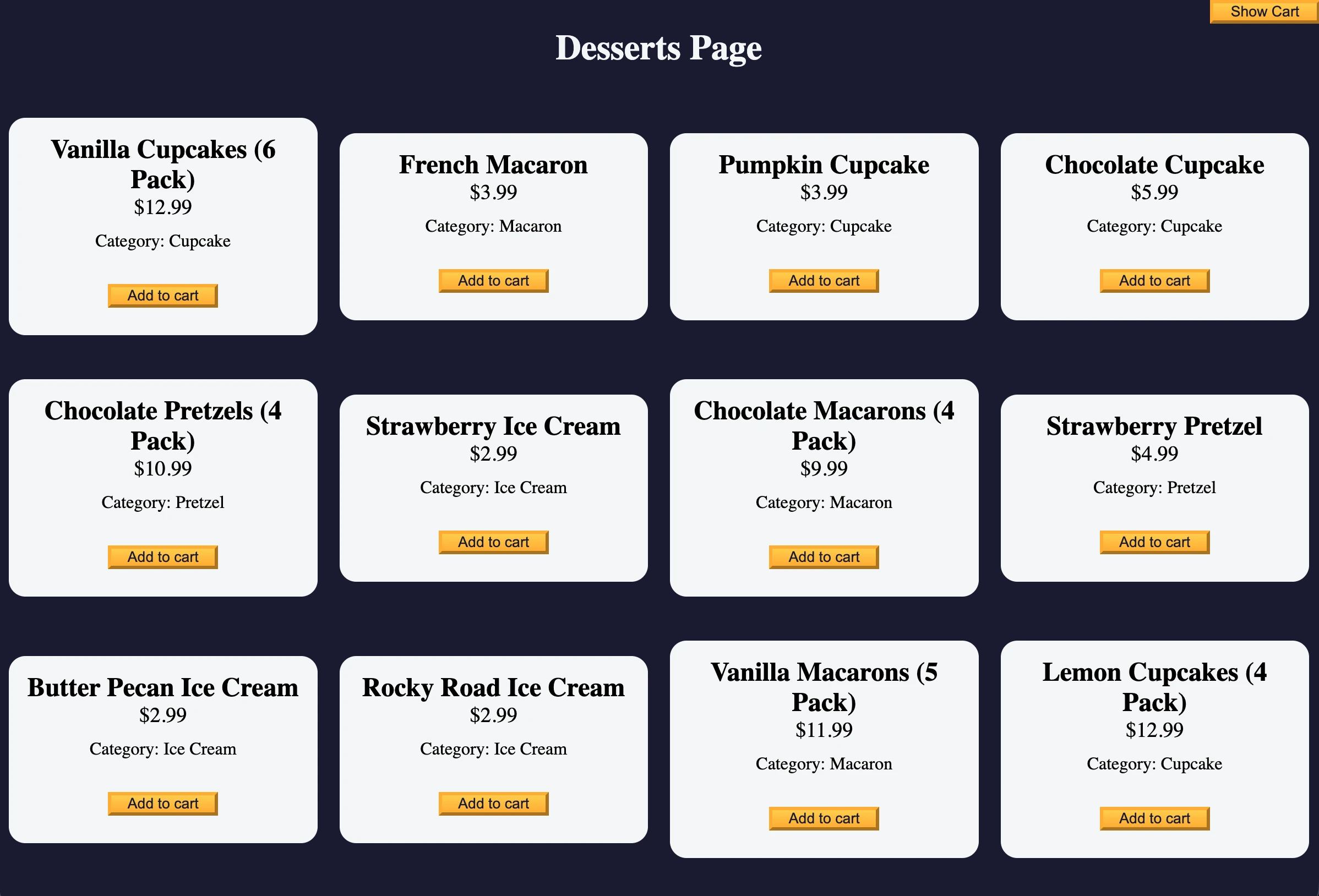
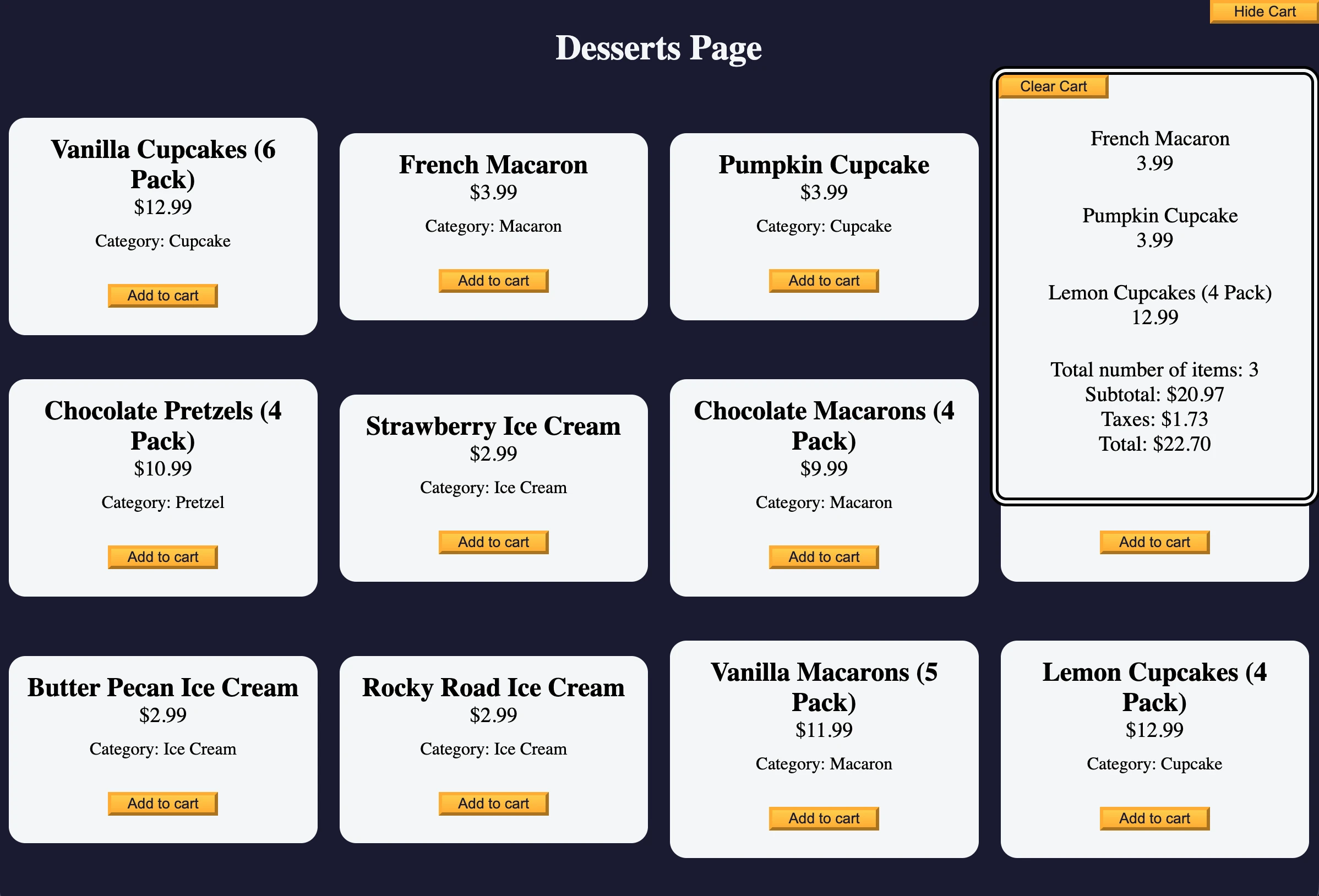
Interactive shopping cart developed with object-oriented programming in JavaScript. An application that demonstrates the use of ES6 classes, state management, and DOM manipulation to create a functional e-commerce system.
Source Code
- index.html
- styles.css
- script.js
<!DOCTYPE html>
<html lang="en">
  <head>
    <meta charset="UTF-8" />
    <meta http-equiv="X-UA-Compatible" content="IE=edge" />
    <meta name="viewport" content="width=device-width, initial-scale=1.0" />
    <title>freeCodeCamp Shopping Cart</title>
    <link rel="stylesheet" href="./styles.css" />
  </head>
  <body>
    <header>
      <h1 class="title">Desserts Page</h1>
    </header>
    <main>
      <button id="cart-btn" type="button" class="btn">
        <span id="show-hide-cart">Show</span> Cart
      </button>
      <div id="cart-container">
        <button class="btn" id="clear-cart-btn">Clear Cart</button>
        <div id="products-container"></div>
        <p>Total number of items: <span id="total-items">0</span></p>
        <p>Subtotal: <span id="subtotal">$0</span></p>
        <p>Taxes: <span id="taxes">$0</span></p>
        <p>Total: <span id="total">$0</span></p>
      </div>
      <div id="dessert-card-container"></div>
    </main>
    <script src="./script.js"></script>
  </body>
</html>
*,
*::before,
*::after {
  margin: 0;
  padding: 0;
  box-sizing: border-box;
}

:root {
  --dark-grey: #1b1b32;
  --light-grey: #f5f6f7;
  --black: #000;
  --white: #fff;
  --grey: #3b3b4f;
  --golden-yellow: #fecc4c;
  --yellow: #ffcc4c;
  --gold: #feac32;
  --orange: #ffac33;
  --dark-orange: #f89808;
}

body {
  background-color: var(--dark-grey);
}

.title {
  color: var(--light-grey);
  text-align: center;
  margin: 25px 0;
}

#dessert-card-container {
  display: flex;
  flex-direction: column;
  flex-wrap: wrap;
  align-items: center;
}

.dessert-card {
  background-color: var(--light-grey);
  padding: 15px;
  text-align: center;
  border-radius: 15px;
  margin: 20px 10px;
}

.dessert-price {
  font-size: 1.2rem;
}

.btn {
  display: block;
  cursor: pointer;
  width: 100px;
  color: var(--dark-grey);
  background-color: var(--gold);
  background-image: linear-gradient(var(--golden-yellow), var(--orange));
  border-color: var(--gold);
  border-width: 3px;
}

.btn:hover {
  background-image: linear-gradient(var(--yellow), var(--dark-orange));
}

#cart-btn {
  position: absolute;
  top: 0;
  right: 0;
}

.add-to-cart-btn {
  margin: 30px auto 10px;
}

#cart-container {
  display: none;
  position: absolute;
  top: 60px;
  right: 0;
  background-color: var(--light-grey);
  width: 200px;
  height: 400px;
  border: 8px double var(--black);
  border-radius: 15px;
  text-align: center;
  font-size: 1.2rem;
  overflow-y: scroll;
}

.product {
  margin: 25px 0;
}

.product-count {
  display: inline-block;
  margin-right: 10px;
}

.product-category {
  margin: 10px 0;
}

@media (min-width: 768px) {
  #dessert-card-container {
    flex-direction: row;
  }

  .dessert-card {
    flex: 1 0 21%;
  }

  #cart-container {
    width: 300px;
  }
}
const cartContainer = document.getElementById("cart-container");
const productsContainer = document.getElementById("products-container");
const dessertCards = document.getElementById("dessert-card-container");
const cartBtn = document.getElementById("cart-btn");
const clearCartBtn = document.getElementById("clear-cart-btn");
const totalNumberOfItems = document.getElementById("total-items");
const cartSubTotal = document.getElementById("subtotal");
const cartTaxes = document.getElementById("taxes");
const cartTotal = document.getElementById("total");
const showHideCartSpan = document.getElementById("show-hide-cart");
let isCartShowing = false;

const products = [
  {
    id: 1,
    name: "Vanilla Cupcakes (6 Pack)",
    price: 12.99,
    category: "Cupcake",
  },
  {
    id: 2,
    name: "French Macaron",
    price: 3.99,
    category: "Macaron",
  },
  {
    id: 3,
    name: "Pumpkin Cupcake",
    price: 3.99,
    category: "Cupcake",
  },
  {
    id: 4,
    name: "Chocolate Cupcake",
    price: 5.99,
    category: "Cupcake",
  },
  {
    id: 5,
    name: "Chocolate Pretzels (4 Pack)",
    price: 10.99,
    category: "Pretzel",
  },
  {
    id: 6,
    name: "Strawberry Ice Cream",
    price: 2.99,
    category: "Ice Cream",
  },
  {
    id: 7,
    name: "Chocolate Macarons (4 Pack)",
    price: 9.99,
    category: "Macaron",
  },
  {
    id: 8,
    name: "Strawberry Pretzel",
    price: 4.99,
    category: "Pretzel",
  },
  {
    id: 9,
    name: "Butter Pecan Ice Cream",
    price: 2.99,
    category: "Ice Cream",
  },
  {
    id: 10,
    name: "Rocky Road Ice Cream",
    price: 2.99,
    category: "Ice Cream",
  },
  {
    id: 11,
    name: "Vanilla Macarons (5 Pack)",
    price: 11.99,
    category: "Macaron",
  },
  {
    id: 12,
    name: "Lemon Cupcakes (4 Pack)",
    price: 12.99,
    category: "Cupcake",
  },
];

products.forEach(
  ({ name, id, price, category }) => {
    dessertCards.innerHTML += `
      <div class="dessert-card">
        <h2>${name}</h2>
        <p class="dessert-price">$${price}</p>
        <p class="product-category">Category: ${category}</p>
        <button
          id="${id}"
          class="btn add-to-cart-btn">Add to cart
        </button>
      </div>
    `;
  }
);

class ShoppingCart {
  constructor() {
    this.items = [];
    this.total = 0;
    this.taxRate = 8.25;
  }

  addItem(id, products) {
    const product = products.find((item) => item.id === id);
    const { name, price } = product;
    this.items.push(product);

    const totalCountPerProduct = {};
    this.items.forEach((dessert) => {
      totalCountPerProduct[dessert.id] = (totalCountPerProduct[dessert.id] || 0) + 1;
    })

    const currentProductCount = totalCountPerProduct[product.id];
    const currentProductCountSpan = document.getElementById(`product-count-for-id${id}`);

    currentProductCount > 1
      ? currentProductCountSpan.textContent = `${currentProductCount}x`
      : productsContainer.innerHTML += `
      <div id="dessert${id}" class="product">
        <p>
          <span class="product-count" id="product-count-for-id${id}"></span>${name}
        </p>
        <p>${price}</p>
      </div>
      `;
  }

  getCounts() {
    return this.items.length;
  }

  clearCart() {
    if (!this.items.length) {
      alert("Your shopping cart is already empty");
      return;
    }

    const isCartCleared = confirm(
      "Are you sure you want to clear all items from your shopping cart?"
    );

    if (isCartCleared) {
      this.items = [];
      this.total = 0;
      productsContainer.innerHTML = "";
      totalNumberOfItems.textContent = 0;
      cartSubTotal.textContent = 0;
      cartTaxes.textContent = 0;
      cartTotal.textContent = 0;
    }
  }

  calculateTaxes(amount) {
    return parseFloat(((this.taxRate / 100) * amount).toFixed(2));
  }

  calculateTotal() {
    const subTotal = this.items.reduce((total, item) => total + item.price, 0);
    const tax = this.calculateTaxes(subTotal);
    this.total = subTotal + tax;
    cartSubTotal.textContent = `$${subTotal.toFixed(2)}`;
    cartTaxes.textContent = `$${tax.toFixed(2)}`;
    cartTotal.textContent = `$${this.total.toFixed(2)}`;
    return this.total;
  }
};

const cart = new ShoppingCart();
const addToCartBtns = document.getElementsByClassName("add-to-cart-btn");

[...addToCartBtns].forEach(
  (btn) => {
    btn.addEventListener("click", (event) => {
      cart.addItem(Number(event.target.id), products);
      totalNumberOfItems.textContent = cart.getCounts();
      cart.calculateTotal();
    })
  }
);

cartBtn.addEventListener("click", () => {
  isCartShowing = !isCartShowing;
  showHideCartSpan.textContent = isCartShowing ? "Hide" : "Show";
  cartContainer.style.display = isCartShowing ? "block" : "none";
});

clearCartBtn.addEventListener("click", cart.clearCart.bind(cart));
The Discovery: Classes Are "Syntactic Sugar"
This was a very interesting project, especially understanding what's "under the hood" of classes in JavaScript.
JavaScript doesn't actually have classes in the traditional sense of languages like Java or C++. When we write:
class ShoppingCart {
  constructor() {
    this.items = [];
    this.total = 0;
  }
  addItem(product) {
    this.items.push(product);
  }
}
JavaScript automatically transforms it (without showing you) into this code:
function ShoppingCart() {
  this.items = [];
  this.total = 0;
}
ShoppingCart.prototype.addItem = function(product) {
  this.items.push(product);
};
It's "syntactic sugar" (a term coined by British computer scientist Peter J. Landin): it makes the code sweeter to read, but underneath it's still the same function-based mechanism.
However, once you understand the mechanism, comparing the two code blocks makes it evident how much simpler the class syntax is to both read and write.
I felt the same "click" as with CSS variables, that feeling of wanting to use them in all my future projects.
What I Learned
Object-Oriented Programming (OOP):
- ES6 Classes: Modern syntax for creating objects with properties and methods
- Constructor: Special method automatically called with
newto initialize the instance - Keyword
this: Reference to the current instance of the class - Keyword
new: Operator that creates a new instance, executes the constructor, and returns the object - Prototypes: Underlying system for classes, each method is added to
ClassName.prototype
Advanced Array Methods:
.forEach()to iterate over elements with side effects.find()to search for the first element that satisfies a condition.reduce()to accumulate values into a single result (e.g., sum prices)
Destructuring:
- Extracting properties from objects:
const { name, price } = product - Concise syntax that avoids repetition like
product.name,product.price
JavaScript Operators:
- Spread Operator (
...): Converts HTMLCollection to array to use array methods - OR Operator (
||): Provides default values:value || 0 - NOT Operator (
!): Inverts booleans for toggle patterns - Ternary Operator (
? :): Inline conditions for more concise code
Template Literals:
- Backticks
`for multi-line strings - Interpolation with
${}to insert variables - Escaping the
$symbol when needed:$${price}(first $ is literal)
Floating Point Handling:
- Problem:
0.1 + 0.2 !== 0.3in JavaScript - Solution:
.toFixed(2)to round +parseFloat()to convert back to number
DOM Manipulation:
getElementsByClassName()returns HTMLCollection (not array!)innerHTML +=to add elements dynamicallystyle.displayfor show/hide:"block"vs"none"
Event Handling:
event.target.idto identify the clicked element.bind(cart)to fix thethiscontext in callbacksaddEventListenerto handle user interactions
State Pattern:
- Boolean toggle with
isCartShowing = !isCartShowing - Centralized state management in the
ShoppingCartclass
Next Project: Learn Intermediate OOP by Building a Platformer Game