Platformer Game


The Project
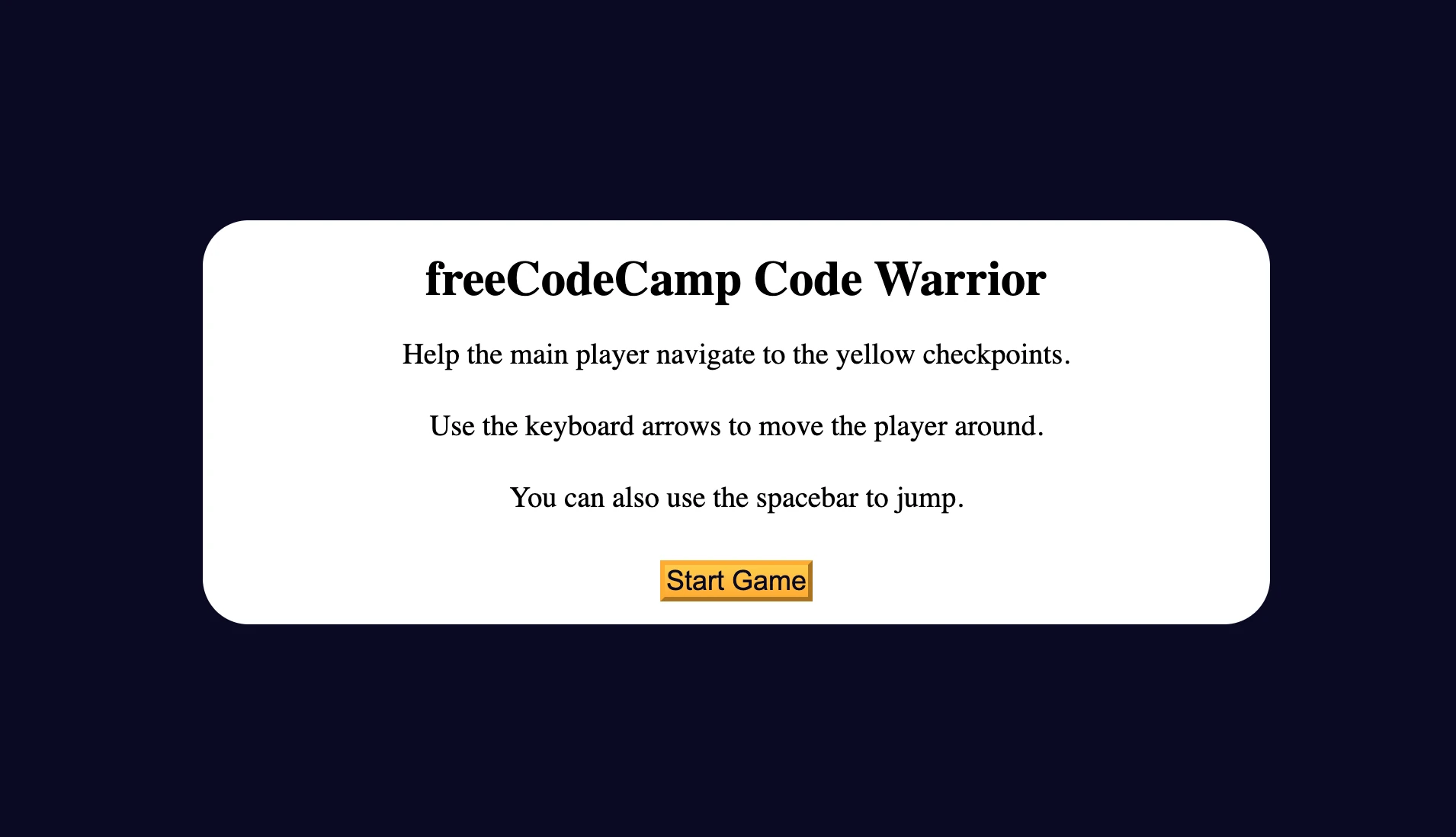
Platformer game developed with intermediate object-oriented programming in JavaScript. An application that demonstrates fluid animations, physics engine, collision detection, and advanced state management to create a complete platform game.
Source Code
- index.html
- styles.css
- script.js
<!DOCTYPE html>
<html lang="en">
  <head>
    <meta charset="UTF-8" />
    <meta http-equiv="X-UA-Compatible" content="IE=edge" />
    <meta name="viewport" content="width=device-width, initial-scale=1.0" />
    <title>Learn Intermediate OOP by Building a Platformer Game</title>
  </head>
  <body>
    <div class="start-screen">
      <h1 class="main-title">freeCodeCamp Code Warrior</h1>
      <p class="instructions">
        Help the main player navigate to the yellow checkpoints.
      </p>
      <p class="instructions">
        Use the keyboard arrows to move the player around.
      </p>
      <p class="instructions">You can also use the spacebar to jump.</p>
      <div class="btn-container">
        <button class="btn" id="start-btn">Start Game</button>
      </div>
    </div>
    <div class="checkpoint-screen">
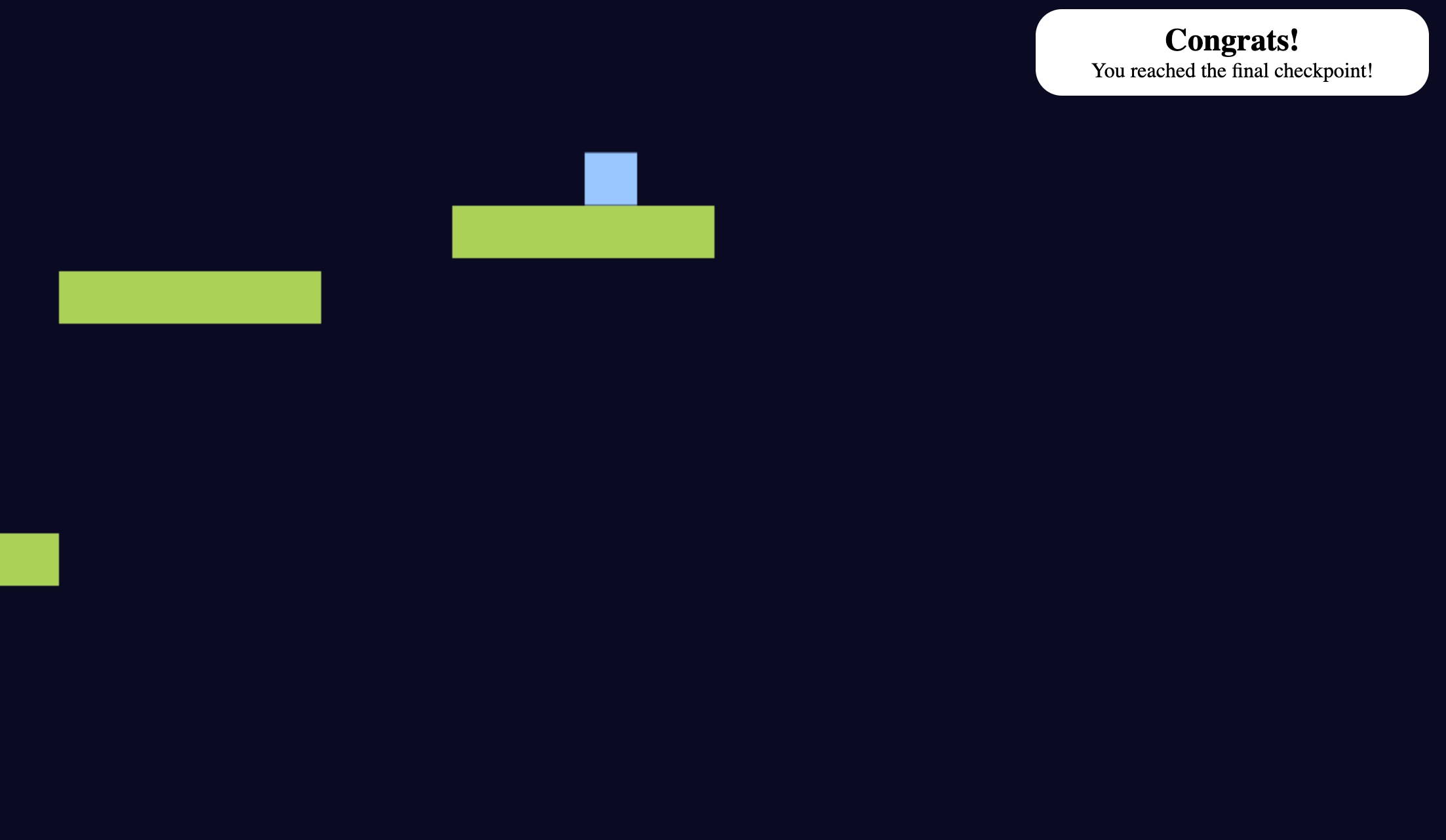
      <h2>Congrats!</h2>
      <p>You reached the last checkpoint.</p>
    </div>
    <canvas id="canvas"></canvas>
    <script src="./script.js"></script>
  </body>
</html>
* {
  margin: 0;
  padding: 0;
  box-sizing: border-box;
}

:root {
  --main-bg-color: #0a0a23;
  --section-bg-color: #ffffff;
  --golden-yellow: #feac32;
}

body {
  background-color: var(--main-bg-color);
}

.start-screen {
  background-color: var(--section-bg-color);
  width: 100%;
  position: absolute;
  top: 50%;
  left: 50%;
  margin-right: -50%;
  transform: translate(-50%, -50%);
  border-radius: 30px;
  padding: 20px;
  padding-bottom: 5px;
}

.main-title {
  text-align: center;
}

.instructions {
  text-align: center;
  font-size: 1.2rem;
  margin: 15px;
  line-height: 2rem;
}

.btn {
  cursor: pointer;
  width: 100px;
  margin: 10px;
  color: #0a0a23;
  font-size: 18px;
  background-color: var(--golden-yellow);
  background-image: linear-gradient(#fecc4c, #ffac33);
  border-color: var(--golden-yellow);
  border-width: 3px;
}

.btn:hover {
  background-image: linear-gradient(#ffcc4c, #f89808);
}

.btn-container {
  display: flex;
  align-items: center;
  justify-content: center;
}

.checkpoint-screen {
  position: absolute;
  left: 0;
  right: 0;
  margin-left: auto;
  margin-right: auto;
  width: 100%;
  text-align: center;
  background-color: var(--section-bg-color);
  border-radius: 20px;
  padding: 10px;
  display: none;
}

#canvas {
  display: none;
}

@media (min-width: 768px) {
  .start-screen {
    width: 60%;
    max-width: 700px;
  }

  .checkpoint-screen {
    max-width: 300px;
  }
}
const startBtn = document.getElementById("start-btn");
const canvas = document.getElementById("canvas");
const startScreen = document.querySelector(".start-screen");
const checkpointScreen = document.querySelector(".checkpoint-screen");
const checkpointMessage = document.querySelector(".checkpoint-screen > p");
const ctx = canvas.getContext("2d");
canvas.width = innerWidth;
canvas.height = innerHeight;
const gravity = 0.5;
let isCheckpointCollisionDetectionActive = true;

const proportionalSize = (size) => {
  return innerHeight < 500 ? Math.ceil((size / 500) * innerHeight) : size;
}

class Player {
  constructor() {
    this.position = {
      x: proportionalSize(10),
      y: proportionalSize(400),
    };
    this.velocity = {
      x: 0,
      y: 0,
    };
    this.width = proportionalSize(40);
    this.height = proportionalSize(40);
  }
  draw() {
    ctx.fillStyle = "#99c9ff";
    ctx.fillRect(this.position.x, this.position.y, this.width, this.height);
  }

  update() {
    this.draw();
    this.position.x += this.velocity.x;
    this.position.y += this.velocity.y;

    if (this.position.y + this.height + this.velocity.y <= canvas.height) {
      if (this.position.y < 0) {
        this.position.y = 0;
        this.velocity.y = gravity;
      }
      this.velocity.y += gravity;
    } else {
      this.velocity.y = 0;
    }

    if (this.position.x < this.width) {
      this.position.x = this.width;
    }

    if (this.position.x >= canvas.width - this.width * 2) {
      this.position.x = canvas.width - this.width * 2;
    }
  }
}

class Platform {
  constructor(x, y) {
    this.position = {
      x,
      y,
    };
    this.width = 200;
    this.height = proportionalSize(40);
  }
  draw() {
    ctx.fillStyle = "#acd157";
    ctx.fillRect(this.position.x, this.position.y, this.width, this.height);
  }
}

class CheckPoint {
  constructor(x, y, z) {
    this.position = {
      x,
      y,
    };
    this.width = proportionalSize(40);
    this.height = proportionalSize(70);
    this.claimed = false;
  };

  draw() {
    ctx.fillStyle = "#f1be32";
    ctx.fillRect(this.position.x, this.position.y, this.width, this.height);
  }
  claim() {
    this.width = 0;
    this.height = 0;
    this.position.y = Infinity;
    this.claimed = true;
  }
};

const player = new Player();

const platformPositions = [
  { x: 500, y: proportionalSize(450) },
  { x: 700, y: proportionalSize(400) },
  { x: 850, y: proportionalSize(350) },
  { x: 900, y: proportionalSize(350) },
  { x: 1050, y: proportionalSize(150) },
  { x: 2500, y: proportionalSize(450) },
  { x: 2900, y: proportionalSize(400) },
  { x: 3150, y: proportionalSize(350) },
  { x: 3900, y: proportionalSize(450) },
  { x: 4200, y: proportionalSize(400) },
  { x: 4400, y: proportionalSize(200) },
  { x: 4700, y: proportionalSize(150) },
];

const platforms = platformPositions.map(
  (platform) => new Platform(platform.x, platform.y)
);

const checkpointPositions = [
  { x: 1170, y: proportionalSize(80), z: 1 },
  { x: 2900, y: proportionalSize(330), z: 2 },
  { x: 4800, y: proportionalSize(80), z: 3 },
];

const checkpoints = checkpointPositions.map(
  (checkpoint) => new CheckPoint(checkpoint.x, checkpoint.y, checkpoint.z)
);

const animate = () => {
  requestAnimationFrame(animate);
  ctx.clearRect(0, 0, canvas.width, canvas.height);

  platforms.forEach((platform) => {
    platform.draw();
  });

  checkpoints.forEach(checkpoint => {
    checkpoint.draw();
  });

  player.update();

  if (keys.rightKey.pressed && player.position.x < proportionalSize(400)) {
    player.velocity.x = 5;
  } else if (keys.leftKey.pressed && player.position.x > proportionalSize(100)) {
    player.velocity.x = -5;
  } else {
    player.velocity.x = 0;

    if (keys.rightKey.pressed && isCheckpointCollisionDetectionActive) {
      platforms.forEach((platform) => {
        platform.position.x -= 5;
      });

      checkpoints.forEach((checkpoint) => {
        checkpoint.position.x -= 5;
      });

    } else if (keys.leftKey.pressed && isCheckpointCollisionDetectionActive) {
      platforms.forEach((platform) => {
        platform.position.x += 5;
      });

      checkpoints.forEach((checkpoint) => {
        checkpoint.position.x += 5;
      });
    }
  }

  platforms.forEach((platform) => {
    const collisionDetectionRules = [
      player.position.y + player.height <= platform.position.y,
      player.position.y + player.height + player.velocity.y >= platform.position.y,
      player.position.x >= platform.position.x - player.width / 2,
      player.position.x <=
        platform.position.x + platform.width - player.width / 3,
    ];

    if (collisionDetectionRules.every((rule) => rule)) {
      player.velocity.y = 0;
      return;
    }

    const platformDetectionRules = [
      player.position.x >= platform.position.x - player.width / 2,
      player.position.x <=
        platform.position.x + platform.width - player.width / 3,
      player.position.y + player.height >= platform.position.y,
      player.position.y <= platform.position.y + platform.height,
    ];

    if (platformDetectionRules.every(rule => rule)) {
      player.position.y = platform.position.y + player.height;
      player.velocity.y = gravity;
    };
  });

  checkpoints.forEach((checkpoint, index, checkpoints) => {
    const checkpointDetectionRules = [
      player.position.x >= checkpoint.position.x,
      player.position.y >= checkpoint.position.y,
      player.position.y + player.height <=
        checkpoint.position.y + checkpoint.height,
      isCheckpointCollisionDetectionActive,
      player.position.x - player.width <=
        checkpoint.position.x - checkpoint.width + player.width * 0.9,
      index === 0 || checkpoints[index - 1].claimed === true,
    ];

    if (checkpointDetectionRules.every((rule) => rule)) {
      checkpoint.claim();


      if (index === checkpoints.length - 1) {
        isCheckpointCollisionDetectionActive = false;
        showCheckpointScreen("You reached the final checkpoint!");
        movePlayer("ArrowRight", 0, false);
      } else if (player.position.x >= checkpoint.position.x && player.position.x <= checkpoint.position.x + 40) {
        showCheckpointScreen("You reached a checkpoint!");
      }


    };
  });
}


const keys = {
  rightKey: {
    pressed: false
  },
  leftKey: {
    pressed: false
  }
};

const movePlayer = (key, xVelocity, isPressed) => {
  if (!isCheckpointCollisionDetectionActive) {
    player.velocity.x = 0;
    player.velocity.y = 0;
    return;
  }

  switch (key) {
    case "ArrowLeft":
      keys.leftKey.pressed = isPressed;
      if (xVelocity === 0) {
        player.velocity.x = xVelocity;
      }
      player.velocity.x -= xVelocity;
      break;
    case "ArrowUp":
    case " ":
    case "Spacebar":
      player.velocity.y -= 8;
      break;
    case "ArrowRight":
      keys.rightKey.pressed = isPressed;
      if (xVelocity === 0) {
        player.velocity.x = xVelocity;
      }
      player.velocity.x += xVelocity;
  }
}

const startGame = () => {
  canvas.style.display = "block";
  startScreen.style.display = "none";
  animate();
}

const showCheckpointScreen = (msg) => {
  checkpointScreen.style.display = "block";
  checkpointMessage.textContent = msg;
  if (isCheckpointCollisionDetectionActive) {
    setTimeout(() => (checkpointScreen.style.display = "none"), 2000);
  }
};

startBtn.addEventListener("click", startGame);

window.addEventListener("keydown", ({ key }) => {
  movePlayer(key, 8, true);
});

window.addEventListener("keyup", ({ key }) => {
  movePlayer(key, 0, false);
});
The Three Revelations
There are 3 concepts that struck me in this project: APIs, requestAnimationFrame, and Infinity.
APIs: Standing on the Shoulders of Giants
I find it incredible how a simple API call gives us as end users the feeling of ease, but behind the scenes there are countless lines of code that compose it.
I now recognize the great work of backend developers: whether they're software engineers from various browsers or developers contributing to open source. I recognize that I'm literally standing on the shoulders of giants.
Every time I write requestAnimationFrame() or canvas.getContext('2d'), I'm using the result of years of optimizations, technical discussions, and iterations.
requestAnimationFrame: Intelligent Efficiency
Take the requestAnimationFrame() API as an example. Thanks to this simple call, the browser knows exactly when it's about to redraw the screen (refresh cycle).
It goes from 60 to 0 fps depending on whether there's activity or not, resulting in energy and memory savings. When the tab button isn't active, the browser simply stops calling the function. Zero wasted cycles.
It's clever because instead of an infinite loop that always runs (even when not needed), the browser synchronizes the code with its native rendering cycle.
Infinity: The "Disable, Don't Destroy" Pattern
Checkpoints in this game are set to Infinity when obtained. But why not destroy the object? Why not remove it from the array entirely?
With claim() we have 4 levels of defense:
claim() {
  this.width = 0;           // 1. Impossible geometry
  this.height = 0;          // 2. Zero dimensions
  this.position.y = Infinity; // 3. Out of the world
  this.claimed = true;      // 4. Already used
}
It's clear there's no intention to remove them from the array. I wondered why: removing them would also free up precious memory, I thought. Well, that's true but the price to pay would be very high.
Each layer protects against a different type of access. In fact, setting width and height to zero protects with mathematics: when the code performs collision detection, it calculates if two rectangles overlap, but with null dimensions the overlap becomes impossible. Even if the code executes, the geometric calculations automatically fail.
Setting position.y to Infinity protects with space. Any player position (100, 500, even 9999) will always be less than Infinity. The checkpoint has literally fallen out of the game world, and any vertical position comparison fails.
The claimed = true protects with logic and is the most efficient check. It's a guard clause, meaning a check that exits the function immediately, that tells the code "this checkpoint has already been used, don't waste time checking collisions". It prevents useless calculations allowing a quick exit from the check. In short, if one of the checks fails due to a future bug, the others save you.
The saved memory isn't worth the problems created:
Removing with checkpoints.splice(index, 1) would create more problems than it solves. At 60fps, the array indices change while you're iterating, potentially causing visible bugs. Each removal also requires memory reallocation and activates the garbage collector (the system that automatically cleans memory), not to mention that modifying the array while others are reading it causes race conditions (situations where multiple parts of the code access the same resource simultaneously creating unpredictable bugs).
With claim() there's no allocation, no garbage collection, zero pauses. Therefore, "turning off/on" existing objects is decidedly better.
What I Learned
Intermediate OOP:
- Inheritance: Extending base classes to create object variants
- Composition: Combining simpler objects to create complex behaviors
- Encapsulation: Hiding implementation details behind clean interfaces
- Object Pooling: Reusing objects instead of creating/destroying them continuously
Game Development Patterns:
- Game Loop: Main update → render cycle synchronized with
requestAnimationFrame() - Delta Time: Frame-rate independent handling for smooth movement
- State Management: Managing game states (menu, playing, paused, game over)
- Collision Detection: AABB (Axis-Aligned Bounding Box) to detect collisions
Canvas API:
getContext('2d')to get the drawing contextclearRect()to clear the canvas every framefillRect()andstrokeRect()to draw shapesdrawImage()for sprites and textures
Physics Simulation:
- Gravity as constant downward acceleration
- Velocity and acceleration as 2D vectors
- Friction for natural slowdown
- Jump mechanics with vertical impulse
Performance Optimization:
requestAnimationFrame()for synchronization with refresh rate- Reduced DOM calls
- Spatial partitioning for efficient collision detection
- Boolean flags for early exit (guard clauses)
Event Handling:
keydownandkeyupfor keyboard input- Simultaneous multiple input handling (jump + movement)
- Preventing default browser behaviors
Defensive Programming:
- Intentional redundancy for robustness
- Guard clauses to prevent useless calculations
- Boundary checking to avoid out-of-bounds
- Fallback values for edge case situations
Ready to start the next project!
Next Project: Review Algorithmic Thinking by Building a Dice Game