Palindrome Checker
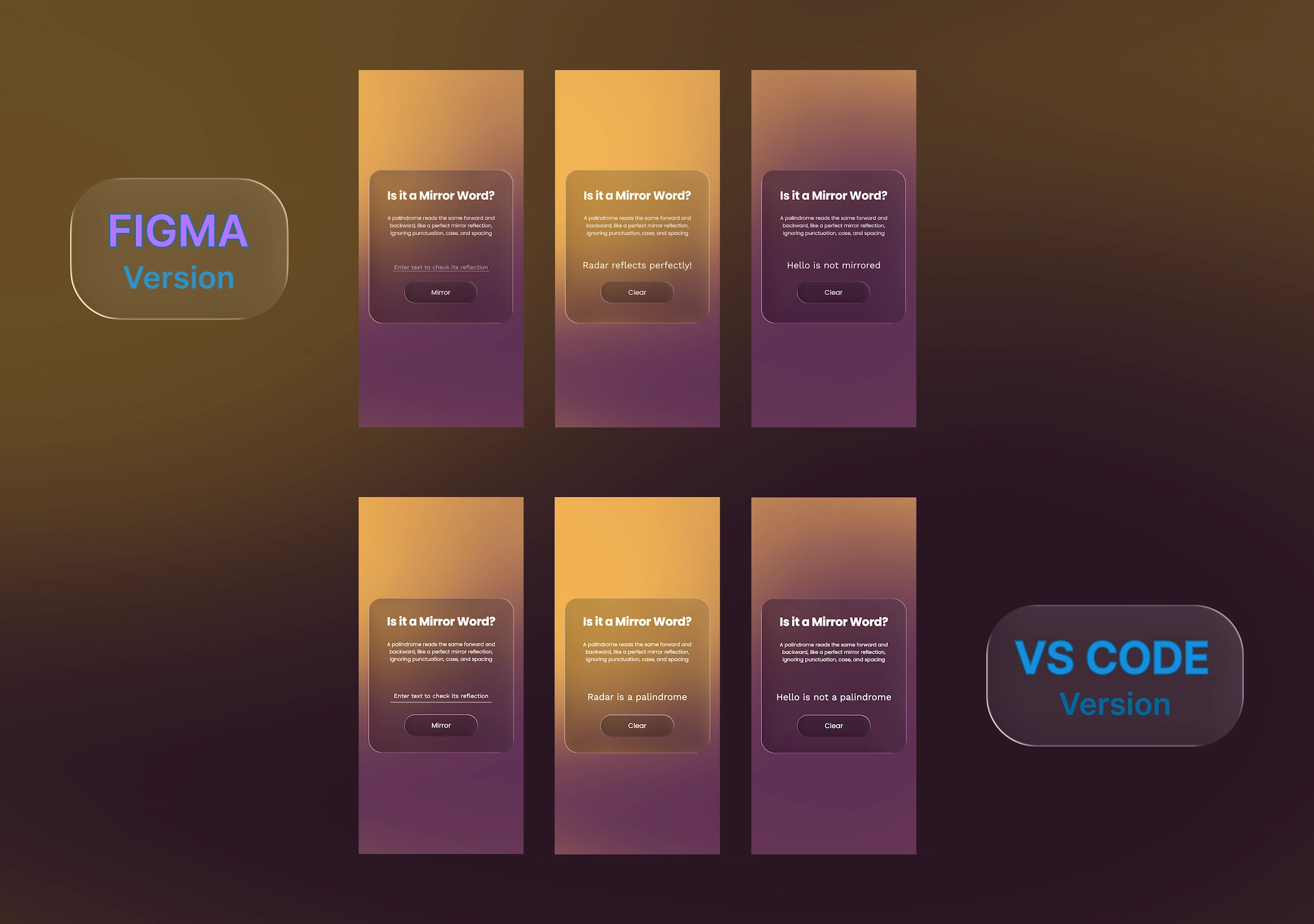
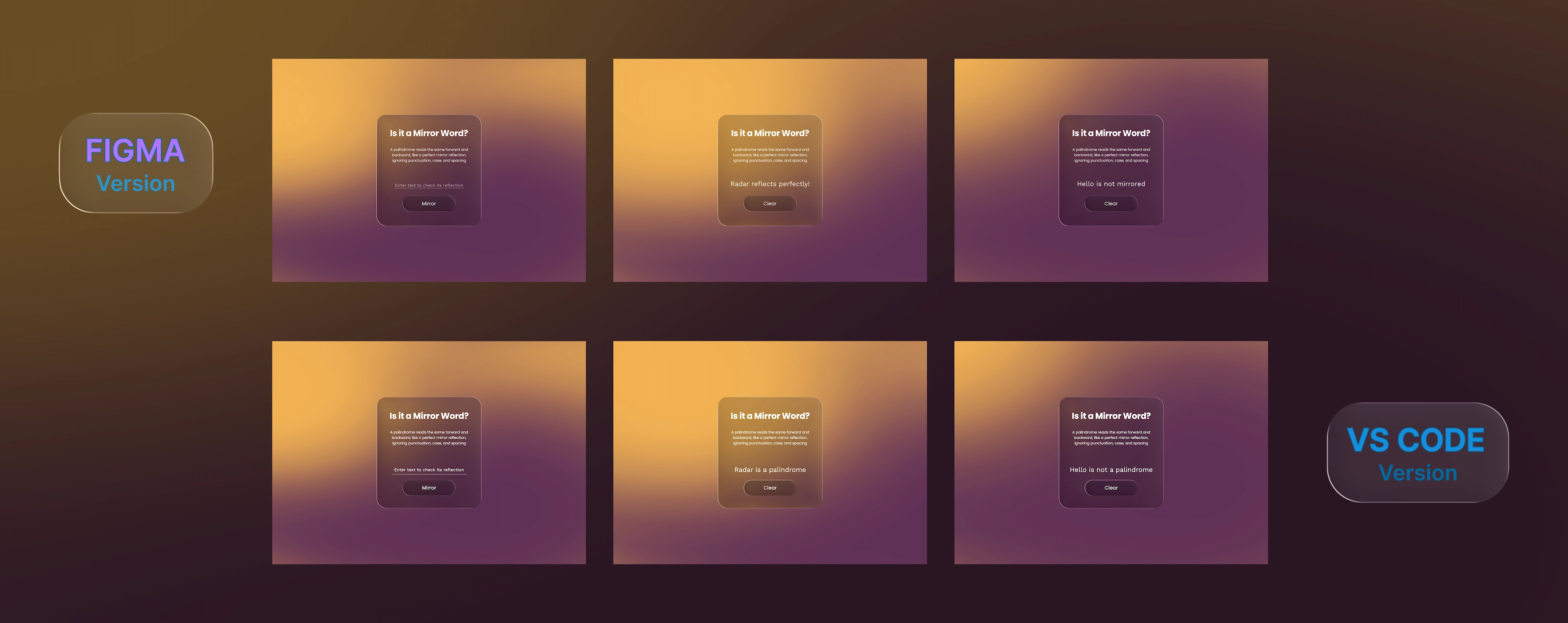
The Project
Palindrome Checker with complete design system and dynamic interface. An application that checks if a word or phrase is a palindrome, with smooth transitions between three different visual states and complete performance optimization.
Source Code
- index.html
- styles.css
- script.js
<!DOCTYPE html>
<html lang="en">
<head>
    <meta charset="UTF-8" />
    <meta name="viewport" content="width=device-width, initial-scale=1.0" />
    <link rel="preconnect" href="https://fonts.googleapis.com">
    <link rel="preconnect" href="https://fonts.gstatic.com" crossorigin>
    <link href="https://fonts.googleapis.com/css2?family=Poppins:ital,wght@0,100;0,200;0,300;0,400;0,500;0,600;0,700;0,800;0,900;1,100;1,200;1,300;1,400;1,500;1,600;1,700;1,800;1,900&family=Work+Sans:ital,wght@0,100..900;1,100..900&display=swap" rel="stylesheet">
    <link rel="stylesheet" href="styles.css">
    <link rel="preload" as="image" href="https://github.com/user-attachments/assets/1a1259f0-0b84-478b-a26f-460d2228203d">
    <link rel="preload" as="image" href="https://github.com/user-attachments/assets/99a6c549-5d45-4a36-8354-1c8039c4f7cb">
    <link rel="preload" as="image" href="https://github.com/user-attachments/assets/d1126873-ad30-4742-a1e2-d050088f0af9">
    <link rel="preload" as="image" href="https://github.com/user-attachments/assets/3b636ec0-524b-40ae-8dbc-a872ebbb49a4">
    <link rel="preload" as="image" href="https://github.com/user-attachments/assets/9ac63aa1-47ba-41f1-b006-7aba6de92e95">
    <link rel="preload" as="image" href="https://github.com/user-attachments/assets/9662ce58-c14a-4212-ab5d-2ae226c9ae85">
    <link rel="preload" as="image" href="https://github.com/user-attachments/assets/77d3bd71-77f1-48aa-9e39-718d601c0239">
    <link rel="preload" as="image" href="https://github.com/user-attachments/assets/ed4bba81-e535-43a9-958b-af6d0a0d4964">
    <link rel="preload" as="image" href="https://github.com/user-attachments/assets/e9db924c-83b1-45db-a9ef-5fe17db3b56a">
    <link rel="preload" as="image" href="https://github.com/user-attachments/assets/989f36b1-383c-4a3b-b1c7-472d7aa38d05">
    <link rel="preload" as="image" href="https://github.com/user-attachments/assets/950ca8ae-6e4d-4598-bd38-15989d782771">
    <link rel="preload" as="image" href="https://github.com/user-attachments/assets/076efb6d-4a7c-46e2-85b7-81606216149b">
    <link rel="preload" as="image" href="https://github.com/user-attachments/assets/33f4a4cd-86c5-42da-be16-6292ec264251">
    <link rel="preload" as="image" href="https://github.com/user-attachments/assets/1b3257a4-eb5a-4245-9c50-2bd43d5f9926">
    <link rel="preload" as="image" href="https://github.com/user-attachments/assets/df01223b-9bae-4707-869b-b188b1ac191c">
    <link rel="preload" as="image" href="https://github.com/user-attachments/assets/2a4e62bd-e766-4fcb-a771-eecbf2d5d713">
    <link rel="preload" as="image" href="https://github.com/user-attachments/assets/318b9e76-1290-448d-b6cd-242103a60163">
    <link rel="preload" as="image" href="https://github.com/user-attachments/assets/e6b2e38e-a467-4b18-bba6-31c783b1896b">
    <link rel="preload" as="image" href="https://github.com/user-attachments/assets/e6edc35e-a909-4cc0-8241-ee83b1ec35b7">
    <link rel="preload" as="image" href="https://github.com/user-attachments/assets/518957aa-ca39-4456-bd8e-d69fd2497ae0">
</head>
<body>
    <div class="card">
        <div class="title">Is it a Mirror Word?</div>
        <div class="description">A palindrome reads the same forward and<br>backward, like a perfect mirror reflection,<br>ignoring punctuation, case, and spacing</div>
        <div class="input-container">
            <input type="text" placeholder="Enter text to check its reflection" id="text-input">
        </div>
        <div class="button-container">
            <button id="check-btn">Mirror</button>
        </div>
        <div id="result" class="hidden"></div>
    </div>
    <script src="script.js"></script>
</body>
</html>
:root {

    /* Every Page */
    --background-button-hover: url("https://github.com/user-attachments/assets/d1126873-ad30-4742-a1e2-d050088f0af9");
    --color-text-primary: #fff;
    --font-style: normal;
    --title-letter-spacing: -0.56px;
    --font-family-primary: "Poppins", sans-serif;
    --font-family-secondary: "Work Sans", sans-serif;
    --font-size-title: 39.17px;
    --font-size-button: 22.38px;
    --font-weight-primary: 700;
    --font-size-description: 16.79px;
    --font-weight-secondary: 400;
    --size-card-width: 481px;
    --size-card-height: 512px;
    --size-card-border-radius: 46px;
    --size-button-width: 243px;
    --size-button-height: 73px;
    --size-button-border-radius: 50px;
    --space-above-title: 55.86px;
    --space-above-description: 33.43px;
    --space-above-button: 35.74px;
    --space-below-button: 55.86px;

    /* Default Page */
    --background-page-default: url("https://github.com/user-attachments/assets/1a1259f0-0b84-478b-a26f-460d2228203d");
    --background-card-default: url("https://github.com/user-attachments/assets/99a6c549-5d45-4a36-8354-1c8039c4f7cb");
    --background-button-default: url("https://github.com/user-attachments/assets/3b636ec0-524b-40ae-8dbc-a872ebbb49a4");
    --input-border-width: 1.5px;
    --input-border-color-default: rgba(255, 255, 255, 0.60);
    --color-placeholder-text-focus:  rgba(255, 255, 255, 0.30);
    --input-border-color-focus: #fff;
    --font-size-input: 20px;
    --size-input-width: 340px;
    --size-input-height: 30px;
    --space-above-input: 89.97px;
    --padding-text-input: 8px;

    /* Palindrome Checked Page AND Palindrome Not Match Page*/
    --font-size-result: 30.78px;
    --top-result: 78px;

    /* Palindrome Checked Page */
    --background-page-palindrome: url("https://github.com/user-attachments/assets/9ac63aa1-47ba-41f1-b006-7aba6de92e95");
    --background-card-palindrome: url("https://github.com/user-attachments/assets/9662ce58-c14a-4212-ab5d-2ae226c9ae85");
    --background-button-palindrome: url("https://github.com/user-attachments/assets/77d3bd71-77f1-48aa-9e39-718d601c0239");

    /* Palindrome Not Match Page */
    --background-page-not-palindrome: url("https://github.com/user-attachments/assets/ed4bba81-e535-43a9-958b-af6d0a0d4964");
    --background-card-not-palindrome: url("https://github.com/user-attachments/assets/e9db924c-83b1-45db-a9ef-5fe17db3b56a");
    --background-button-not-palindrome: url("https://github.com/user-attachments/assets/989f36b1-383c-4a3b-b1c7-472d7aa38d05");

}

/* RESET */
* {
    margin: 0;
    padding: 0;
    box-sizing: border-box;
}

/* TEXT */

body {
    margin: 0;
    padding: 0;
    transition: background-image 1s ease-in-out;
}

html {
    font-style: normal;
    line-height: normal;
    background-image: var(--background-page-default);
    background-size: cover;
    background-repeat: no-repeat;
    background-size: cover;
    background-position: center;
    background-attachment: fixed;
}

.title, .description, #check-btn {
    color: var(--color-text-primary);
    font-family: var(--font-family-primary);
    font-style: var(--font-style);
}

.description, .placeholder, #check-btn, #result {
    font-weight: var(--font-weight-secondary);
}

.title {
    font-size: var(--font-size-title);
    font-weight: var(--font-weight-primary);
    letter-spacing: -0.56px;
    margin-top: var(--space-above-title);
}

.description {
    font-size: var(--font-size-description);
    margin-top: var(--space-above-description);
}

.placeholder, #result {
    font-family: var(--font-family-secondary);
}

.placeholder {
    color: var(--color-placeholder-default);
    font-family: var(--font-family-secondary);
    font-size: var(--font-size-input);
}

#result {
    color: var(--color-text-primary);
    font-size: var(--font-size-result);
    top: var(--top-result);
    left: 0;
    width: 100%;
    height: 100%;
    display: flex;
    justify-content: center;
    align-items: center;
    position: absolute;
    pointer-events: none;
    z-index: 10;
}


.input-container {
    margin-top: var(--space-above-input);
    position: relative;
    width: var(--size-input-width);
    height: var(--size-input-height);
}

#text-input {
    outline: 0;
    padding: var(--padding-text-input);
    width: 100%;
    border: none;
    background: transparent;
    color: var(--color-text-primary);
    font-family: "Work Sans";
    font-size: var(--font-size-input);
    border-bottom: var(--input-border-width) solid var(--input-border-color-default);
    text-align: center;
    transition: width 0.2s ease;
}

#text-input::placeholder {
    color: var(--color-placeholder-default);
}

#text-input:focus {
    border-bottom-color: var(--input-border-color-focus);;
    transition: border-bottom 0.3s ease;
}

/* BOX */

.card {
    width: var(--size-card-width);
    height: var(--size-card-height);
    border-radius: var(--size-card-border-radius);
    background-image: var(--background-card-default);
    position: absolute;
    top: 50%;
    left: 50%;
    transform: translate(-50%, -50%);
    display: flex;
    flex-direction: column;
    justify-content: center;
    align-items: center;
    text-align: center;
}

#check-btn {
    font-size: var(--font-size-button);
    display: flex;
    margin-top: var(--space-above-button);
    margin-bottom: var(--space-below-button);
    display: flex;
    width: var(--size-button-width);
    height: var(--size-button-height);
    padding: 14px;
    justify-content: center;
    align-items: center;
    gap: 14px;
    border-radius: var(--size-card-border-radius);
    background-image: var(--background-button-default);
    border: none;
    transition: background-image 0.5s ease, transform 0.25s ease;
}

#check-btn:hover {
    background-image: var(--background-button-hover);
    cursor: pointer;
    transform: scale(1.02);

}

#check-btn:active {
    transform: scale(0.95);
}

.hidden-input {
    visibility: hidden;
    position: absolute;
    top: 0;
    left: 0;
    width: 100%;
}

.hidden {
    display: none;
}

html.palindrome-background {
    background-image: var(--background-page-palindrome);
}

html.not-palindrome-background {
    background-image: var(--background-page-not-palindrome);
}

.card.palindrome-card {
    background-image: var(--background-card-palindrome);
}

.card.not-palindrome-card {
    background-image: var(--background-card-not-palindrome);
}

#check-btn.palindrome-button {
    background-image: var(--background-button-palindrome);
}

#check-btn.not-palindrome-button {
    background-image: var(--background-button-not-palindrome);
}

#text-input:focus::placeholder {
    color: var(--color-placeholder-text-focus);
    transition: color 0.25s ease-out;
}

@media (max-width: 768px) {
    :root {
    /* Every Page */
    --background-button-hover: url("https://github.com/user-attachments/assets/518957aa-ca39-4456-bd8e-d69fd2497ae0");
    --color-text-primary: #fff;
    --font-style: normal;
    --title-letter-spacing: -0.56px;
    --font-family-primary: "Poppins", sans-serif;
    --font-family-secondary: "Work Sans", sans-serif;
    --font-size-title: 28px;
    --font-size-button: 16px;
    --font-weight-primary: 700;
    --font-size-description: 12px;
    --font-weight-secondary: 400;
    --size-card-width: 344px;
    --size-card-height: 366px;
    --size-card-border-radius: 32px;
    --size-button-width: 174px;
    --size-button-height: 52px;
    --size-button-border-radius: 36px;
    --space-above-title: 34px;
    --space-above-description: 24px;
    --space-above-button: 25px;
    --space-below-button: 39px;

    /* Default Page */
    --background-page-default: url("https://github.com/user-attachments/assets/950ca8ae-6e4d-4598-bd38-15989d782771");
    --background-card-default: url("https://github.com/user-attachments/assets/076efb6d-4a7c-46e2-85b7-81606216149b");
    --background-button-default: url("https://github.com/user-attachments/assets/33f4a4cd-86c5-42da-be16-6292ec264251");
    --input-border-width: 1.5px;
    --input-border-color-default: rgba(255, 255, 255, 0.60);
    --color-placeholder-text-focus:  rgba(255, 255, 255, 0.30);
    --input-border-color-focus: #fff;
    --font-size-input: 14px;
    --size-input-width: 240px;
    --size-input-height: 42px;
    --space-above-input: 64px;
    --padding-text-input: 6px;

    /* Palindrome Checked Page AND Palindrome Not Match Page*/
    --font-size-result: 22px;
    --top-result: 50px;

    /* Palindrome Checked Page */
    --background-page-palindrome: url("https://github.com/user-attachments/assets/1b3257a4-eb5a-4245-9c50-2bd43d5f9926");
    --background-card-palindrome: url("https://github.com/user-attachments/assets/df01223b-9bae-4707-869b-b188b1ac191c");
    --background-button-palindrome: url("https://github.com/user-attachments/assets/2a4e62bd-e766-4fcb-a771-eecbf2d5d713");

    /* Palindrome Not Match Page */
    --background-page-not-palindrome: url("https://github.com/user-attachments/assets/318b9e76-1290-448d-b6cd-242103a60163");
    --background-card-not-palindrome: url("https://github.com/user-attachments/assets/e6b2e38e-a467-4b18-bba6-31c783b1896b");
    --background-button-not-palindrome: url("https://github.com/user-attachments/assets/e6edc35e-a909-4cc0-8241-ee83b1ec35b7");
    }
}
const textInput = document.getElementById("text-input");
const checkBtn = document.getElementById("check-btn");
const result = document.getElementById("result");
const card = document.querySelector(".card");
const htmlElement = document.documentElement;
let lastValue = "";


const checkPalindrome = () => {
    const userValue = textInput.value;
    lastValue = userValue;

    if (userValue === "") {
        alert("Please input a value");
        return;
    }

    const cleanInput = userValue.toLowerCase().replace(/[^a-z0-9]/g, "");

    const reverseText = cleanInput.split("").reverse().join("");

    textInput.classList.add("hidden-input");
    result.classList.remove("hidden");


    if (cleanInput===reverseText) {
        result.textContent = `${userValue} is a palindrome`;
        htmlElement.classList.add("palindrome-background");
        card.classList.add("palindrome-card");
        checkBtn.classList.add("palindrome-button");
        checkBtn.textContent = "Clear";
    } else {
        result.textContent = `${userValue} is not a palindrome`;
        checkBtn.textContent = "Clear";
        htmlElement.classList.add("not-palindrome-background");
        card.classList.add("not-palindrome-card");
        checkBtn.classList.add("not-palindrome-button");
    }

};

const resetInterface = () => {
    textInput.value = "";
    textInput.classList.remove("hidden-input");
    result.textContent = "";
    result.classList.add("hidden");
    htmlElement.classList.remove("palindrome-background", "not-palindrome-background");
    card.classList.remove("palindrome-card", "not-palindrome-card");
    checkBtn.classList.remove("palindrome-button", "not-palindrome-button")
    checkBtn.textContent = "Mirror";
    lastValue = "";
}

checkBtn.addEventListener("click", () => {
    if (checkBtn.textContent === "Clear" && (textInput.value === lastValue || textInput.value === "")) {
        resetInterface();
    }
    else {
        checkPalindrome();
    }
})
The Most Fun Project of My Life!
This was the most fun code and design project of my life!
I connected so many dots. A few days ago I was in the car waiting for a person and while waiting I wondered: how do you replicate Apple's Liquid Glass with just CSS? Would React be necessary? I saw a tutorial that promised to achieve Liquid Glass with the simple lines of code it suggested, I didn't delve into it right then but as soon as I was about to look carefully at the tutorial the day before yesterday, when I started the project, I realized afterwards that React would be needed. This is because liquid glass isn't the simple background blur effect or the Aero design born with Windows Vista. It's much more complex, it's actually rich with advanced parameters that the blur effect can only dream of.
Internal Inspiration
I didn't need external inspiration this time, because I drew inspiration from my first app created with Figma. It was an assignment from the Breccia course I took, where I used some photos of my puppy Lucy when she was little.
I'm including two screenshots below:
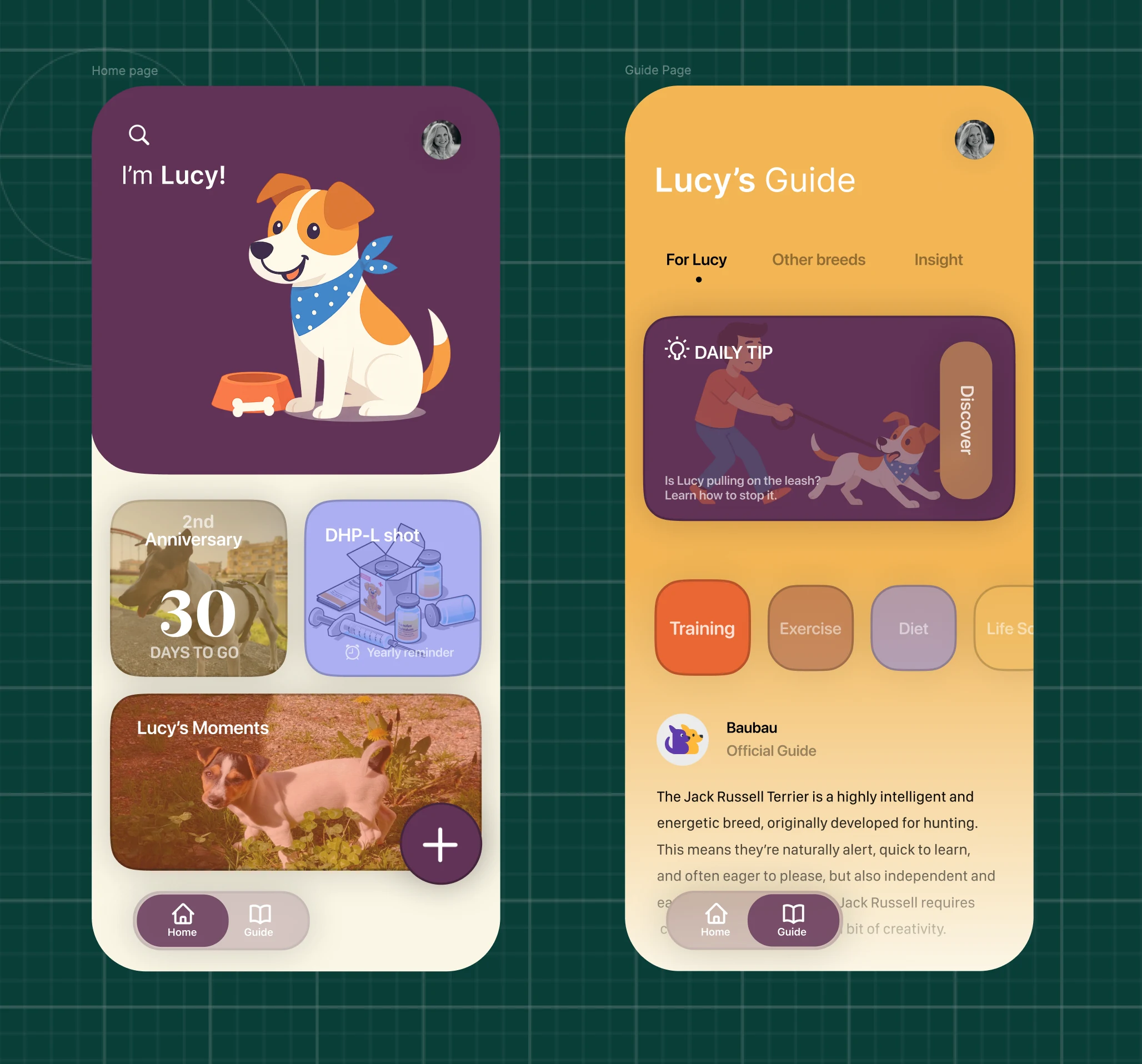
From it I took the color choices which I then adapted to the backgrounds of everything, from card to buttons, each extracted from every "situation" created in Figma, having first prototyped there, as always. To be honest I still need to research this but I suppose that giving different background-images to every element that always change compared to the next and previous screen isn't a best practice.
The Optimization Challenge
As long as I was testing the code with Live Server in Visual Studio Code there were no glitches/lag, because it had image availability at the speed of light, having them in the project folder; but when I exported them to GitHub, in the repository assets, I started seeing the limits. I subsequently tried to solve them with TinyPng but the results were very poor, I didn't even have control over the output quality. Then I came across other formats, particularly WebP but to no avail, it lost too much quality while keeping quality parameters at high levels.
The breakthrough was a program, totally open source, called ImageOptim, which made my computer work like never before: the CPU reached 92°C, this is because it runs completely locally. It reduced quality by just 30%, but it was enough. Now the application has no more glitches and images get pre-loaded thanks to the "preload" property that I had the pleasure of discovering today, while looking for ways to optimize the UX.
The Growth Sensation
I'm extremely happy with the result, because inspiration was practically nil and for this very reason I feel it's more "my" project compared to others, despite never ever having copied others' content, but especially it's this sensation of needing less and less inspiration that makes you perceive progress. It's like at the gym, after some years I could have created (and I did) a workout from scratch, even creatively, but not less technical for that.
The Three Non-Stop Days
It was 3 non-stop days, I only stopped to make a medical visit. I felt fatigue in the hardest moments, because I'd be lying if I said it was all simple, especially regarding JavaScript. CSS made me lose patience with element positioning but then I solved it and also understanding how to do it next time, it may seem strange but I used Refactoring UI principles and also the calculator to make it exactly like the Figma version, but JavaScript instead gave me problems not so much with calculations, but rather with buttons. A minimal modification, a minimal syntax oversight and I was back to square one. I certainly complicated my life by planning multiple interfaces but I'm happy this way.
The Three Edge Cases
Last curiosity, I changed phones almost a year ago to a foldable to take advantage of using it as a reader in the cafeteria at work and in moments where I would have risked wasting time, given that the small phone I had certainly wasn't created to increase productivity, I used it at most to read brief documents but it was always impossible to read books on it. Well I'm talking about the iPhone 12 mini, and it's right here that I understood Liquid Glass, beta after beta, improvement after improvement. But I don't just refer to this. I had the idea to use it as "prototype in progress" while using Figma on desktop, every modification made there I saw it materialize instantly also on the iPhone. I based the dimensions for the mobile version precisely by visualizing it step by step from there. It represents a true edge case, in fact, it remains inevitable that if the experience with it will be perfect, it will be even better with all others. And it's not over here, as written before my main phone is a foldable: without doing it on purpose I have 3 edge cases! Because the iPhone is the small phone, the foldable closed is the narrow phone, the foldable open is the huge phone. From time to time I adopted the previous prototype in progress process also with the foldable.
As always, as taught by Refactoring UI I started designing for mobile.
What I Learned
Advanced CSS Variables System:
- Complete design system with variables for every element
- Responsive variables that completely change between desktop and mobile
- CSS Variables for background-image dynamic switching
- Structured color system and spacing system
Performance Optimization:
rel="preload"for image pre-loading- Image optimization with ImageOptim
Complex State Management:
- JavaScript state tracking with
lastValuevariable - Dynamic button text change ("Mirror" ↔ "Clear")
- UI state synchronization between multiple elements
- Error handling for empty input validation
Advanced JavaScript Patterns:
- String manipulation for palindrome logic
toLowerCase(),replace()with regex,split(),reverse(),join()
Mobile-First Responsive Design:
- Edge case testing on 3 different devices
- Real-time prototype testing workflow
- Mobile-first approach as taught by Refactoring UI
User Experience Engineering:
- Accessibility with placeholder descriptions
- Immediate visual feedback for user actions
- Error prevention with input validation
Reflection
I'm becoming faster and faster and my interest isn't waning, quite the opposite.
Next Project: Learn the Date Object by Building a Date Formatter