Football Team Cards
The Project
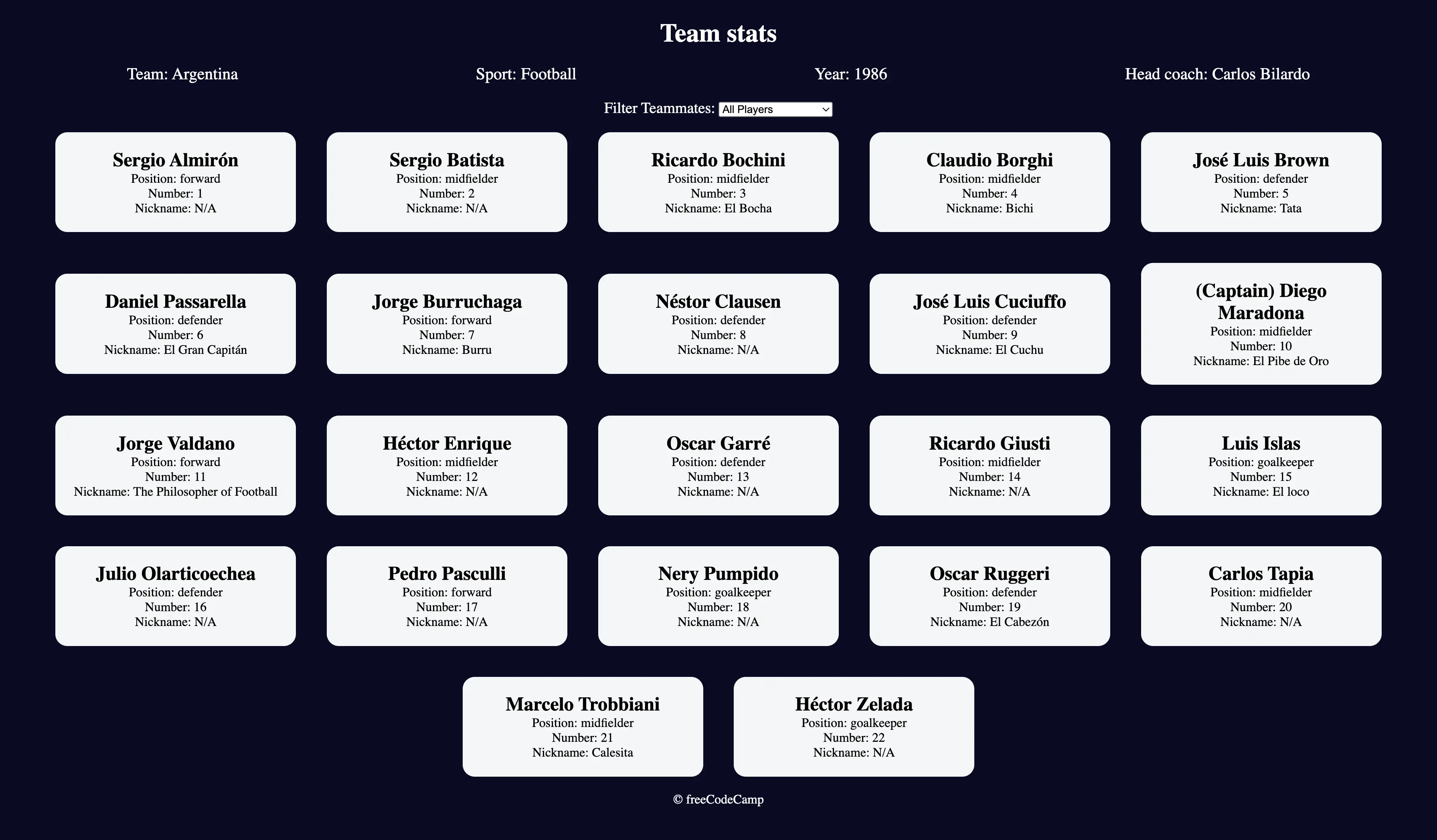
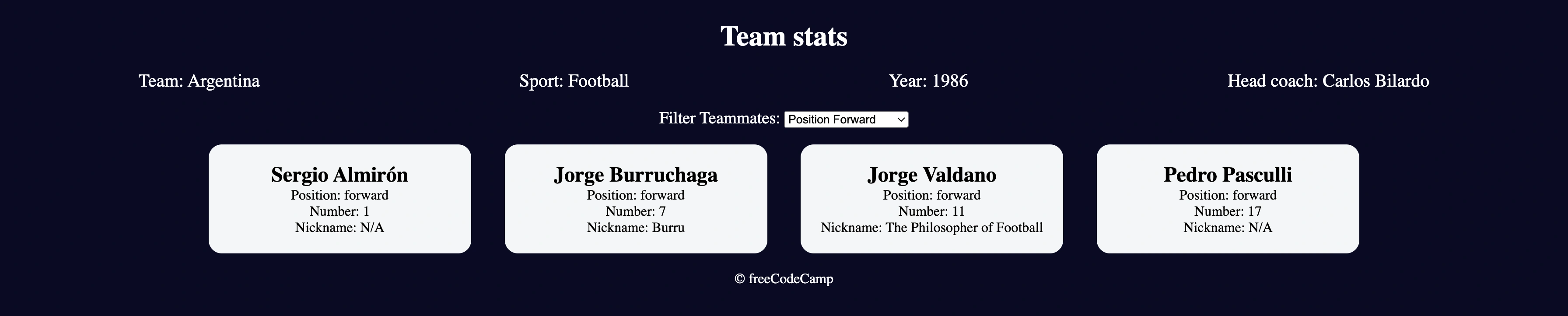
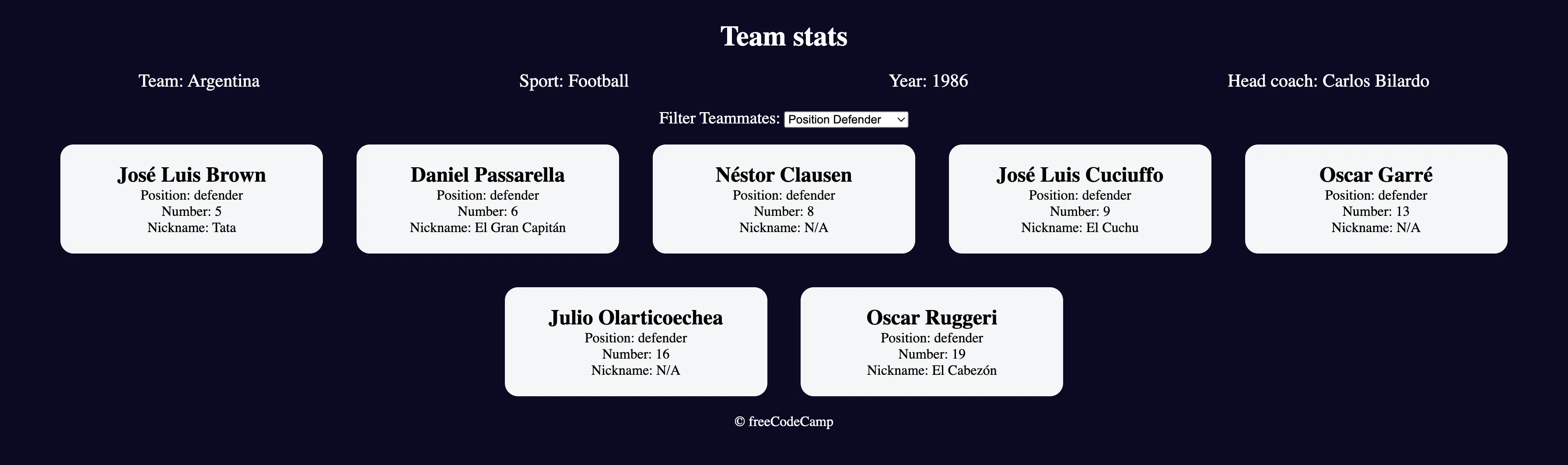
Interactive Football Team Cards with advanced filtering system, developed using modern JavaScript methods, destructuring, and flow control with switch statements. A digital museum of the 1986 Argentina team.
Source Code
- index.html
- styles.css
- script.js
<!DOCTYPE html>
<html lang="en">
<head>
<meta charset="UTF-8" />
<meta http-equiv="X-UA-Compatible" content="IE=edge" />
<meta name="viewport" content="width=device-width, initial-scale=1.0" />
<title>
Learn Modern JavaScript methods by building football team cards
</title>
<link rel="stylesheet" href="styles.css" />
</head>
<body>
<h1 class="title">Team stats</h1>
<main>
<div class="team-stats">
<p>Team: <span id="team"></span></p>
<p>Sport: <span id="sport"></span></p>
<p>Year: <span id="year"></span></p>
<p>Head coach: <span id="head-coach"></span></p>
</div>
<label class="options-label" for="players">Filter Teammates:</label>
<select name="players" id="players">
<option value="all">All Players</option>
<option value="nickname">Nicknames</option>
<option value="forward">Position Forward</option>
<option value="midfielder">Position Midfielder</option>
<option value="defender">Position Defender</option>
<option value="goalkeeper">Position Goalkeeper</option>
</select>
<div class="cards" id="player-cards">
<div class="player-card">
<h2>Sergio Almirón</h2>
<p>Position: forward</p>
<p>Number: 1</p>
<p>Nickname: N/A</p>
</div>
<div class="player-card">
<h2>Sergio Batista</h2>
<p>Position: midfielder</p>
<p>Number: 2</p>
<p>Nickname: N/A</p>
</div>
<div class="player-card">
<h2>Ricardo Bochini</h2>
<p>Position: midfielder</p>
<p>Number: 3</p>
<p>Nickname: El Bocha</p>
</div>
<div class="player-card">
<h2>Claudio Borghi</h2>
<p>Position: midfielder</p>
<p>Number: 4</p>
<p>Nickname: Bichi</p>
</div>
<div class="player-card">
<h2>José Luis Brown</h2>
<p>Position: defender</p>
<p>Number: 5</p>
<p>Nickname: Tata</p>
</div>
<div class="player-card">
<h2>Daniel Passarella</h2>
<p>Position: defender</p>
<p>Number: 6</p>
<p>Nickname: El Gran Capitán</p>
</div>
<div class="player-card">
<h2>Jorge Burruchaga</h2>
<p>Position: forward</p>
<p>Number: 7</p>
<p>Nickname: Burru</p>
</div>
<div class="player-card">
<h2>Néstor Clausen</h2>
<p>Position: defender</p>
<p>Number: 8</p>
<p>Nickname: N/A</p>
</div>
<div class="player-card">
<h2>José Luis Cuciuffo</h2>
<p>Position: defender</p>
<p>Number: 9</p>
<p>Nickname: El Cuchu</p>
</div>
<div class="player-card">
<h2>(Captain) Diego Maradona</h2>
<p>Position: midfielder</p>
<p>Number: 10</p>
<p>Nickname: El Pibe de Oro</p>
</div>
<div class="player-card">
<h2>Jorge Valdano</h2>
<p>Position: forward</p>
<p>Number: 11</p>
<p>Nickname: The Philosopher of Football</p>
</div>
<div class="player-card">
<h2>Héctor Enrique</h2>
<p>Position: midfielder</p>
<p>Number: 12</p>
<p>Nickname: N/A</p>
</div>
<div class="player-card">
<h2>Oscar Garré</h2>
<p>Position: defender</p>
<p>Number: 13</p>
<p>Nickname: N/A</p>
</div>
<div class="player-card">
<h2>Ricardo Giusti</h2>
<p>Position: midfielder</p>
<p>Number: 14</p>
<p>Nickname: N/A</p>
</div>
<div class="player-card">
<h2>Luis Islas</h2>
<p>Position: goalkeeper</p>
<p>Number: 15</p>
<p>Nickname: El loco</p>
</div>
<div class="player-card">
<h2>Julio Olarticoechea</h2>
<p>Position: defender</p>
<p>Number: 16</p>
<p>Nickname: N/A</p>
</div>
<div class="player-card">
<h2>Pedro Pasculli</h2>
<p>Position: forward</p>
<p>Number: 17</p>
<p>Nickname: N/A</p>
</div>
<div class="player-card">
<h2>Nery Pumpido</h2>
<p>Position: goalkeeper</p>
<p>Number: 18</p>
<p>Nickname: N/A</p>
</div>
<div class="player-card">
<h2>Oscar Ruggeri</h2>
<p>Position: defender</p>
<p>Number: 19</p>
<p>Nickname: El Cabezón</p>
</div>
<div class="player-card">
<h2>Carlos Tapia</h2>
<p>Position: midfielder</p>
<p>Number: 20</p>
<p>Nickname: N/A</p>
</div>
<div class="player-card">
<h2>Marcelo Trobbiani</h2>
<p>Position: midfielder</p>
<p>Number: 21</p>
<p>Nickname: Calesita</p>
</div>
<div class="player-card">
<h2>Héctor Zelada</h2>
<p>Position: goalkeeper</p>
<p>Number: 22</p>
<p>Nickname: N/A</p>
</div>
</div>
</main>
<footer>© freeCodeCamp</footer>
<script src="./script.js"></script>
</body>
</html>
*,
*::before,
*::after {
  box-sizing: border-box;
  margin: 0;
  padding: 0;
}

:root {
  --dark-grey: #0a0a23;
  --light-grey: #f5f6f7;
  --white: #ffffff;
  --black: #000;
}

body {
  background-color: var(--dark-grey);
  text-align: center;
  padding: 10px;
}

.title,
.options-label,
.team-stats,
footer {
  color: var(--white);
}

.title {
  margin: 1.3rem 0;
}

.team-stats {
  display: flex;
  justify-content: space-around;
  flex-wrap: wrap;
  font-size: 1.3rem;
  margin: 1.2rem 0;
}

.options-label {
  font-size: 1.2rem;
}

.cards {
  display: flex;
  flex-wrap: wrap;
  justify-content: center;
  align-items: center;
}

.player-card {
  background-color: var(--light-grey);
  padding: 1.3rem;
  margin: 1.2rem;
  width: 300px;
  border-radius: 15px;
}

@media (max-width: 768px) {
  .team-stats {
    flex-direction: column;
  }
}
const teamName = document.getElementById("team");
const typeOfSport = document.getElementById("sport");
const worldCupYear = document.getElementById("year");
const headCoach = document.getElementById("head-coach");
const playerCards = document.getElementById("player-cards");
const playersDropdownList = document.getElementById("players");
const myFavoriteFootballTeam = {
  team: "Argentina",
  sport: "Football",
  year: 1986,
  isWorldCupWinner: true,
  headCoach: {
    coachName: "Carlos Bilardo",
    matches: 7,
  },
  players: [
    {
      name: "Sergio Almirón",
      position: "forward",
      number: 1,
      isCaptain: false,
      nickname: null,
    },
    {
      name: "Sergio Batista",
      position: "midfielder",
      number: 2,
      isCaptain: false,
      nickname: null,
    },
     {
      name: "Ricardo Bochini",
      position: "midfielder",
      number: 3,
      isCaptain: false,
      nickname: "El Bocha",
    },
    {
      name: "Claudio Borghi",
      position: "midfielder",
      number: 4,
      isCaptain: false,
      nickname: "Bichi",
    },
    {
      name: "José Luis Brown",
      position: "defender",
      number: 5,
      isCaptain: false,
      nickname: "Tata",
    },
    {
      name: "Daniel Passarella",
      position: "defender",
      number: 6,
      isCaptain: false,
      nickname: "El Gran Capitán",
    },
    {
      name: "Jorge Burruchaga",
      position: "forward",
      number: 7,
      isCaptain: false,
      nickname: "Burru",
    },
    {
      name: "Néstor Clausen",
      position: "defender",
      number: 8,
      isCaptain: false,
      nickname: null,
    },
    {
      name: "José Luis Cuciuffo",
      position: "defender",
      number: 9,
      isCaptain: false,
      nickname: "El Cuchu",
    },
    {
      name: "Diego Maradona",
      position: "midfielder",
      number: 10,
      isCaptain: true,
      nickname: "El Pibe de Oro",
    },
    {
      name: "Jorge Valdano",
      position: "forward",
      number: 11,
      isCaptain: false,
      nickname: "The Philosopher of Football",
    },
    {
      name: "Héctor Enrique",
      position: "midfielder",
      number: 12,
      isCaptain: false,
      nickname: null,
    },
    {
      name: "Oscar Garré",
      position: "defender",
      number: 13,
      isCaptain: false,
      nickname: null,
    },
    {
      name: "Ricardo Giusti",
      position: "midfielder",
      number: 14,
      isCaptain: false,
      nickname: null,
    },
    {
      name: "Luis Islas",
      position: "goalkeeper",
      number: 15,
      isCaptain: false,
      nickname: "El loco",
    },
    {
      name: "Julio Olarticoechea",
      position: "defender",
      number: 16,
      isCaptain: false,
      nickname: null,
    },
    {
      name: "Pedro Pasculli",
      position: "forward",
      number: 17,
      isCaptain: false,
      nickname: null,
    },
    {
      name: "Nery Pumpido",
      position: "goalkeeper",
      number: 18,
      isCaptain: false,
      nickname: null,
    },
    {
      name: "Oscar Ruggeri",
      position: "defender",
      number: 19,
      isCaptain: false,
      nickname: "El Cabezón",
    },
    {
      name: "Carlos Tapia",
      position: "midfielder",
      number: 20,
      isCaptain: false,
      nickname: null,
    },
    {
      name: "Marcelo Trobbiani",
      position: "midfielder",
      number: 21,
      isCaptain: false,
      nickname: "Calesita",
    },
    {
      name: "Héctor Zelada",
      position: "goalkeeper",
      number: 22,
      isCaptain: false,
      nickname: null,
    },
  ],
};

Object.freeze(myFavoriteFootballTeam);
const { sport, team, year, players } = myFavoriteFootballTeam;
const { coachName } = myFavoriteFootballTeam.headCoach;

typeOfSport.textContent = sport;
teamName.textContent = team;
worldCupYear.textContent = year;
headCoach.textContent = coachName;

const setPlayerCards = (arr = players) => {
  playerCards.innerHTML += arr
    .map(
      ({ name, position, number, isCaptain, nickname }) => {
        return `
        <div class="player-card">
          <h2>${isCaptain ? "(Captain)" : ""} ${name}</h2>
          <p>Position: ${position}</p>
          <p>Number: ${number}</p>
          <p>Nickname: ${nickname !== null ? nickname : "N/A"}</p>
        </div>
      ` }
    )
    .join("");
};

playersDropdownList.addEventListener("change", (e) => {
  playerCards.innerHTML = "";

  switch (e.target.value) {
    case "nickname":
      setPlayerCards(players.filter((player) => player.nickname !== null));
      break;
    case "forward":
      setPlayerCards(players.filter((player) => player.position === "forward"));
      break;
    case "midfielder":
      setPlayerCards(
        players.filter((player) => player.position === "midfielder")
      );
      break;
    case "defender":
      setPlayerCards(
        players.filter((player) => player.position === "defender")
      );
      break;
    case "goalkeeper":
      setPlayerCards(
        players.filter((player) => player.position === "goalkeeper")
      );
      break;

    default:
      setPlayerCards()

  }
});
The Consolidated Approach
I adopted the same methodical approach used in the previous project. I now have new structured paragraphs ready to add to the vademecum. At this point it's as if I had developed two parallel vademecums, so it's finally time to unify and integrate all these new concepts into the main vademecum!
Deepening My Understanding of Switch Statements
I enjoyed this project, particularly the opportunity to deepen my understanding of the switch control statement. I thought I had reached the peak of code readability with if/else conditional statements, but switch might surpass them. However, I discovered they shouldn't be used arbitrarily, they have specific characteristics that this table summarizes:
Comparison Table: if...else if vs switch
| Feature | if... else if... else | switch |
|---|---|---|
| Type of Comparison | Flexible: Can evaluate complex and different conditions for each block (e.g. x > 10, y === 'test', z <= 5). | Rigid: Compares a single variable/expression with a series of constant values (e.g. x === 1, x === 'a'). |
| Readability | Less readable when there are many similar conditions. The variable to check is repeated in every if. | Much more readable and clean when comparing a single variable with many possible values. The intent is clearer. |
| Ideal Use Cases | When you need to check value ranges (e.g. score > 90) or multiple unrelated conditions. | When you have a list of specific and discrete values to check (e.g. days of the week, menu options, status codes). |
| "Default" Handling | Handled by the last else block, which catches all uncovered cases. | Handled by the default block, which has the same purpose and is highly recommended for robustness. |
| Performance | Generally considered slightly slower by modern JavaScript engines when there are many conditions, but the difference is almost always negligible. | In many scenarios, it can be slightly faster because JavaScript engines can optimize it better (e.g. using a jump table), but it shouldn't be the main reason for choice. |
| "Fall-through" Risk | Doesn't exist. Each block is isolated. | Exists if you forget the break statement. This can be both a bug and an advanced feature (for grouping cases). |
What I Learned
Modern JavaScript Destructuring:
- Object destructuring with
const { sport, team, year, players } = myFavoriteFootballTeam - Nested object destructuring with
const { coachName } = myFavoriteFootballTeam.headCoach - Array destructuring in function parameters
Switch Statement Mastery:
- Switch statement for handling multiple conditions
- Break statements to avoid fall-through behavior
- Default case for robust error handling
- Event value switching with
e.target.value
Advanced Array Methods:
.filter()for conditional array filtering.map()for array transformation to HTML- Method chaining for consecutive operations
Object Methods:
Object.freeze()for creating immutable objects- Object property access with dot notation
- Complex nested object navigation
Template Literals & Conditional Rendering:
- Advanced template literals with conditional logic
- Ternary operators for conditional content (
isCaptain ? "(Captain)" : "") - Null checking with conditional rendering (
nickname !== null ? nickname : "N/A")
Event Handling & DOM Manipulation:
- Event listener with event object destructuring
- Dynamic content clearing with
innerHTML = "" - Function calls with optional parameters
Modern ES6+ Features:
- Arrow functions for concise syntax
- Template literals for HTML generation
- Const/let for proper variable scoping
Reflection
I'm not a football lover, but I admit that freeCodeCamp's idea of creating a digital museum dedicated to legendary players of the past through code moved me.
Next Project: Learn localStorage by Building a Todo App