fCC Forum Leaderboard
The Project
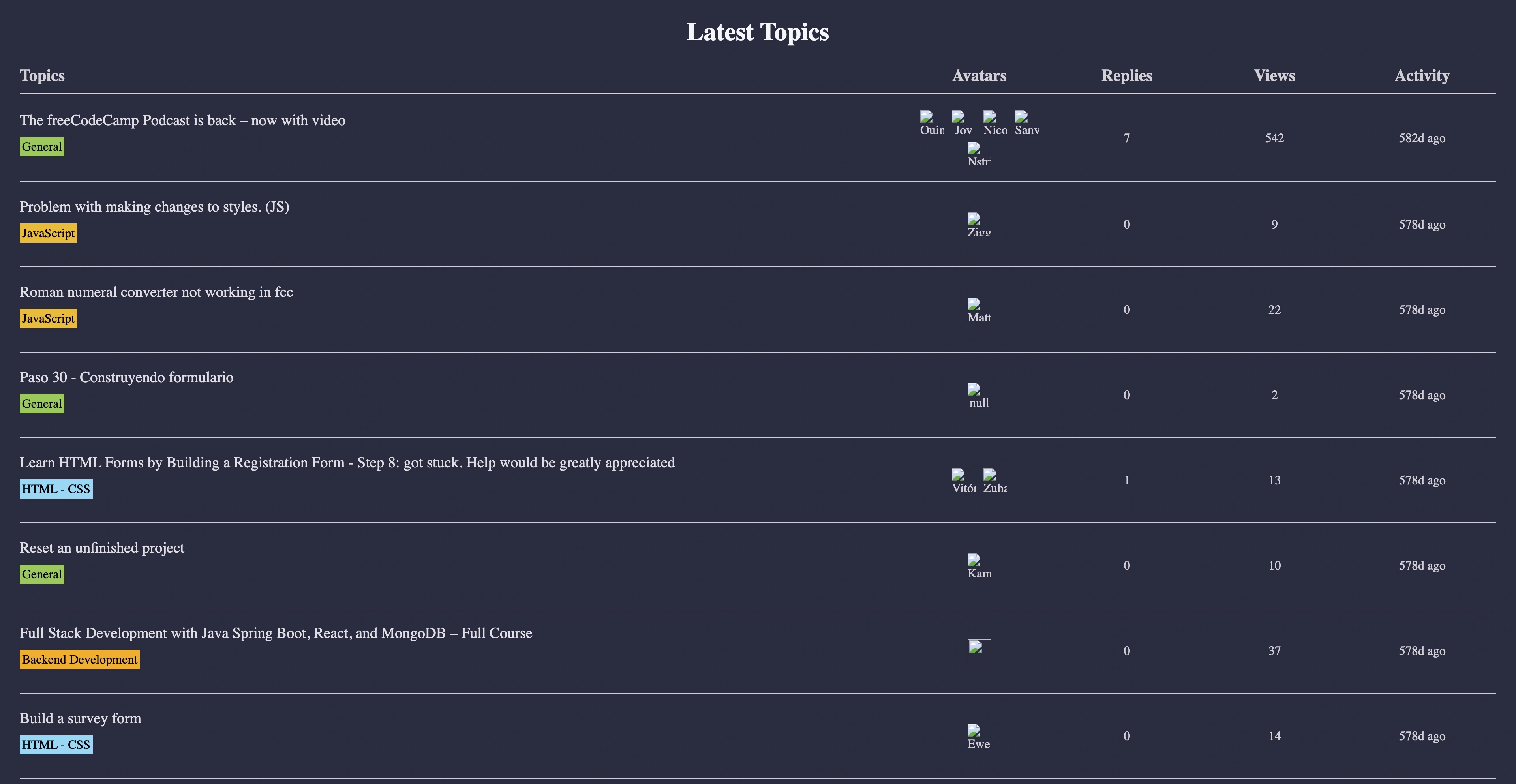
fCC Forum Leaderboard built with vanilla JavaScript, the Fetch API, and asynchronous programming, combining DOM manipulation, advanced destructuring, and data formatting inside a responsive table. A project that represents the natural step up from handling Promises with .then() to a more expressive and readable syntax with async/await.
Source Code
- index.html
- styles.css
- script.js
<!DOCTYPE html>
<html lang="en">
  <head>
    <meta charset="UTF-8" />
    <meta http-equiv="X-UA-Compatible" content="IE=edge" />
    <meta name="viewport" content="width=device-width, initial-scale=1.0" />
    <title>fCC Forum Leaderboard</title>
    <link rel="stylesheet" href="./styles.css" />
  </head>
  <body>
    <header>
      <nav>
        <img
          class="fcc-logo"
          src="https://cdn.freecodecamp.org/platform/universal/fcc_primary.svg"
          alt="freeCodeCamp logo"
        />
      </nav>
      <h1 class="title">Latest Topics</h1>
    </header>
    <main>
      <div class="table-wrapper">
        <table>
          <thead>
            <tr>
              <th id="topics">Topics</th>
              <th id="avatars">Avatars</th>
              <th id="replies">Replies</th>
              <th id="views">Views</th>
              <th id="activity">Activity</th>
            </tr>
          </thead>
          <tbody id="posts-container"></tbody>
        </table>
      </div>
    </main>
    <script src="./script.js"></script>
  </body>
</html>
* {
  margin: 0;
  padding: 0;
  box-sizing: border-box;
}

:root {
  --main-bg-color: #2a2a40;
  --black: #000;
  --dark-navy: #0a0a23;
  --dark-grey: #d0d0d5;
  --medium-grey: #dfdfe2;
  --light-grey: #f5f6f7;
  --peach: #f28373;
  --salmon-color: #f0aea9;
  --light-blue: #8bd9f6;
  --light-orange: #f8b172;
  --light-green: #93cb5b;
  --golden-yellow: #f1ba33;
  --gold: #f9aa23;
  --green: #6bca6b;
}

body {
  background-color: var(--main-bg-color);
}

nav {
  background-color: var(--dark-navy);
  padding: 10px 0;
}

.fcc-logo {
  width: 210px;
  display: block;
  margin: auto;
}

.title {
  margin: 25px 0;
  text-align: center;
  color: var(--light-grey);
}

.table-wrapper {
  padding: 0 25px;
  overflow-x: auto;
}

table {
  width: 100%;
  color: var(--dark-grey);
  margin: auto;
  table-layout: fixed;
  border-collapse: collapse;
  overflow-x: scroll;
}

#topics {
  text-align: start;
  width: 60%;
}

th {
  border-bottom: 2px solid var(--dark-grey);
  padding-bottom: 10px;
  font-size: 1.3rem;
}

td:not(:first-child) {
  text-align: center;
}

td {
  border-bottom: 1px solid var(--dark-grey);
  padding: 20px 0;
}

.post-title {
  font-size: 1.2rem;
  color: var(--medium-grey);
  text-decoration: none;
}

.category {
  padding: 3px;
  color: var(--black);
  text-decoration: none;
  display: block;
  width: fit-content;
  margin: 10px 0 10px;
}

.career {
  background-color: var(--salmon-color);
}

.feedback,
.html-css {
  background-color: var(--light-blue);
}

.support {
  background-color: var(--light-orange);
}

.general {
  background-color: var(--light-green);
}

.javascript {
  background-color: var(--golden-yellow);
}

.backend {
  background-color: var(--gold);
}

.python {
  background-color: var(--green);
}

.motivation {
  background-color: var(--peach);
}

.avatar-container {
  display: flex;
  justify-content: center;
  gap: 10px;
  flex-wrap: wrap;
}

.avatar-container img {
  width: 30px;
  height: 30px;
}

@media (max-width: 750px) {
  .table-wrapper {
    padding: 0 15px;
  }

  table {
    width: 700px;
  }

  th {
    font-size: 1.2rem;
  }

  .post-title {
    font-size: 1.1rem;
  }
}
const forumLatest = "https://cdn.freecodecamp.org/curriculum/forum-latest/latest.json";
const forumTopicUrl = "https://forum.freecodecamp.org/t/";
const forumCategoryUrl = "https://forum.freecodecamp.org/c/";
const avatarUrl = "https://sea1.discourse-cdn.com/freecodecamp";

const postsContainer = document.getElementById("posts-container");

const allCategories = {
  299: { category: "Career Advice", className: "career" },
  409: { category: "Project Feedback", className: "feedback" },
  417: { category: "freeCodeCamp Support", className: "support" },
  421: { category: "JavaScript", className: "javascript" },
  423: { category: "HTML - CSS", className: "html-css" },
  424: { category: "Python", className: "python" },
  432: { category: "You Can Do This!", className: "motivation" },
  560: { category: "Backend Development", className: "backend" },
};

const forumCategory = (id) => {
  let selectedCategory = {};

  if (allCategories.hasOwnProperty(id)) {
    const { className, category } = allCategories[id];

    selectedCategory.className = className;
    selectedCategory.category = category;
  } else {
    selectedCategory.className = "general";
    selectedCategory.category = "General";
    selectedCategory.id = 1;
  }
  const url = `${forumCategoryUrl}${selectedCategory.className}/${id}`;
  const linkText = selectedCategory.category;
  const linkClass = `category ${selectedCategory.className}`;

  return `<a href="${url}" class="${linkClass}" target="_blank">
    ${linkText}
  </a>`;
};

const timeAgo = (time) => {
  const currentTime = new Date();
  const lastPost = new Date(time);

  const timeDifference = currentTime - lastPost;
  const msPerMinute = 1000 * 60;

  const minutesAgo = Math.floor(timeDifference / msPerMinute);
  const hoursAgo = Math.floor(minutesAgo / 60);
  const daysAgo = Math.floor(hoursAgo / 24);

  if (minutesAgo < 60) {
    return `${minutesAgo}m ago`;
  }

  if (hoursAgo < 24) {
    return `${hoursAgo}h ago`;
  }

  return `${daysAgo}d ago`;
};

const viewCount = (views) => {
  const thousands = Math.floor(views / 1000);

  if (views >= 1000) {
    return `${thousands}k`;
  }

  return views;
};

const avatars = (posters, users) => {
  return posters
    .map((poster) => {
      const user = users.find((user) => user.id === poster.user_id);
      if (user) {
        const avatar = user.avatar_template.replace(/{size}/, 30);
        const userAvatarUrl = avatar.startsWith("/user_avatar/")
          ? avatarUrl.concat(avatar)
          : avatar;
        return `<img src="${userAvatarUrl}" alt="${user.name}" />`;
      }
    })
    .join("");
};

const fetchData = async () => {
  try {
    const res = await fetch(forumLatest);
    const data = await res.json();
    showLatestPosts(data);
  } catch (err) {
    console.log(err);
  }
};

fetchData();

const showLatestPosts = (data) => {
  const { topic_list, users } = data;
  const { topics } = topic_list;

  postsContainer.innerHTML = topics.map((item) => {
    const {
      id,
      title,
      views,
      posts_count,
      slug,
      posters,
      category_id,
      bumped_at,
    } = item;

    return `
    <tr>
      <td>
        <a class="post-title" target="_blank" href="${forumTopicUrl}${slug}/${id}">${title}</a>

        ${forumCategory(category_id)}
      </td>
      <td>
        <div class="avatar-container">
          ${avatars(posters, users)}
        </div>
      </td>
      <td>${posts_count - 1}</td>
      <td>${viewCount(views)}</td>
      <td>${timeAgo(bumped_at)}</td>
    </tr>`;
  }).join("");
};
The Project and the “Right Feeling”
This was a really interesting project, and it became clear why.
I realized that the exercises I enjoy the most are the ones where I can mix JavaScript with HTML: the exercise feels beautiful, I don’t do it on purpose but every time I use innerHTML I smile. There’s no better way to wrap up this part of JavaScript, since React is exactly this, JavaScript embracing HTML (or rather, JSX). With each new step, I feel more and more that I’m exactly where I’m supposed to be, and that feeling fills me with joy.
The Level Up: From .then() to async/await
In this project, there was a real step up in how I think about asynchronicity.
The previous project (fCC News Authors Page) used the .then().catch() chain, which is like a manual gearbox in a car: powerful, but more verbose, with many steps that need to be explicitly wired together. In this project, instead, I started using async/await, meaning the same engine (Promises) but with an automatic gearbox: the code flows from top to bottom as if it were synchronous, while remaining fully asynchronous under the hood.
In synchronous code, each instruction waits for the previous one to finish before starting. I fully grasped the concept with this analogy: synchronous code is like a cook who puts bread in the toaster and stands there staring at it until it pops up, blocking everything else.
In asynchronous code, instead, you start a slow operation (like a fetch to the server, the “toaster”), and while that operation runs in the background the program keeps executing other instructions, just like an efficient cook who starts the toast and, in the meantime, grabs the milk, prepares the cup, and only goes back to the toaster when it beeps.
This led to a very practical insight: thanks to asynchronicity, you can start the fetch, show a loading indicator, keep the interface responsive, and only update the UI when the Promise is resolved, delivering a smooth experience even when the server takes some time to respond.
Coming back to async/await, the key point is that they don’t introduce a new mental model: it is yet another case of syntactic sugar, this time for Promises. What previously was written as a .then() / .catch() chain, now is expressed through:
async functionto “mark” the function as asynchronousawaitto wait for Promises to resolve (for examplefetch,res.json())try...catchto handle errors in a way that feels very similar to synchronous code (as with.catch((err) => {})
The result? Same logic, but much more readable.
One thing I would do differently is the use of the .concat() method to join strings. With template literals (${...}) the code would be more readable, avoiding that subject–verb–object method call style that unnecessarily complicates such a simple operation.
To be specific, here's what I mean:
transform:
// Solution required by the tutorial (.concat Method)
const userAvatarUrl = avatar.startsWith("/user_avatar/")
  ? avatarUrl.concat(avatar)
  : avatar;
into:
// Solution with Template Literal (More readable)
const userAvatarUrl = avatar.startsWith("/user_avatar/")
  ? `${avatarUrl}${avatar}`
  : avatar;
What I Learned
Async/Await and try/catch:
- Declaring a function with
asyncallows the use ofawaitinside it to “pause” execution until a Promise resolves, while still not blocking the main thread. await fetch(url)and thenawait res.json()replace the.then()chain, making the flow much closer to synchronous code and therefore easier to read.- The
try { ... } catch (err) { ... }block becomes the idiomatic way to handle asynchronous errors, unifying network, parsing, and logic errors in a single place.
Destructuring on nested objects:
- The multi-level destructuring
const { topic_list, users } = data; const { topics } = topic_list;helps navigate complex JSON responses without constantly using deep dot notation. - Destructuring each
topicdirectly insideshowLatestPostsmakes it clear which fields are actually used and reduces visual noise.const { id, title, views, posts_count, slug, posters, category_id, bumped_at } = item;
Array methods to transform data into UI:
.map()was central to transforming thetopicsarray into table rows, returning a single HTML string viajoin("")assigned once toinnerHTML..find()was used to cross-referenceposterswithusersto get avatar data, showing how multiple collections can be combined in a single pass..join("")after.map()avoids repeated+=concatenations and is both more efficient and more readable.
Pure helper functions for data formatting:
timeAgo(bumped_at)encapsulates the time-difference logic in minutes, hours, and days, turning raw timestamps into readable strings like10m ago,3h ago, or2d ago.viewCount(views)introduces compact formatting logic (1500→1k), clearly separating presentation concerns from the rest of the code.- These pure functions are easy to test and reuse in different contexts.
Practical use of maps and configuration objects:
- The
allCategoriesobject works as a small configuration map to translatecategory_idintocategoryandclassName, showing how to centralize mapping rules between API data and UI. - The
forumCategory(category_id)function generates the category link markup by combining these metadata dynamically instead of scattering mapping logic inside the template.
Template literals for dynamic HTML:
- Using multi-line template literals to generate
<tr>...</tr>and<a>...</a>made it natural to interpolate JavaScript variables directly into HTML. - This approach is very close to the way libraries like React think, where structured data is mapped directly to UI components.
“One-shot” rendering pattern:
- Assigning
postsContainer.innerHTML = topics.map(...).join("");in a single step avoids repeated DOM updates and layout recalculations compared to updating the DOM inside a loop. - This pattern marks an important step towards a more declarative way of thinking about rendering, rather than an imperative one.
Next Project: Build an RPG Creature Search App (Certification Project)