Dice Game
The Project
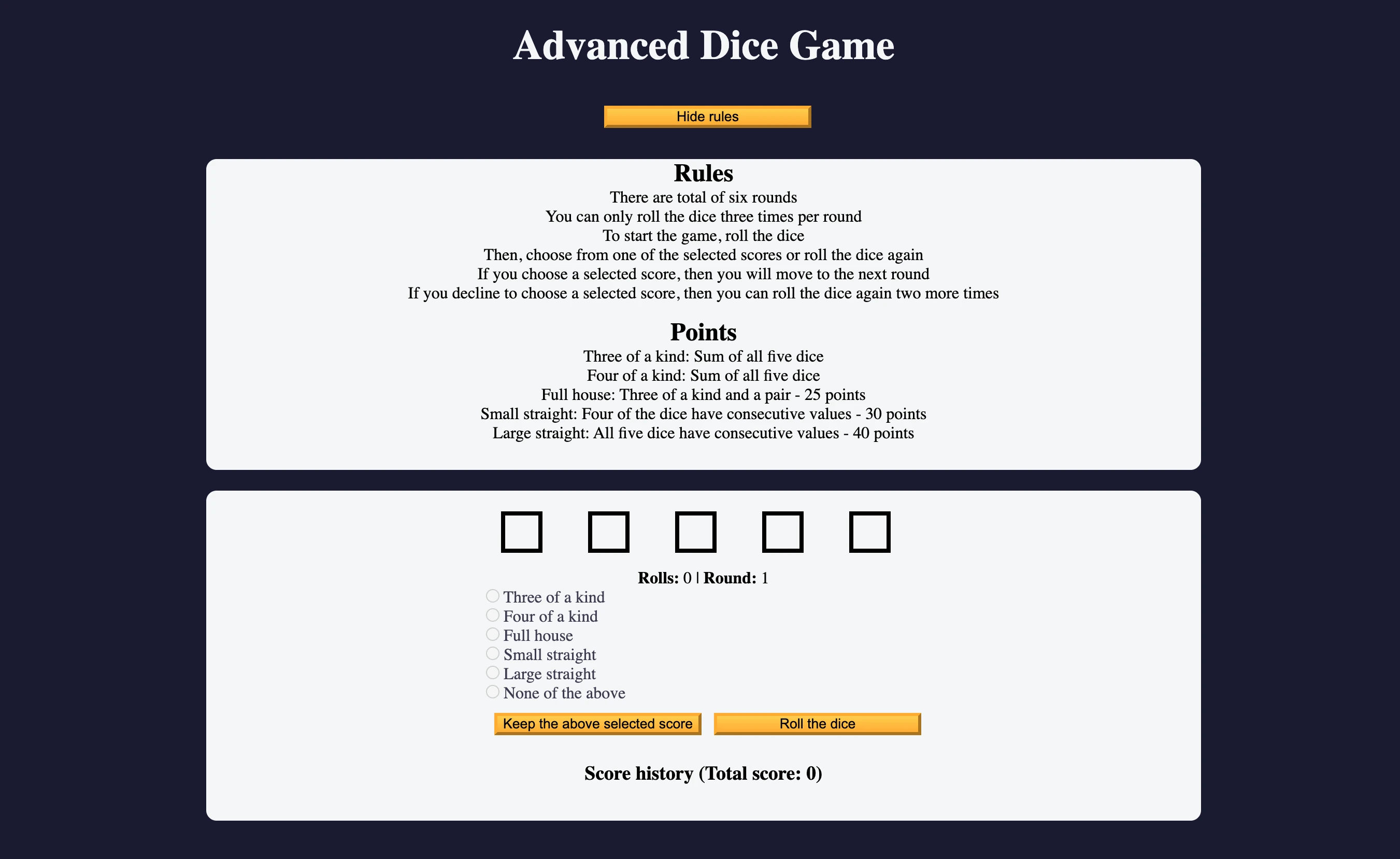
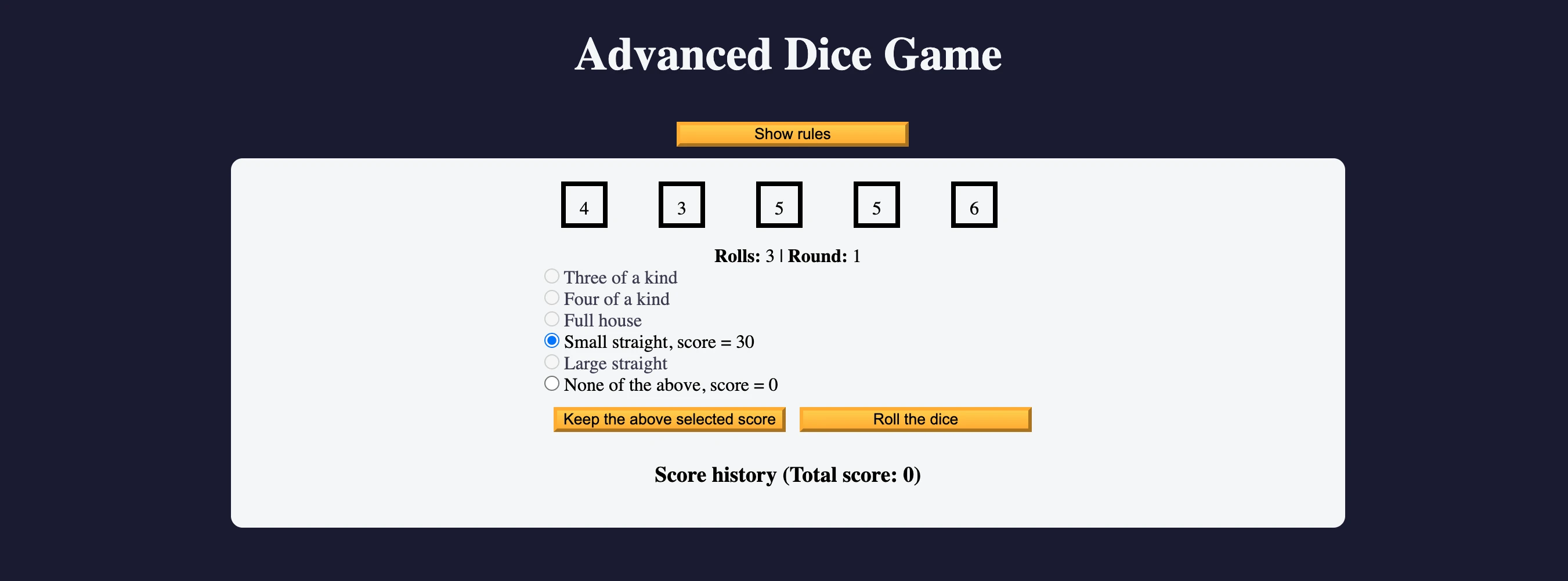
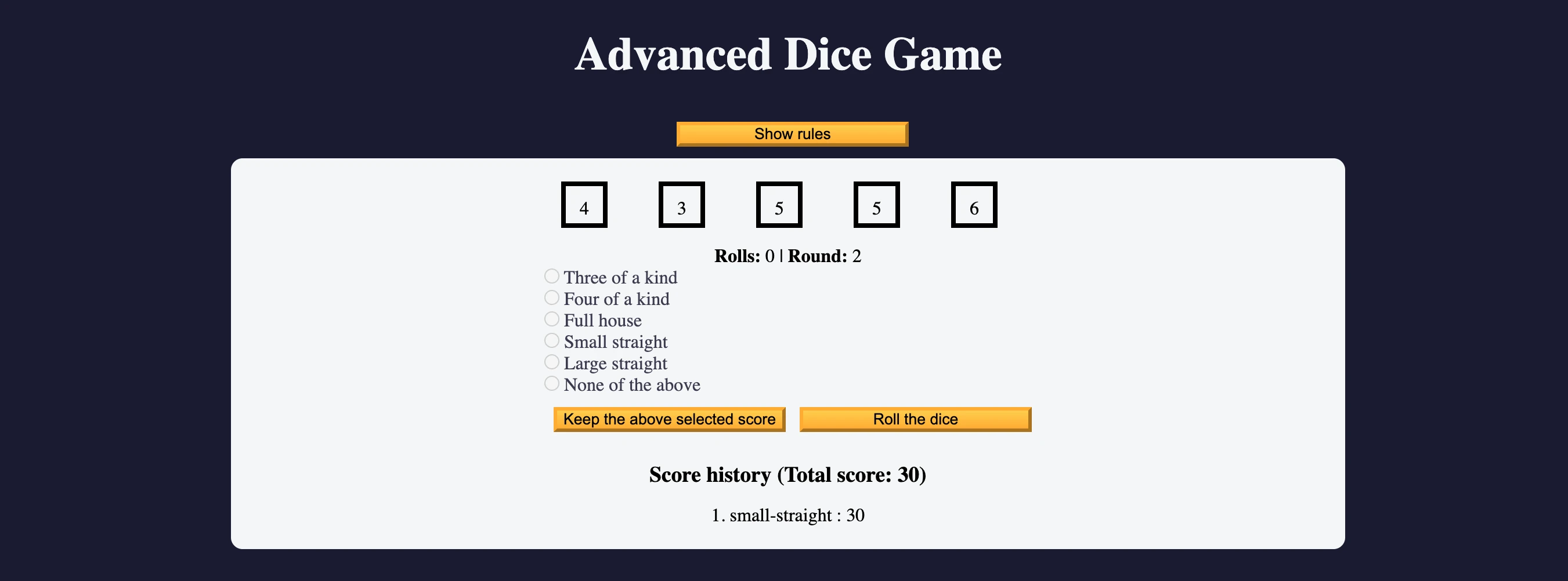
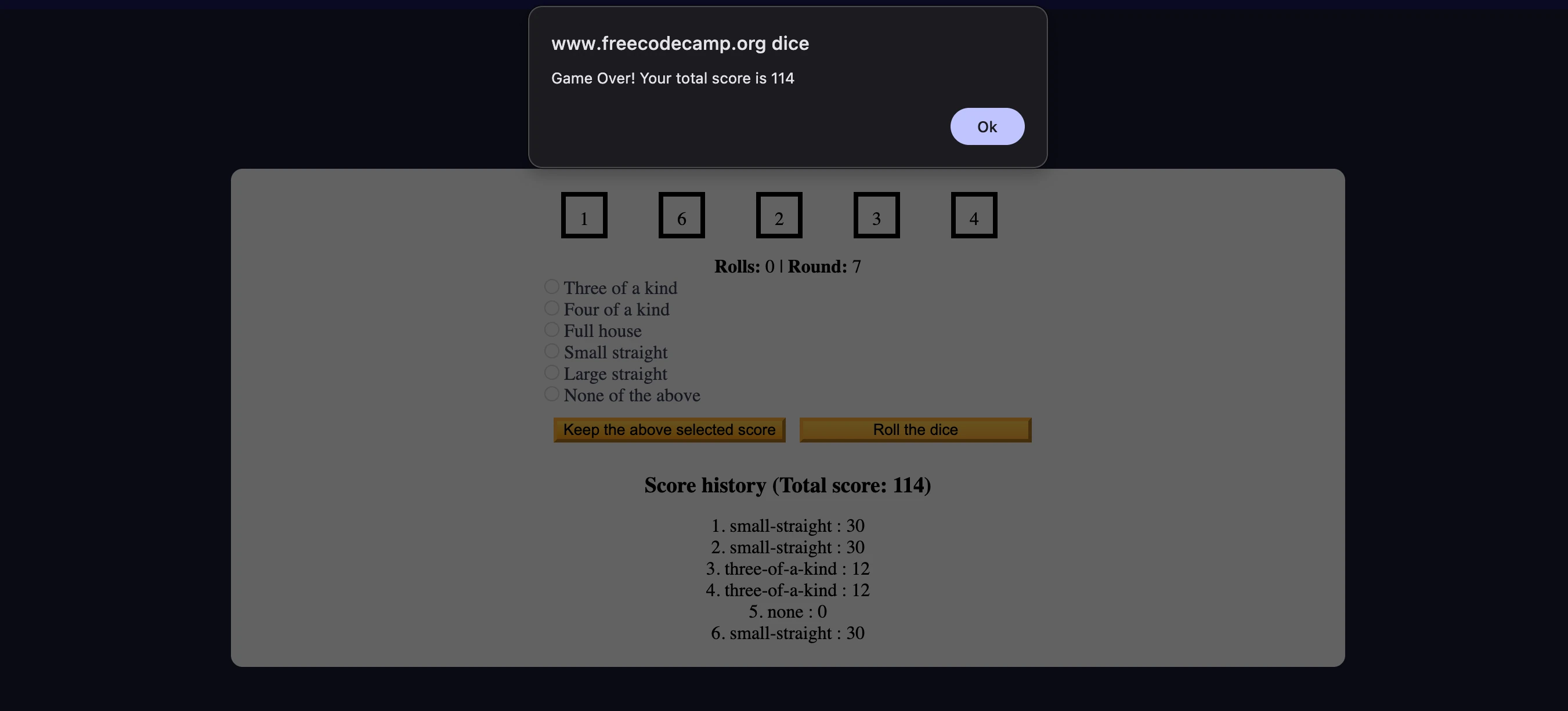
Dice Game developed with vanilla JavaScript, focused on algorithmic logic, state management, and DOM manipulation. A project that requires putting together multiple concepts previously learned in a context with minimal structured guidance.
Source Code
- index.html
- styles.css
- script.js
<!DOCTYPE html>
<html lang="en">

<head>
  <meta charset="utf-8" />
  <meta name="viewport" content="width=device-width, initial-scale=1.0" />
  <title>Advanced Dice Game</title>
  <link rel="stylesheet" href="styles.css" />
</head>

<body>
  <header>
    <h1>Advanced Dice Game</h1>
    <button class="btn" id="rules-btn" type="button">Show rules</button>
    <div class="rules-container">
      <h2>Rules</h2>
      <ul>
        <li>There are total of six rounds</li>
        <li>You can only roll the dice three times per round</li>
        <li>To start the game, roll the dice</li>
        <li>
          Then, choose from one of the selected scores or roll the dice again
        </li>
        <li>
          If you choose a selected score, then you will move to the next round
        </li>
        <li>
          If you decline to choose a selected score, then you can roll the
          dice again two more times
        </li>
      </ul>
      <h2 class="points">Points</h2>
      <ul>
        <li>Three of a kind: Sum of all five dice</li>
        <li>Four of a kind: Sum of all five dice</li>
        <li>Full house: Three of a kind and a pair - 25 points</li>
        <li>
          Small straight: Four of the dice have consecutive values - 30 points
        </li>
        <li>
          Large straight: All five dice have consecutive values - 40 points
        </li>
      </ul>
    </div>
  </header>

  <main>
    <form id="game">
      <div id="dice">
        <div class="die"></div>
        <div class="die"></div>
        <div class="die"></div>
        <div class="die"></div>
        <div class="die"></div>
      </div>

      <p class="rounds-text">
        <strong>Rolls:</strong> <span id="current-round-rolls">0</span> |
        <strong>Round:</strong> <span id="current-round">1</span>
      </p>

      <div id="score-options">
        <div>
          <input type="radio" name="score-options" id="three-of-a-kind" value="three-of-a-kind" disabled />
          <label for="three-of-a-kind">Three of a kind<span></span></label>
        </div>
        <div>
          <input type="radio" name="score-options" id="four-of-a-kind" value="four-of-a-kind" disabled />
          <label for="four-of-a-kind">Four of a kind<span></span></label>
        </div>
        <div>
          <input type="radio" name="score-options" id="full-house" value="full-house" disabled />
          <label for="full-house">Full house<span></span></label>
        </div>
        <div>
          <input type="radio" name="score-options" id="small-straight" value="small-straight" disabled />
          <label for="small-straight">Small straight<span></span></label>
        </div>
        <div>
          <input type="radio" name="score-options" id="large-straight" value="large-straight" disabled />
          <label for="large-straight">Large straight<span></span></label>
        </div>

        <div>
          <input type="radio" name="score-options" id="none" value="none" disabled />
          <label for="none">None of the above<span></span></label>
        </div>
      </div>

      <button class="btn" id="keep-score-btn" type="button">
        Keep the above selected score
      </button>
      <button class="btn" id="roll-dice-btn" type="button">
        Roll the dice
      </button>
    </form>

    <div id="scores">
      <h3>Score history (Total score: <span id="total-score">0</span>)</h3>
      <ol id="score-history"></ol>
    </div>
  </main>
  <script src="./script.js"></script>
</body>

</html>
*,
*::before,
*::after {
  box-sizing: border-box;
  margin: 0;
  padding: 0;
}

:root {
  --dark-grey: #1b1b32;
  --light-grey: #f5f6f7;
  --black: #000;
  --white: #fff;
  --grey: #3b3b4f;
  --golden-yellow: #fecc4c;
  --yellow: #ffcc4c;
  --gold: #feac32;
  --orange: #ffac33;
  --dark-orange: #f89808;
}

body {
  background-color: var(--dark-grey);
}

header {
  color: var(--light-grey);
  text-align: center;
}

h1 {
  font-size: 2.5rem;
  margin: 25px 0;
}

.rules-container {
  display: none;
  background-color: var(--light-grey);
  color: var(--black);
  width: 50%;
  margin: 20px auto;
  height: 300px;
  border-radius: 10px;
  overflow-y: scroll;
}

.rules-container ul {
  list-style-type: none;
}

.points {
  margin-top: 15px;
}

main {
  background-color: var(--light-grey);
  padding: 20px;
  display: grid;
  grid-template-columns: repeat(auto-fit, minmax(500px, 1fr));
  gap: 1rem;
  margin: auto;
  justify-items: center;
  width: 50%;
  border-radius: 10px;
}

#dice {
  display: flex;
  justify-content: space-around;
  margin-bottom: 15px;
}

.die {
  width: 40px;
  height: 40px;
  text-align: center;
  margin-right: 15px;
  border: 4px solid var(--black);
  padding: 10px;
}

.rounds-text {
  text-align: center;
}

input[type="radio"]:disabled + label {
  color: var(--grey);
}

#score-history {
  margin-top: 15px;
  text-align: center;
  list-style-position: inside;
}

.btn {
  cursor: pointer;
  width: 200px;
  margin: 10px 0 10px 0.5rem;
  color: var(--black);
  background-color: var(--gold);
  background-image: linear-gradient(var(--golden-yellow), var(--orange));
  border-color: var(--gold);
  border-width: 3px;
}

.btn:hover:enabled {
  background-image: linear-gradient(var(--yellow), var(--dark-orange));
}

@media (max-width: 992px) {
  main {
    width: 100%;
  }
}

@media (max-width: 500px) {
  .btn {
    width: 120px;
  }
}
const listOfAllDice = document.querySelectorAll(".die");
const scoreInputs = document.querySelectorAll("#score-options input");
const scoreSpans = document.querySelectorAll("#score-options span");
const roundElement = document.getElementById("current-round");
const rollsElement = document.getElementById("current-round-rolls");
const totalScoreElement = document.getElementById("total-score");
const scoreHistory = document.getElementById("score-history");
const rollDiceBtn = document.getElementById("roll-dice-btn");
const keepScoreBtn = document.getElementById("keep-score-btn");
const rulesContainer = document.querySelector(".rules-container");
const rulesBtn = document.getElementById("rules-btn");

let diceValuesArr = [];
let isModalShowing = false;
let score = 0;
let round = 1;
let rolls = 0;

const rollDice = () => {
  diceValuesArr = [];

  for (let i = 0; i < 5; i++) {
    const randomDice = Math.floor(Math.random() * 6) + 1;
    diceValuesArr.push(randomDice);
  };

  listOfAllDice.forEach((dice, index) => {
    dice.textContent = diceValuesArr[index];
  });
};

const updateStats = () => {
  rollsElement.textContent = rolls;
  roundElement.textContent = round;
};

const updateRadioOption = (index, score) => {
  scoreInputs[index].disabled = false;
  scoreInputs[index].value = score;
  scoreSpans[index].textContent = `, score = ${score}`;
};

const updateScore = (selectedValue, achieved) => {
  score += parseInt(selectedValue);
  totalScoreElement.textContent = score;

  scoreHistory.innerHTML += `<li>${achieved} : ${selectedValue}</li>`;
};


const getHighestDuplicates = (arr) => {
  const counts = {};

  for (const num of arr) {
    if (counts[num]) {
      counts[num]++;
    } else {
      counts[num] = 1;
    }
  }

  let highestCount = 0;

  for (const num of arr) {
    const count = counts[num];
    if (count >= 3 && count > highestCount) {
      highestCount = count;
    }
    if (count >= 4 && count > highestCount) {
      highestCount = count;
    }
  }

  const sumOfAllDice = arr.reduce((a, b) => a + b, 0);

  if (highestCount >= 4) {
    updateRadioOption(1, sumOfAllDice);
  }

  if (highestCount >= 3) {
    updateRadioOption(0, sumOfAllDice);
  }

};

const detectFullHouse = (arr) => {
  const counts = {};

  for (const num of arr) {
    counts[num] = counts[num] ? counts[num] + 1 : 1;
  }

  const hasThreeOfAKind = Object.values(counts).includes(3);
  const hasPair = Object.values(counts).includes(2);

  if (hasThreeOfAKind && hasPair) {
    updateRadioOption(2, 25);
  }

};

const checkForStraights = (arr) => {
  const sortedNumbersArr = arr.sort((a, b) => a - b);
  const uniqueNumbersArr = [...new Set(sortedNumbersArr)];
  const uniqueNumbersStr = uniqueNumbersArr.join("");

  const smallStraightsArr = ["1234", "2345", "3456"];
  const largeStraightsArr = ["12345", "23456"];

  if (smallStraightsArr.some(straight => uniqueNumbersStr.includes(straight))) {
    updateRadioOption(3, 30);
  }

  if (largeStraightsArr.includes(uniqueNumbersStr)) {
    updateRadioOption(4, 40);
  }

};

const resetRadioOptions = () => {
  scoreInputs.forEach((input) => {
    input.disabled = true;
    input.checked = false;
  });

  scoreSpans.forEach((span) => {
    span.textContent = "";
  });
};

const resetGame = () => {
  diceValuesArr = [0, 0, 0, 0, 0];
  score = 0;
  round = 1;
  rolls = 0;

  listOfAllDice.forEach((dice, index) => {
    dice.textContent = diceValuesArr[index];
  });

  totalScoreElement.textContent = score;
  scoreHistory.innerHTML = "";

  rollsElement.textContent = rolls;
  roundElement.textContent = round;

  resetRadioOptions();
};

rollDiceBtn.addEventListener("click", () => {
  if (rolls === 3) {
    alert("You have made three rolls this round. Please select a score.");
  } else {
    rolls++;
    resetRadioOptions();
    rollDice();
    updateStats();
    getHighestDuplicates(diceValuesArr);
    detectFullHouse(diceValuesArr);
    checkForStraights(diceValuesArr);
    updateRadioOption(5, 0);
  }
});

rulesBtn.addEventListener("click", () => {
  isModalShowing = !isModalShowing;

  if (isModalShowing) {
    rulesBtn.textContent = "Hide rules";
    rulesContainer.style.display = "block";
  } else {
    rulesBtn.textContent = "Show rules";
    rulesContainer.style.display = "none";
  }
});

keepScoreBtn.addEventListener("click", () => {
  let selectedValue;
  let achieved;

  for (const radioButton of scoreInputs) {
    if (radioButton.checked) {
      selectedValue = radioButton.value;
      achieved = radioButton.id;
      break;
    }
  }

  if (selectedValue) {
    rolls = 0;
    round++;
    updateStats();
    resetRadioOptions();
    updateScore(selectedValue, achieved);
    if (round > 6) {
      setTimeout(() => {
        alert(`Game Over! Your total score is ${score}`);
        resetGame();
      }, 500);
    }
  } else {
    alert("Please select an option or roll the dice");
  }
});
The Most Difficult Project
It was by far the most difficult project I've completed. There were few steps but they were extremely complex. Now I understand why this is the freeCodeCamp course with the highest abandonment rate.
I didn't like it due to the subject matter: it wasn't a game I knew and it didn't excite me to play it before starting the project to understand the logic, nor after implementing it. The fact is, I learned a lot. In projects like this one, that leave you with "blank canvas", just like in certification projects, the main difficulty lies in putting the pieces together and thus summarizing everything you've learned before.
I missed not having a single complete guide but I was still able to find the information since it's like having two guides. I was waiting to finish the course to merge them but it's possible I'll do it sooner, because it's a step that has always helped me reorganize concepts in my mind.
The Reflection: Learning Strategy
I'm undecided between doing the Google UX Course 6 or starting the certification project right away, but reading what I've written, the most logical thing that emerges is: merge the guide, do the Google UX course to break away from the full immersion with freeCodeCamp, then start the 4th certification project at full speed.
Thinking about it, it would also be smart to see if the guide needs modifications. After all, I made most of these changes while using it for certification projects, where it became essential. When I have doubts, consulting the guide is my first step, the second is MDN Web Docs, even though lately less so, the third, as a last resort, is the code tutor.
AI for deepening concepts is exceptional, although it's like playing heads or tails hoping what it says is correct. It's also excellent for suggesting alternatives, but it's a tool that makes you lazy quite a bit. A bike with training wheels that if you don't learn to remove them you keep for life.
To mitigate the hallucination risk, for almost 2 months I've replaced Claude with Perplexity, always setting Claude or Gemini as the model, both with chain of thought active, switching between models based on the desired temperament. This way I ensure the performance of the best models accompanied by verifiable sources. Sometimes I check actively, even though I should do it more often, and I discover really interesting sites.
The Three Critical Concepts
I've noted down some concepts based on comparisons between freeCodeCamp's approach and better alternatives. Nothing was wrong, after all who am I to say otherwise? But exploring the alternatives led me to think critically.
1. style.display vs classList.toggle() - The SRP
FreeCodeCamp proposed:
if (isModalShowing) {
  rulesBtn.textContent = "Hide rules";
  rulesContainer.style.display = "block";
} else {
  rulesBtn.textContent = "Show rules";
  rulesContainer.style.display = "none";
}
This solution directly modifies the inline styles of the HTML element. Following the Single Responsibility Principle it makes much more sense to separate CSS from JavaScript:
.rules-container {
  display: none;
}

.rules-container.show {
  display: block;
}
And in JavaScript:
rulesContainer.classList.toggle("show");
rulesBtn.textContent = isModalShowing ? "Hide rules" : "Show rules";
This way we don't have CSS pieces in JavaScript, but rather two distinct documents: JavaScript only deals with calling the style from CSS, not creating it.
2. parseInt() vs Number() - Semantic Rigor
FreeCodeCamp's approach was score += parseInt(selectedValue);
I had inserted score += Number(selectedValue);
Both are correct, but Number() seems to be more rigorous. Here's why:
| Aspect | parseInt() | Number() |
|---|---|---|
| "15" | 15 ✅ | 15 ✅ |
| "15.7" | 15 (truncates decimals) | 15.7 (keeps decimals) |
| "15px" | 15 (ignores rest) | NaN (error) |
| "" | NaN | 0 |
Number() is more rigorous because it fails when it encounters invalid input, while parseInt() does "optimistic" conversions. Depending on the context, the rigor of Number() can be preferable for catching input errors.
3. innerHTML += vs createElement() - Performance and DOM Integrity
This point emerged from the code tutor who rightly pointed out that:
scoreHistory.innerHTML += `<li>${achieved} : ${selectedValue}</li>`;
It's short and readable, but the better solution, albeit more verbose, is:
const historyItem = document.createElement("li");
historyItem.textContent = `${achieved} : ${selectedValue}`;
scoreHistory.appendChild(historyItem);
The reason why is really interesting: with innerHTML +=, having elements already present:
<li>Three of a kind : 15</li>
<li>Four of a kind : 20</li>
<li>Full house : 25</li>
Adding the 4th element with innerHTML +=, the browser destroys the first 3 and recreates all 4 from scratch! With appendChild() a new element is simply added, leaving the others intact.
This happens because in scoreHistory, with the other 3 elements present, the browser will read all existing HTML (referring only to scoreHistory in this case), convert it to a string, add the new one and destroy the other elements from the DOM, risking changes to their states from what they were before.
innerHTML remains excellent when you want to create the content of an element from scratch (with assignment, not concatenation), but for iterative appends createElement() + appendChild() is decidedly superior.
What I Learned
Pattern Matching Algorithms:
- Detecting Three/Four of a Kind by counting occurrences of numbers
- Detecting Full House by verifying the presence of groups of 3 and 2
- Detecting Straight by converting arrays to strings for pattern matching
- Using
Setto remove duplicates:[...new Set(arr)]
Array Methods and Iteration:
.forEach()to iterate and modify DOM elements.reduce()to accumulate values (sum of dice).sort()with numeric callback to sort arrays.includes()to search patterns in strings.some()to verify if at least one element satisfies a condition
Object Manipulation:
- Counting element occurrences by creating objects
{ number: count } Object.values()to extract only values from an object- Inline ternary operator:
counts[num] = counts[num] ? counts[num] + 1 : 1
Event Handling and Validation:
- Guard clauses to check preconditions before executing code
- Input validation before processing user selections
addEventListener()to handle interactionssetTimeout()to delay execution (allows UI update before alert)
Professional Code Patterns:
- DRY (Don't Repeat Yourself): refactoring the
updateRadioOption(5, 0)call to a single location - Separation of concerns: specific functions for each type of detection
- Early exit: using
breakto exit loops when finding what you seek - Semantic naming that explains the "what" not the "how"
Critical Differences Between Methods:
textContentvsinnerHTML: textContent is safer, innerHTML recreates DOM- Assignment vs concatenation:
=vs+=have different performance implications style.displayvsclassList.toggle(): CSS/JS separation vs inline styles
Next Project: Build a Cash Register (CERTIFICATION PROJECT!)