Calorie Counter
The Project
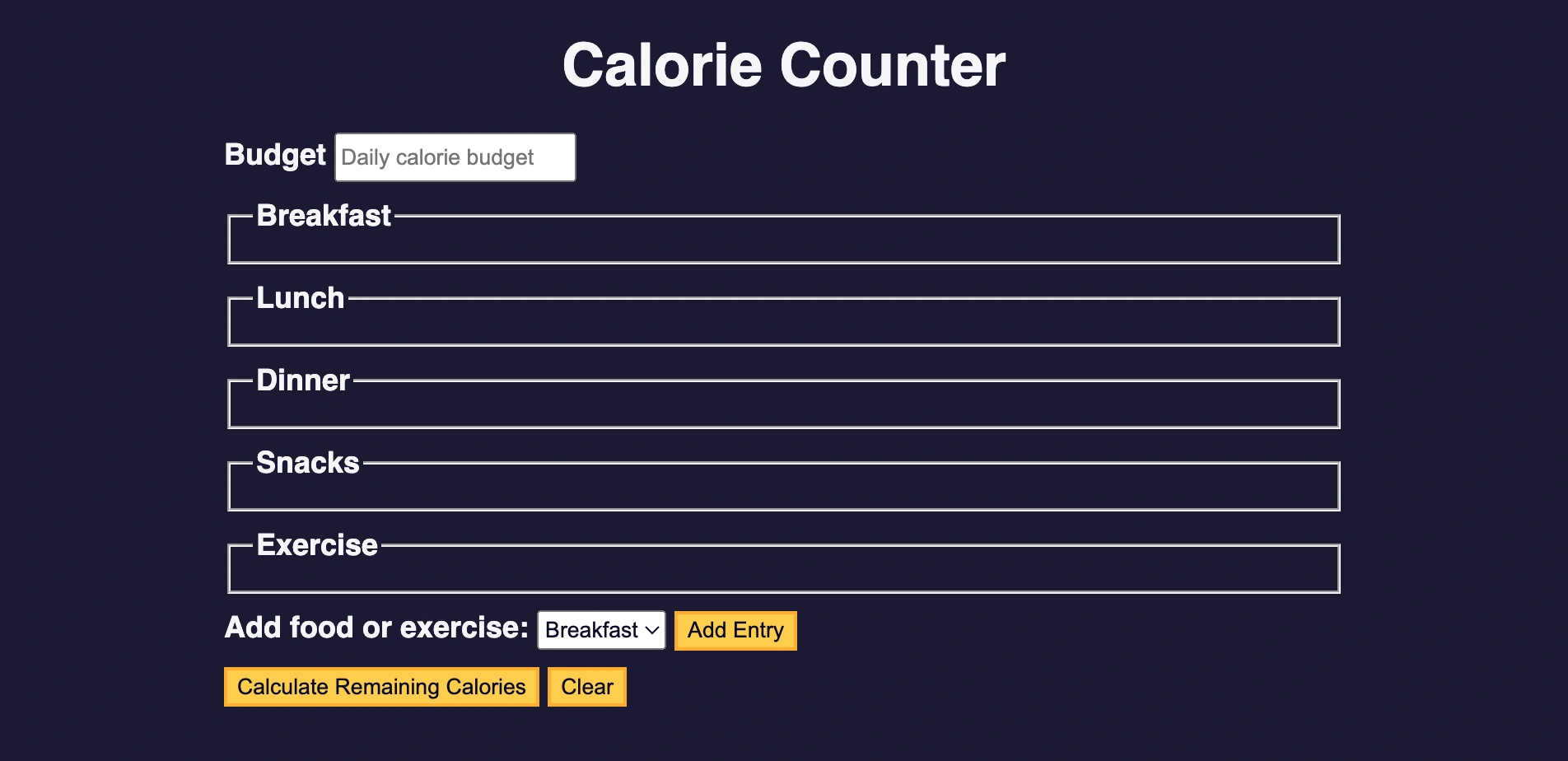
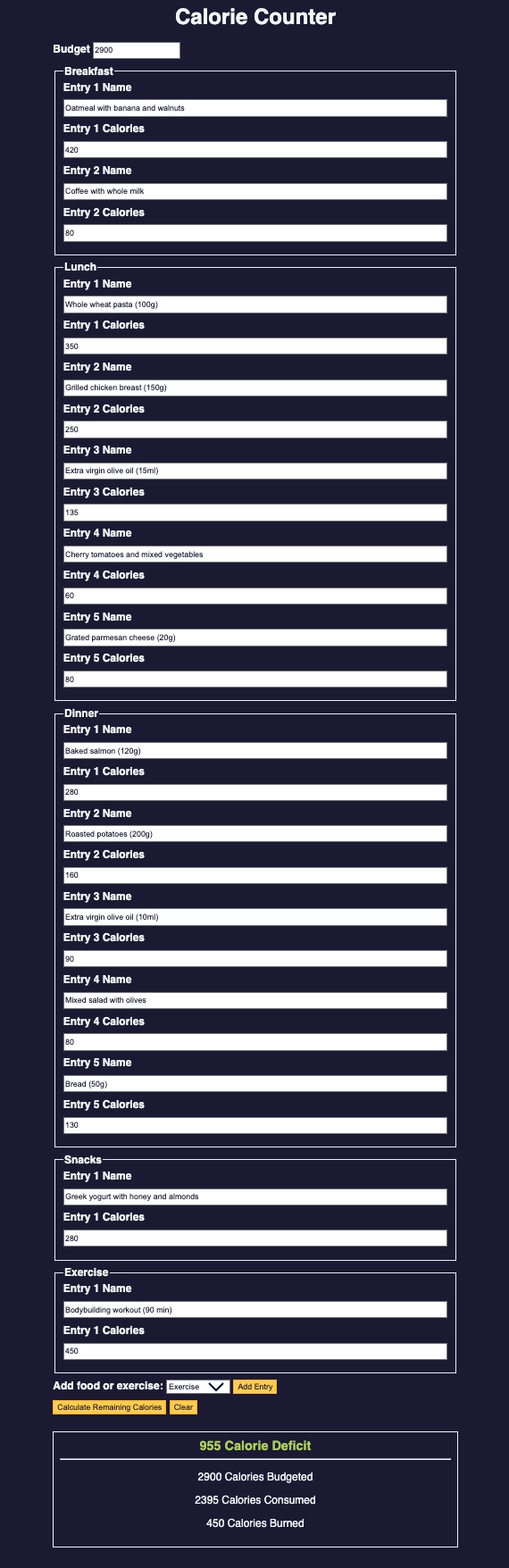
Calorie counter with advanced form validation, built entirely in vanilla JavaScript. An application that allows adding dynamic entries for different meal categories.
Source Code
- index.html
- styles.css
- script.js
<!DOCTYPE html>
<html lang="en">
  <head>
    <meta charset="utf-8" />
    <meta name="viewport" content="width=device-width, initial-scale=1.0" />
    <title>Calorie Counter</title>
    <link rel="stylesheet" href="styles.css">
  </head>
  <body>
    <main>
      <h1>Calorie Counter</h1>
      <div class="container">
        <form id="calorie-counter">
          <label for="budget">Budget</label>
          <input
            type="number"
            min="0"
            id="budget"
            placeholder="Daily calorie budget"
            required
          />
          <fieldset id="breakfast">
            <legend>Breakfast</legend>
            <div class="input-container"></div>
          </fieldset>
          <fieldset id="lunch">
            <legend>Lunch</legend>
            <div class="input-container"></div>
          </fieldset>
          <fieldset id="dinner">
            <legend>Dinner</legend>
            <div class="input-container"></div>
          </fieldset>
          <fieldset id="snacks">
            <legend>Snacks</legend>
            <div class="input-container"></div>
          </fieldset>
          <fieldset id="exercise">
            <legend>Exercise</legend>
            <div class="input-container"></div>
          </fieldset>
          <div class="controls">
            <span>
              <label for="entry-dropdown">Add food or exercise:</label>
              <select id="entry-dropdown" name="options">
                <option value="breakfast" selected>Breakfast</option>
                <option value="lunch">Lunch</option>
                <option value="dinner">Dinner</option>
                <option value="snacks">Snacks</option>
                <option value="exercise">Exercise</option>
              </select>
              <button type="button" id="add-entry">Add Entry</button>
            </span>
          </div>
          <div>
            <button type="submit">
              Calculate Remaining Calories
            </button>
            <button type="button" id="clear">Clear</button>
          </div>
        </form>
        <div id="output" class="output hide"></div>
      </div>
    </main>
    <script src="./script.js"></script>
  </body>
</html>
:root {
  --light-grey: #f5f6f7;
  --dark-blue: #0a0a23;
  --fcc-blue: #1b1b32;
  --light-yellow: #fecc4c;
  --dark-yellow: #feac32;
  --light-pink: #ffadad;
  --dark-red: #850000;
  --light-green: #acd157;
}

body {
  font-family: "Lato", Helvetica, Arial, sans-serif;
  font-size: 18px;
  background-color: var(--fcc-blue);
  color: var(--light-grey);
}

h1 {
  text-align: center;
}

.container {
  width: 90%;
  max-width: 680px;
}

h1,
.container,
.output {
  margin: 20px auto;
}

label,
legend {
  font-weight: bold;
}

.input-container {
  display: flex;
  flex-direction: column;
}

button {
  cursor: pointer;
  text-decoration: none;
  background-color: var(--light-yellow);
  border: 2px solid var(--dark-yellow);
}

button,
input,
select {
  min-height: 24px;
  color: var(--dark-blue);
}

fieldset,
label,
button,
input,
select {
  margin-bottom: 10px;
}

.output {
  border: 2px solid var(--light-grey);
  padding: 10px;
  text-align: center;
}

.hide {
  display: none;
}

.output span {
  font-weight: bold;
  font-size: 1.2em;
}

.surplus {
  color: var(--light-pink);
}

.deficit {
  color: var(--light-green);
}
const calorieCounter = document.getElementById('calorie-counter');
const budgetNumberInput = document.getElementById('budget');
const entryDropdown = document.getElementById('entry-dropdown');
const addEntryButton = document.getElementById('add-entry');
const clearButton = document.getElementById('clear');
const output = document.getElementById('output');
let isError = false;

function cleanInputString(str) {
  const regex = /[+-\s]/g;
  return str.replace(regex, '');
}

function isInvalidInput(str) {
  const regex = /\d+e\d+/i;
  return str.match(regex);
}

function addEntry() {
  const targetInputContainer = document.querySelector(`#${entryDropdown.value} .input-container`);
  const entryNumber = targetInputContainer.querySelectorAll('input[type="text"]').length + 1;
  const HTMLString = `
  <label for="${entryDropdown.value}-${entryNumber}-name">Entry ${entryNumber} Name</label>
  <input type="text" id="${entryDropdown.value}-${entryNumber}-name" placeholder="Name" />
  <label for="${entryDropdown.value}-${entryNumber}-calories">Entry ${entryNumber} Calories</label>
  <input
    type="number"
    min="0"
    id="${entryDropdown.value}-${entryNumber}-calories"
    placeholder="Calories"
  />`;
  targetInputContainer.insertAdjacentHTML('beforeend', HTMLString);
}

function calculateCalories(e) {
  e.preventDefault();
  isError = false;

  const breakfastNumberInputs = document.querySelectorAll("#breakfast input[type='number']");
  const lunchNumberInputs = document.querySelectorAll("#lunch input[type='number']");
  const dinnerNumberInputs = document.querySelectorAll("#dinner input[type='number']");
  const snacksNumberInputs = document.querySelectorAll("#snacks input[type='number']");
  const exerciseNumberInputs = document.querySelectorAll("#exercise input[type='number']");

  const breakfastCalories = getCaloriesFromInputs(breakfastNumberInputs);
  const lunchCalories = getCaloriesFromInputs(lunchNumberInputs);
  const dinnerCalories = getCaloriesFromInputs(dinnerNumberInputs);
  const snacksCalories = getCaloriesFromInputs(snacksNumberInputs);
  const exerciseCalories = getCaloriesFromInputs(exerciseNumberInputs);
  const budgetCalories = getCaloriesFromInputs([budgetNumberInput]);

  if (isError) {
    return;
  }

  const consumedCalories = breakfastCalories + lunchCalories + dinnerCalories + snacksCalories;
  const remainingCalories = budgetCalories - consumedCalories + exerciseCalories;
  const surplusOrDeficit = remainingCalories < 0 ? 'Surplus' : 'Deficit';
  output.innerHTML = `
  <span class="${surplusOrDeficit.toLowerCase()}">${Math.abs(remainingCalories)} Calorie ${surplusOrDeficit}</span>
  <hr>
  <p>${budgetCalories} Calories Budgeted</p>
  <p>${consumedCalories} Calories Consumed</p>
  <p>${exerciseCalories} Calories Burned</p>
  `;

  output.classList.remove('hide');
}

function getCaloriesFromInputs(list) {
  let calories = 0;

  for (const item of list) {
    const currVal = cleanInputString(item.value);
    const invalidInputMatch = isInvalidInput(currVal);

    if (invalidInputMatch) {
      alert(`Invalid Input: ${invalidInputMatch[0]}`);
      isError = true;
      return null;
    }
    calories += Number(currVal);
  }
  return calories;
}

function clearForm() {
  const inputContainers = Array.from(document.querySelectorAll('.input-container'));

  for (const container of inputContainers) {
    container.innerHTML = '';
  }

  budgetNumberInput.value = '';
  output.innerText = '';
  output.classList.add('hide');
}

addEntryButton.addEventListener("click", addEntry);
calorieCounter.addEventListener("submit", calculateCalories);
clearButton.addEventListener("click", clearForm);
A Project Close to My Heart
This is a very dear topic to me, as I've been doing gym for 6 years now and I've had many periods where I used calorie counter applications, particularly I found MyFitnessPal to be good. I even taught the tool to friends who were training to make them autonomous.
I never promoted the compulsive daily addition of foods, but rather using the tool to plan the diet and from time to time trying to add what you're eating in a specific period to identify eating habits that support your goals and those that instead hinder them.
And extraordinarily this tool created with freeCodeCamp is sufficient for this purpose! Even though MyFitnessPal has advanced features like adding foods starting from barcode scanning, this application, although "raw", reaches the same final goal.
The Discovery of Dynamic HTML
This project gave me several insights! Through research I discovered the power of dynamic HTML compared to static HTML.
If you had to write everything manually you'd have to predict hundreds of entries for each category, making the HTML file huge and impossible to maintain.
With dynamic JavaScript instead:
const HTMLString = `
  <label for="${entryDropdown.value}-${entryNumber}-name">Entry ${entryNumber} Name</label>
  <input type="text" id="${entryDropdown.value}-${entryNumber}-name" placeholder="Name" />
`;
A single template automatically adapts to any situation: user wants 1 entry? Creates 1 entry. Wants 50? Same code!
I was surprised by HTML integrated into JS, albeit simply with HTMLString.
The accessibility insight: I realized that since adding elements useful for accessibility is automatable, like the for in HTML that automatically connects label and input, every generated entry is instantly accessible. Modify the template once and thousands of elements automatically become compatible with screen readers and keyboard navigation!
The Final Challenge
The last 10 steps or so were the most difficult, I made extensive use of the code tutor, not so much to get the solution to challenges, but to have each step's reason explained to me, because I saw too many abstract concepts in the clearForm function. In fact, most messages ended with: "I successfully passed this step by writing (...) but would you explain it to me?"
What I Learned
Advanced DOM Manipulation:
document.querySelector()with specific selectorsquerySelectorAll()for element listsinsertAdjacentHTML()for dynamic insertion- Template literals for HTML generation
Dynamic Content Creation:
- HTMLString with interpolated variables
- Dynamic ID generation with entryNumber
- Automatic adaptation to user choices
Form Validation & Input Handling:
- Regular expressions for data cleaning (
/[+-\s]/g) - Input validation with pattern matching (
/\d+e\d+/i) - Error handling with boolean flags
Event Handling:
addEventListener()for user interactions- Event management for dynamic elements
Reflection
This project was the turning point! I'm starting to appreciate JS but I don't feel like a master yet, I need lots of practice.
Tomorrow I'll update the vademecum because in these very last projects so many new concepts have been introduced.
Next Project: Review DOM Manipulation by Building a Rock, Paper, Scissors Game