Cash Register
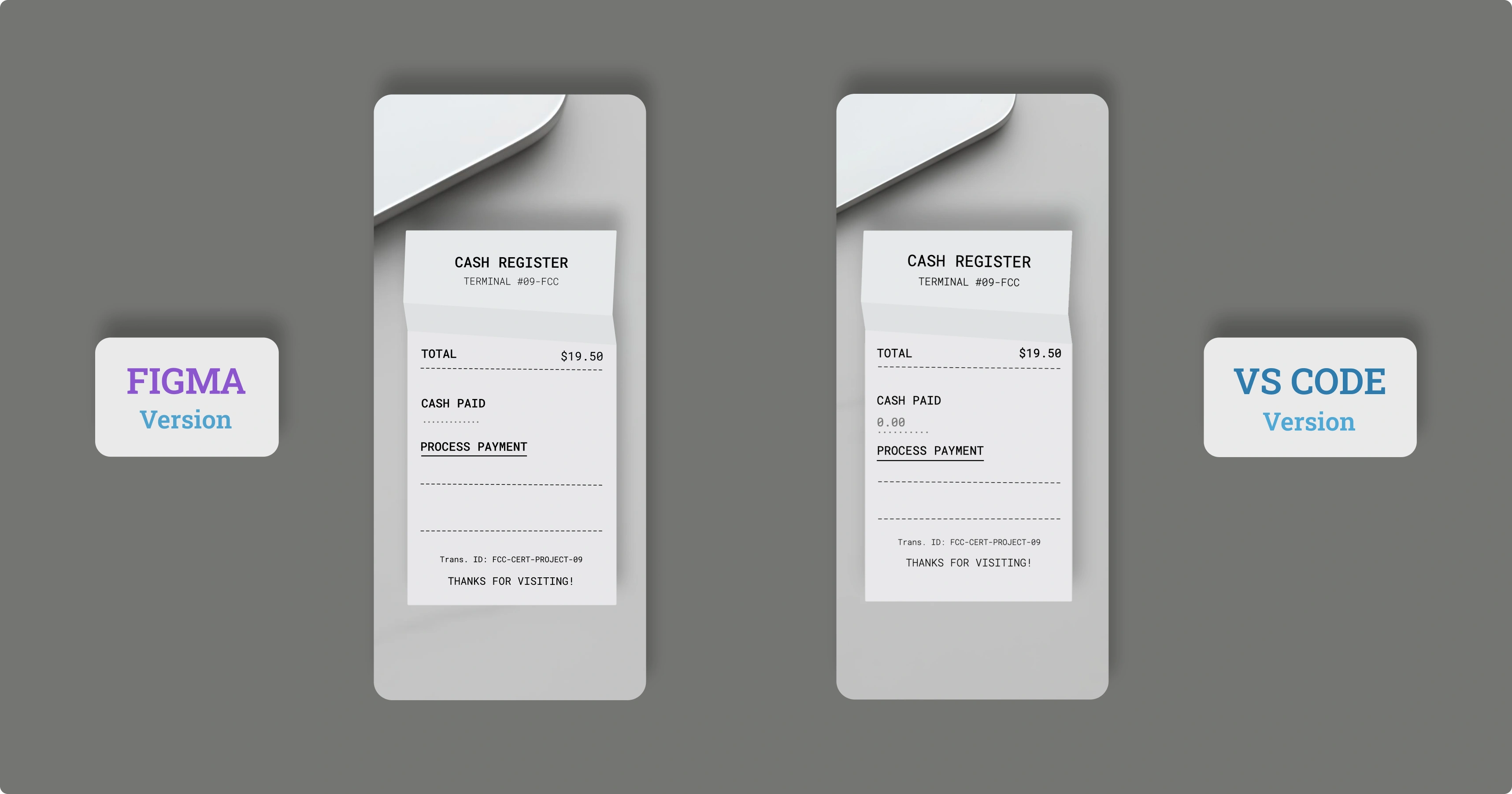
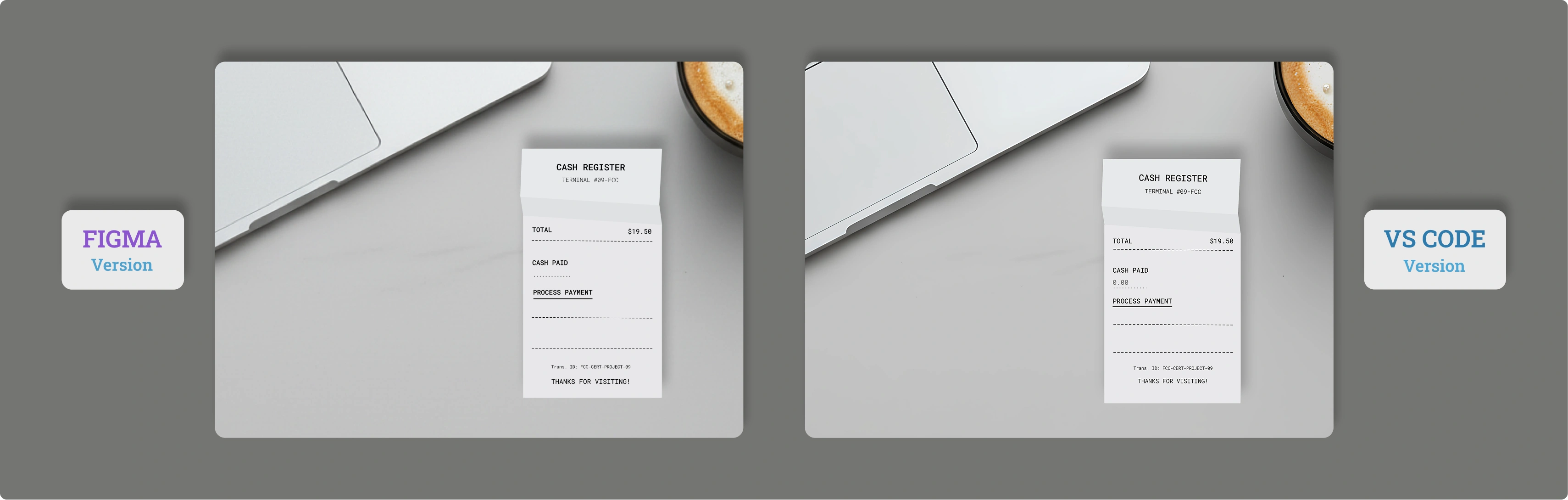
Il Progetto
Cash Register sviluppato con JavaScript vanilla e architettura OOP, implementando algoritmi greedy, calcoli precisi con interi e gestione completa dello stato della cassa. Un'applicazione che dimostra pattern di validazione, calcolo del resto ottimale e design skeuomorfico.
Codice Sorgente
- index.html
- styles.css
- script.js
<!-- DESIGN
   ------
   * This file contains the HTML structure of the Cash Register application.
   * The architecture follows this flow:
   * - Head with meta tags and the Google Font 'Roboto Mono', was chosen as the font to realistically simulate the
   *   monospaced, dot-matrix style of a thermal receipt printer
   * - Body containing a <main> element
   * - Inside <main>, a primary <div> ".receipt-container" is used to display the SVG background (the paper receipt)
   * - A child <div> ".receipt-content" is nested inside the container to hold all the actual UI content (text, form, etc.).

   * The UI content itself is semantically structured into three main blocks:
   * - .receipt-header: Contains the main title and terminal ID
   * - .receipt-body: Contains the core interactive elements (form, input, button) and the output area (#change-due)
   * - .receipt-footer: Contains the closing messages and transaction ID.
-->

<!DOCTYPE html>
<html lang="en">
    <head>
        <title>Cash Register</title>
        <meta charset="UTF-8" />
        <meta name="viewport" content="width=device-width, initial-scale=1.0">
        <link rel="stylesheet" href="styles.css">
        <link rel="preconnect" href="https://fonts.googleapis.com">
        <link rel="preconnect" href="https://fonts.gstatic.com" crossorigin>
        <link href="https://fonts.googleapis.com/css2?family=Roboto+Mono:wght@300;400;700&display=swap" rel="stylesheet">
    </head>

    <body>

        <!--
            * freeCodeCamp instructions:
            * - You should have an input element with an id of "cash"
            * - You should have a div, span, or p element with an id of "change-due"
            * - You should have a button element with an id of "purchase-btn"
        -->

        <main>

            <div class="receipt-container">
                <div class="receipt-content">
                    <div class="receipt-header">
                        <h1>CASH REGISTER</h1>
                        <p>TERMINAL #09-FCC</p>
                    </div>
                    <div class="receipt-body">
                        <div class="total">
                            <p>TOTAL</p>
                            <p>$19.50</p>
                        </div>
                        <p>-------------------------------</p>
                        <form id="cash-register-form">
                            <label for="cash">CASH PAID</label>
                            <div class="user-input">
                                <input type="number" id="cash" name="cash" placeholder="0.00" step="0.01" min="0" required>
                            </div>
                            <button type="button" id="purchase-btn" class="cta-button">PROCESS PAYMENT</button>
                        </form>
                        <p>-------------------------------</p>
                        <div id="change-due"></div>
                        <p>-------------------------------</p>
                    </div>
                    <div class="receipt-footer">
                        <p class="tribute"><a href="https://www.freecodecamp.org/" target="_blank" rel="noopener noreferrer" aria-label="Visit freeCodeCamp website (opens in new tab)">Trans. ID: FCC-CERT-PROJECT-09</a></p>
                        <p>THANKS FOR VISITING!</p>
                    </div>
                </div>
            </div>

        </main>

        <script src="script.js"></script>
    </body>

</html>
/* DESIGN
   ------
   * I chose to make the mobile version the default (Mobile-First approach),
   * with the desktop version being an override in a single media query
   * for the same reasons as the other project, namely:
   * - Mobile traffic is dominant, so it should be the primary experience
   * - Mobile devices load only the base CSS and variables, ensuring a
   *   faster load time, which is critical for mobile connections.

   * The architecture is a "Utility-First Variables" system:
   * - All values (fonts, margins, sizes) are centralized in :root variables,
   *   organized by UNIVERSAL and MOBILE (default)
   * - The DESKTOP media query only overrides these variables, which keeps
   *   the CSS ruleset minimal and highly maintainable.

   * The layout is a hybrid:
   * - A single ".receipt-container" is centered using position: absolute
   *   to hold the SVG receipt background
   * - Inside, ".receipt-content" uses display: flex with
   *   flex-direction: column to manage the internal UI flow
   * - Techniques (like radial-gradient for input dots)
   *   are used to achieve the skeuomorphic "receipt" design.
*/


/* UNIVERSAL (common variables to mobile and desktop) */

:root {
    /* Background */
    --background: url("https://github.com/user-attachments/assets/6b1734ff-6f1c-4c9f-8b5d-463daea23f85"); /* incredibly lightweight background, weighs only 70 KB */
    --font-color: #000;

    /* Font */
    --font-family: "Roboto Mono", monospace, sans-serif;
    --font-weight-light: 300;
    --font-weight-normal: 400;
    --font-weight-medium: 500;

    /* Color */
    --input-dots-hover-button-color: #6b6b6a;

    /* Animation */
    --result-animation: slideInFade 0.4s cubic-bezier(0.2, 1, 0.3, 1);
}


/* MOBILE (default version) */

:root {
    /* Receipt frame */
    --receipt-image: url("https://github.com/user-attachments/assets/c16ae536-5d58-41d2-8712-d52244549792"); /* the receipt is also incredibly lightweight, only 2 KB, I created it in Figma */
    --receipt-width: 377.702px;
    --receipt-height: 662.999px;
    --receipt-position-top: 50%;
    --receipt-position-left: 50%;
    --aspect-ratio: 377.702 / 662.999;

    /* Layout & Position */
    --receipt-padding: 0 54px 24px 44px;
    --title-margin-top: 110px;
    --subtitle-margin-top: 5px;
    --total-1-margin-top: 85px;
    --hyphens-1-margin-top: 0px;
    --label-margin-top: 28px;
    --input-margin-top: 4px;
    --button-margin-top: 12px;
    --hyphens-2-margin-top: 24px;
    --result-margin-top: 3px;
    --hyphens-3-margin-top: 5px;
    --footer-block-margin-top: 16px;
    --tribute-margin-top: 2px;
    --footer-margin-top: 12px;

    /* Font Size */
    --font-size-base: 18px;
    --font-size-title: 24px;
    --font-size-small: 16px;
    --font-size-result: 14px;
    --font-size-hyphens: 15px;
    --font-size-x-small: 12px;

    /* Input */
    --input-padding: 5px 0;
    --input-dots-width: 28%;
    --input-dots-height: 2px;
    --input-dots-size: 1.2px;
    --input-dots-spacing: 8px;

    /* Button */
    --button-padding: 2px 0;
    --button-underline-thickness: 1.5px;
    --button-underline-offset: 8px;

    /* Result */
    --result-min-height: 2em;
}


/* Total CSS reset to avoid unexpected behavior across different browsers */
* {
    margin: 0;
    padding: 0;
    box-sizing: border-box;
}

body {
    background-image: var(--background);
    background-size: cover;
    background-repeat: no-repeat;
    min-height: 100vh; /* Fallback per browser che non supportano dvh */
    min-height: 100dvh; /* L'unità del viewport dinamico per iOS */
    background-attachment: fixed;
    background-position: 65% 0%;
    font-family: var(--font-family);
    color: var(--font-color);
    font-weight: var(--font-weight-light);
    font-size: var(--font-size-base);
    overflow: hidden;
}

.receipt-container {
    background-image: var(--receipt-image);
    position: absolute;
    top: var(--receipt-position-top);
    left: var(--receipt-position-left);
    transform: translate(-50%, -50%);
    width: var(--receipt-width);
    background-repeat: no-repeat;
    background-size: 100% 100%;
    max-height: var(--receipt-height);
    aspect-ratio: var(--aspect-ratio);
}

.receipt-content {
    display: flex;
    flex-direction: column;
    text-align: center;
    padding: var(--receipt-padding);
}

.receipt-header {
    margin-top: var(--title-margin-top);
    transform: rotate(0.674deg);
}

.receipt-footer {
    width: 100%;
    margin-top: var(--footer-block-margin-top);
}

h1 {
    font-size: var(--font-size-title);
    font-weight: var(--font-weight-normal);
}

button {
    font-weight: var(--font-weight-medium);
}

.receipt-header > p, .receipt-footer > p:nth-child(2) {
    font-size: var(--font-size-small);
}

.receipt-header > p {
    margin-top: var(--subtitle-margin-top);
}

.total {
  display: flex;
  justify-content: space-between;
  width: 100%;
  margin-top: var(--total-1-margin-top);
}

.total > p {
    margin-top: 0;
    font-weight: var(--font-weight-medium);
}
.total > p:nth-child(2) {
    margin-top: 0;
}

.receipt-body > p {
    font-size: var(--font-size-hyphens);
}

.receipt-body > p:nth-child(2) {
    margin-top: var(--hyphens-1-margin-top);
    transform: rotate(0.561deg);
}
.receipt-body > p:nth-child(4) {
    margin-top: var(--hyphens-2-margin-top);
    transform: rotate(0.371deg);
}
.receipt-body > p:nth-child(6) {
    margin-top: var(--hyphens-3-margin-top);
}


#cash-register-form {
    margin-top: var(--label-margin-top);
    text-align: left;
    font-weight: var(--font-weight-normal);
}

.user-input {
    position: relative;
}

.user-input::before {
    content: "";
    position: absolute;
    bottom: 0;
    left: 0;
    width: var(--input-dots-width);
    height: var(--input-dots-height);
    background-image: radial-gradient(
        circle,
        var(--input-dots-hover-button-color) var(--input-dots-size),
        transparent 1px
    );
    background-size: var(--input-dots-spacing) 100%;
    background-repeat: repeat-x;
    background-position: bottom left;
}

input {
    margin-top: var(--input-margin-top);
    border: none;
    background: transparent;
    width: 100%;
    padding: var(--input-padding);
    font-family: var(--font-family);
    font-size: var(--font-size-base);
    font-weight: var(--font-weight-medium);
}

input:focus {
    outline: none;
}

/* these next two rules hide the typical input field arrows (0.00 ▲ ▼)
 * on all WebKit-based browsers (like Safari, Chrome, Edge) */
input::-webkit-outer-spin-button,
input::-webkit-inner-spin-button {
  -webkit-appearance: none;
  margin: 0;
}

input[type=number] { /* does the same thing as the block above, but for Firefox */
  -moz-appearance: textfield;
}

button {
    margin-top: var(--button-margin-top);
    background: transparent;
    border: none;
    cursor: pointer;
    font-family: var(--font-family);
    font-size: var(--font-size-base);
    text-decoration: underline;
    text-decoration-thickness: var(--button-underline-thickness);
    text-underline-offset: var(--button-underline-offset);
    padding: var(--button-padding);
    color: black;
}

#change-due {
    margin-top: var(--result-margin-top);
    min-height: var(--result-min-height);
    font-size: var(--font-size-result);
    font-weight: var(--font-weight-medium);
}

.tribute {
    margin-top: var(--tribute-margin-top);
    font-size: var(--font-size-x-small);
}
.tribute a {
    color: var(--font-color);
    text-decoration: none;
}

.receipt-footer > p:nth-child(2) {
    margin-top: var(--footer-margin-top);
}


button:hover {
    color: var(--input-dots-hover-button-color);
}


/* DESKTOP (override of mobile variables and addition of receipt-frame) */

@media (min-width: 600px) and (min-height: 850px) {

:root {
    /* Receipt frame */
    --receipt-image: url("https://github.com/user-attachments/assets/272d1484-ae7b-4027-ae06-ce93290a36b5");
    --receipt-width: 447.315px;
    --receipt-height: 785.195px;
    --receipt-position-top: 55%;
    --receipt-position-left: 70%;
    --aspect-ratio: 377.702 / 662.999;

    /* Layout & Position */
    --receipt-padding: 0 64px 24px 54px;
    --title-margin-top: 130px;
    --subtitle-margin-top: 10px;
    --total-1-margin-top: 112px;
    --label-margin-top: 32px;
    --button-margin-top: 20px;
    --hyphens-2-margin-top: 38px;
    --result-margin-top: 12px;
    --hyphens-3-margin-top: 12px;
    --tribute-margin-top: 8px;
    --footer-margin-top: 16px;

    /* Font Size */
    --font-size-hyphens: 17.7px;

    /* Result */
    --result-min-height: 2em;
}
}
/* DESIGN
   ------
  * This file contains the validation logic for Cash Register
  * The main architectural decisions include:
  *
  * - Class-based Architecture (OOP): The choice to use a `class CashRegister`
  *   encapsulates all the operational logic. This approach promotes separation of
  *   responsibilities, so while the `constructor` handles the initial preparation of the
  *   drawer, the subsequent methods (`processPurchase`, `#calculateChange`) manage
  *   the change calculation phases. This promotes a more organized and modular code.
  *   I admit I used them in the first place because I wanted to practice, as it's a concept
  *   that excited me from the first moment I encountered it, much like what happened with variables
  *   in the CSS context. However, I first tried to understand if it was a good approach for this
  *   specific case, and luckily, it turned out to be.
  *
  * - Calculations with integers: JavaScript doesn't count the way we do, for example, 0.1 + 0.2
  *   for it is 0.30000000000000004 instead of 0.3). This is because while we humans count with ten
  *   fingers (base-10), computers count using billions of ON/OFF switches (base-2); it's like trying
  *   to weigh exactly 0.1 grams on a scale having only 1g, 2g, 4g, etc., weights available.
  *   You can't be perfectly precise, and this imprecision accumulates in calculations.
  *   To get around this very problem, all monetary operations were performed using cents (integers).
  *   The conversion from dollars to cents happens at the input, and the final re-conversion for the
  *   output is in dollars. This approach guarantees maximum calculation precision.
  *
  * - Data structure (Map): I'm referring to the management of "cashInDrawer".
  *   I used this approach because Map would give me more consistent code.
  *   I'll add an example below to quickly show what I mean:
  *   If I had used objects:
  *   let pennies = drawer.PENNY;
  *   let hundreds = drawer["ONE HUNDRED"];
  *   Using Map:
  *   let pennies = this.cashInDrawer.get("PENNY");
  *   let hundreds = this.cashInDrawer.get("ONE HUNDRED");
  *
  * - Greedy algorithm for change:
  *   For the change calculation process, I used a greedy algorithm.
  *   This means that, starting from the highest value denomination (thanks to the
  *   pre-sorted "DENOMINATIONS"), the system tries to dispense the largest possible
  *   number of that bill/coin, and then progressively moves to the lower value
  *   ones, until the change due is depleted.
  *   It's a strategy that makes the "best choice at the moment," and for standard monetary
  *   systems, it always guarantees the optimal result. This isn't always true, in fact,
  *   imagining an atypical monetary system with denominations of 1, 7, and 10 cents, to give
  *   15 in change, the greedy approach would end up giving 6 coins (1x10 + 5x1), while the
  *   optimal solution would have been 3 coins (1x7 + 1x7 + 1x1).
  *   I had used the same approach in the Roman Numeral Converter.
*/


/* freeCodeCamp instructions:
 * - You should have a global variable called price.
 * - You should have a global variable called cid.
 * - When #cash < price, alert "Customer does not have enough money to purchase the item".
 * - When #cash == price, #change-due shows "No change due - customer paid with exact cash".
 * - Test (price 19.5, cash 20, standard cid): #change-due shows "Status: OPEN QUARTER: $0.5".
 * - Test (price 3.26, cash 100, standard cid): #change-due shows "Status: OPEN TWENTY: $60 TEN:
 *   $20 FIVE: $15 ONE: $1 QUARTER: $0.5 DIME: $0.2 PENNY: $0.04".
 * - Test (price 19.5, cash 20, cid[PENNY, 0.01]): #change-due shows "Status: INSUFFICIENT_FUNDS".
 * - Test (price 19.5, cash 20, cid[PENNY, 0.01, ONE, 1]): #change-due shows "Status: INSUFFICIENT_FUNDS".
 * - Test (price 19.5, cash 20, cid[PENNY, 0.5]): #change-due shows "Status: CLOSED PENNY: $0.5".
 */


const cashInput = document.getElementById("cash");
const purchaseBtn = document.getElementById("purchase-btn");
const result = document.getElementById("change-due");

let price = 19.5;
let cid = [["PENNY", 1.01], ["NICKEL", 2.05], ["DIME", 3.1], ["QUARTER", 4.25], ["ONE", 90], ["FIVE", 55], ["TEN", 20], ["TWENTY", 60], ["ONE HUNDRED", 100]];
const DENOMINATIONS = [["ONE HUNDRED", 10000], ["TWENTY", 2000], ["TEN", 1000], ["FIVE", 500], ["ONE", 100], ["QUARTER", 25], ["DIME", 10], ["NICKEL", 5], ["PENNY", 1]];

class CashRegister {

    constructor(cid) {
        this.cashInDrawer = new Map();
        this.totalInDrawer = 0; // Total cash in drawer, in cents

        cid.forEach(([currencyName, amountInDollars]) => { // first we destructure
            const amountInCents = Math.round(amountInDollars * 100); // round because it rounds to the nearest integer, e.g., 4.4 -> 4, 4.5 -> 5
            this.cashInDrawer.set(currencyName, amountInCents); // sets the cash in drawer exactly like in cid but this time the values are in cents
            this.totalInDrawer += amountInCents; // since we started from zero (this.totalInDrawer = 0) we now sum and assign with the values
        });

        this.sortedCashInDrawer = new Map(); // we create a new map because we want the values to be sorted like in DENOMINATIONS, so from largest to smallest (greedy algorithm)
        DENOMINATIONS.forEach(([name, value]) => {
          if(this.cashInDrawer.has(name)) { // we check if it actually exists in the this.cashInDrawer map
            this.sortedCashInDrawer.set(name, this.cashInDrawer.get(name)); // we can't use += because it's only used when working with numbers, .set() is its equivalent when working with maps. So with .get() we read the value from the original map (cashInDrawer), while with set we write that value to the new map (sortedCashInDrawer)
          }
        })
    }

    processPurchase(priceInCents, cashGivenInCents) {
      let changeDueInCents = cashGivenInCents - priceInCents;

      const originalChangeDue = changeDueInCents;

      if (this.totalInDrawer < changeDueInCents) {
        return {status: "INSUFFICIENT_FUNDS", change: []};
      }

      else {
        let changeToGive = []; // here we save the change to give
        this.sortedCashInDrawer.forEach((amountInDrawer, name) => { // we iterate over the denominations in the drawer, from largest to smallest (thanks to sortedCashInDrawer)
          let amountToReturn = 0;
          const currencyValue = DENOMINATIONS.find(denom => denom[0] === name) [1]; // finds the value in cents of the current denomination (e.g., 2000 for "TWENTY")
          let availableAmount = amountInDrawer; // copy of the available amount of money in the drawer

          while (changeDueInCents >= currencyValue && availableAmount > 0) { // With this loop, it keeps taking this denomination as long as the change is sufficient and as long as there is some in the drawer
            changeDueInCents -= currencyValue; // subtract from the total change due
            availableAmount -= currencyValue; // subtract from the stock of this denomination
            amountToReturn += currencyValue; // add to the partial total to return
          }

          if (amountToReturn > 0) {
            changeToGive.push([name, amountToReturn / 100]) // we convert cents to dollars for the output
          }
        });

        if (changeDueInCents > 0) { // here we check if (after the loop) there is remaining change, which means we didn't have the right coins/bills
          return {status: "INSUFFICIENT_FUNDS", change: []};
        }

        if (this.totalInDrawer === originalChangeDue) { // finally we check if the change due emptied the drawer, how? by comparing with the original total
          return {status: "CLOSED", change: changeToGive};
        }

        else {
          return {status: "OPEN", change: changeToGive};
        }

      }
    }

}


cashInput.addEventListener("blur", () => { // I noticed that on my iPhone 12 mini, so on iOS, after clicking the input and then exiting, the receipt stays scrolled up, this way we bring it back to the original state
  window.scrollTo(0, 0);
});

cashInput.addEventListener("keydown", (event) => {
  if (event.key === "Enter") {
    event.preventDefault();
    purchaseBtn.click();
  }
});


purchaseBtn.addEventListener("click", () => {
  const register = new CashRegister(cid); // We create a new class instance every time the user clicks the button, this is essential because the freeCodeCamp tests will modify the global "cid" variable to run the test
  const cashGiven = parseFloat(cashInput.value); // we read the value from the input (which is a string, e.g., "20") and convert it to a number (e.g., 20.0) using parseFloat() to be able to do calculations

  // we convert everything to cents for "safe" calculations
  const priceInCents = Math.round(price * 100);
  const cashGivenInCents = Math.round(cashGiven * 100);

  if (isNaN(cashGiven) || cashGiven <= 0 ) {
    alert("Please enter a valid positive number");
    cashInput.value = "";
    return;
  }

  else if (cashGivenInCents < priceInCents) {
    alert("Customer does not have enough money to purchase the item");
    cashInput.value = "";
    return;
  }

  else if (cashGivenInCents === priceInCents) {
    result.textContent = "No change due - customer paid with exact cash";
    cashInput.value = "";
    return;
  }

  else { // this happens when the customer paid more, so we calculate the change
    const transactionResult = register.processPurchase(priceInCents, cashGivenInCents); // This is the line that "activates" the main logic of our cash register. We call the 'processPurchase' method (the "brain" that does all the calculations) passing it the price and the cash received. The method will return a "report" (an object) that contains the 'status' of the transaction and, if necessary, the 'change' (the calculated change)

    if (transactionResult.status === "INSUFFICIENT_FUNDS") { // we format the output based on the status
      result.textContent = "Status: INSUFFICIENT_FUNDS";

    } else if (transactionResult.status === "OPEN" || transactionResult.status === "CLOSED") {
      let changeText = transactionResult.change.map(item => `${item[0]}: $${item[1]}`).join(" ");
      result.textContent = `Status: ${transactionResult.status} ${changeText}`;
    }
    cashInput.value = "";
  }
});
Il Traguardo: Google UX Certificate
Ho conseguito il Google UX Certificate completando gli ultimi 2 corsi che mi mancavano e realizzando altri 2 progetti richiesti per ottenerlo.
Sono state due settimane molto intense e sono veramente contento di quanto fatto.
Il Cash Register Project
Nei certification project, come questo, documento la maggior parte delle scelte tecniche direttamente nel codice, incluse le scoperte fatte durante lo sviluppo. Non c'è quindi molto da aggiungere qui.
Nonostante ciò, ci tengo però a evidenziare alcuni aspetti. In primo luogo sono entusiasta di aver creato immagini incredibilmente leggere senza sacrificare la grafica.
Lo scontrino SVG - 2 KB:
Il risultato è stato ottenuto grazie a Figma, dove ho creato lo scontrino con un rettangolo e lo strumento penna. Essendo SVG nativi, ho semplicemente raggruppato i vari elementi ed esportato come SVG. Risultato: 2 KB!
Il background ottimizzato - 70 KB:
Inizialmente avevo scelto un'immagine diversa: un tavolo con una fetta di pane e foglia d'insalata. Purtroppo non offriva un buon contrasto e pesava ben 2 MB. Ho quindi effettuato una nuova ricerca nelle librerie di stock fotografico, cogliendo l'occasione per aggiornare la mia cartella Tools sul desktop con i migliori strumenti per immagini.
Ho preso ispirazione da un'illustrazione e ho utilizzato Imagen (tool nel workspace Gemini). Dato che la qualità iniziale era scarsa, ho applicato upscaling con uno dei tool nella cartella. Dopodiché, grazie a ImageOptim, l'immagine è scesa ulteriormente di peso mantenendo l'estetica intatta.
Risultato: qualità altissima e peso di soli 70 KB!
La logica con classi OOP:
Ho documentato tutto all'interno del codice. Ho voluto utilizzare le classi per esercitarmi e fortunatamente si è rivelata un'ottima scelta, sebbene sia una soluzione più complessa del necessario rispetto a quanto richiesto per superare i test freeCodeCamp.
Gli Altri Due Progetti per Google UX
Maintenance App Website:
Il primo è stato un semplice sito web. Ho deciso di non seguire altre tracce, bensì di riprendere la Maintenance App immaginando di vendere quel servizio. Ecco il risultato:
Maintenance App Website, versione desktop e mobile
Versione Desktop

Versione Mobile

Mosaic: Il Progetto del Cuore
Il terzo progetto per la certificazione è stato il più significativo: Mosaic, un tool AI per psicoterapeuti. Considerata la profondità del visual design (analisi del Liquid Glass, Accessibilità) e la filosofia Open Source, l'ho trattato come un UI Design Concept a sé stante.
Vai al Concept di MosaicCosa Ho Imparato
Architettura OOP Avanzata:
- Classi ES6 per incapsulare logica operativa complessa
constructor()per inizializzazione e preparazione dati- Metodi privati (
#calculateChange) per proteggere logica interna - Separazione responsabilità tra preparazione e calcolo
Strutture Dati Moderne:
Mapinvece di oggetti per gestione chiave-valore più consistente- Accesso uniforme ai dati:
.get()e.set()vs notazioni miste - Iterazione con
.forEach()su Map per logica più pulita
Algoritmi Greedy:
- Strategia "best choice at the moment" per calcolo resto ottimale
- Pre-sorting delle denominazioni da maggiore a minore
- Loop
whileper dispensare massimo numero di ogni denominazione - Comprensione limiti: funziona solo con sistemi monetari standard
Calcoli Precisi con Interi:
- Problema floating-point:
0.1 + 0.2 !== 0.3in JavaScript - Conversione dollari → centesimi all'input per precisione
Math.round()per arrotondamento sicuro- Riconversione centesimi → dollari solo all'output
Validazione Input Robusta:
- Guard clauses per controlli precondizione
isNaN()per validare numeri- Gestione casi edge: cash esatto, insufficiente, maggiore
- Alert informativi per feedback immediato
Gestione Stati Transazione:
- Status
INSUFFICIENT_FUNDSquando impossibile dare resto - Status
CLOSEDquando resto svuota completamente il cassetto - Status
OPENper transazioni standard con resto parziale - Return di oggetti strutturati:
{status, change}
Ottimizzazione Immagini:
- SVG nativi da Figma: 2 KB per grafica vettoriale
- Imagen (Gemini) per generazione illustrazioni
- Upscaling AI per migliorare qualità senza peso
- ImageOptim per compressione finale: 2 MB → 70 KB
Design Skeuomorfico:
- Radial gradient per simulare input dots su receipt
background-sizeebackground-repeatper pattern- Font Roboto Mono per simulare stampante termica
- Transform rotate per imperfezioni realistiche
Mobile-First con Variabili CSS:
- Tutti i valori centralizzati in
:rootvariables - Media query che sovrascrive solo le variabili necessarie
- Fallback
100vh+100dvhper gestire barra URL dinamica iOS - Conditional loading: SVG receipt diversi per mobile/desktop
Event Handling Avanzato:
blurevent per fix scroll iOS dopo input focuskeydownconEnterper submit alternativopreventDefault()per controllare comportamento form- Istanza classe ricreata ad ogni click per test freeCodeCamp
Array Methods Funzionali:
.find()per cercare valore denominazione in DENOMINATIONS.forEach()per iterare su Map cashInDrawer.map()per formattare array change in stringa.join()per concatenare stringhe di output
Prossimo Progetto: Imparare Fetch e Promises costruendo una pagina degli autori di freeCodeCamp